AdFection Spyware Ads: What Canadian Businesses Should Know About Discover-Tech
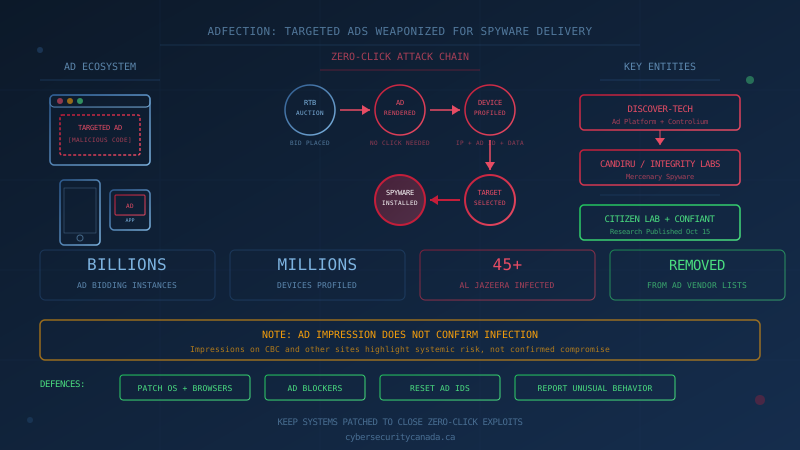
Citizen Lab at the University of Toronto, together with U.S. cybersecurity firm Confiant, published research on October 15, 2026, documenting a new spyware delivery technique they call AdFection. The reports show that Israel-based company Discover-Tech used the targeted advertising ecosystem to profile millions of users and deliver zero-click mercenary spyware to selected targets. Ads appeared on well-known sites including CBC, BBC, the New York Times, and others, and in apps ranging from DuoLingo to Yahoo Mail. For Canadian businesses, the findings are a reminder that the advertising infrastructure touching nearly every device can be weaponized, and that keeping systems patched is one of the few defences that work when an attack requires no user interaction at all.
This is the first technical demonstration of in-the-wild infection with zero-click mercenary spyware via targeted ads, according to Citizen Lab's executive summary. The research confirms that at least 45 devices at international media network Al Jazeera were infected with Candiru spyware through AdFection in 2024 and 2025, as reported by CBC News on October 15.
What Is AdFection and How Does It Work?
AdFection exploits the real-time bidding system that powers most online advertising. Each time a targeted ad appears on a website or in an app, it is usually the result of a split-second auction where advertisers bid to show their ad to a particular user. This system broadcasts information about users and their devices to help advertisers reach specific audiences. Discover-Tech, operating a platform called Controlium, used this ecosystem not to sell products but to profile millions of devices and, for selected targets, deliver malicious code disguised as normal ads.
When a user is shown a Discover-Tech ad, the user's advertising identifier and IP address are transmitted to Discover-Tech servers. If the user is selected for targeting, their device receives malicious JavaScript that connects to servers linked to mercenary spyware firms. The code runs when the ad displays, without the user clicking anything. Ron Deibert, Citizen Lab's director, told CBC News that this represents a "worst-nightmare" scenario: "The moment [the ad] is rendered, their device can be hacked, so there's really no defence against this, short of not using a smartphone or [not] connecting to the internet."
Citizen Lab found billions of instances of Discover-Tech bidding to send such advertisements to users and no sign the company engaged in any legitimate advertising business. Following the investigation, Google and IAB Europe removed Discover-Tech from their certified vendor lists, and Google and Beeswax terminated the company's access to their ad systems.
Did Canadian Networks Get Infected?
No Canadian networks have been confirmed infected. Citizen Lab observed Discover-Tech ad impressions on CBC and other sites accessible in Canada, but the researchers are clear that an ad impression does not in and of itself confirm targeting or infection with spyware. The data shows that Discover-Tech was able to bid on and display ads on these networks, which highlights the systemic risk. It does not mean devices on those networks were compromised.
Chuck Thompson, head of public affairs at CBC, told CBC News that the public broadcaster's logs have "no trace of having delivered any ads" from Discover-Tech, and that CBC escalated to Google "to verify and provide answers."
The Office of the Privacy Commissioner of Canada stated that it "is currently examining the report," according to CBC's coverage. The distinction between impression and infection matters for Canadian businesses trying to assess their own risk: seeing a Discover-Tech ad, if one ever appeared on a device in your organization, would not by itself mean that device was hacked. It would mean the device was potentially profiled, and that further investigation is warranted for anyone who suspects they may have been a target of interest.
Why Zero-Click Attacks Are Harder to Defend Against
Most cyberattacks require some user action: clicking a malicious link, opening an infected attachment, or entering credentials on a fake login page. Zero-click attacks bypass this entirely. The user does nothing, and the attack happens anyway. This makes traditional security awareness training, while still valuable, insufficient on its own.
The defences that do work against zero-click exploits are technical rather than behavioural:
-
Patching. Zero-click exploits rely on software vulnerabilities. When a vulnerability is patched, the exploit stops working. Keeping operating systems, browsers, and apps updated is the single most effective defence. The Canadian Centre for Cyber Security's Baseline Controls list patch management as a foundational requirement, and our patch management guide explains how to prioritize updates when time is limited.
-
Reducing attack surface. Ad-blocking software, either browser extensions or network-level tools, can prevent many ads from loading in the first place. This is not a complete solution (ads can still appear through apps or sponsored content), but it reduces the number of opportunities for a malicious ad to reach a device. Ars Technica's coverage notes that researchers recommend installing ad blockers and resetting mobile advertising IDs in device settings.
-
Device hygiene. Periodically resetting your mobile advertising ID (available in iOS and Android settings) makes it harder for profiling systems to maintain a persistent identity for your device. Disabling personalized ads where possible further limits the data advertisers collect.
-
Treating unusual behaviour seriously. Zero-click infections can be difficult to detect, but not invisible. Devices that exhibit unexpected battery drain, data usage, overheating, or apps appearing that were not installed should be investigated. Staff should know to report such anomalies to IT rather than dismissing them.
What Should Canadian SMBs Do Now?
For most Canadian small and medium businesses, the immediate risk from AdFection is low. The confirmed targets (Al Jazeera journalists and staff) fit the profile of high-value surveillance targets, not typical SMB employees. Mercenary spyware is expensive, and the operators behind it are generally state-backed actors pursuing journalists, activists, dissidents, and government officials.
That said, the systemic risk is real. The advertising ecosystem that delivered these attacks touches nearly every device. If someone in your organization might be of interest to a state-level actor (executives with government contracts, employees with sensitive political connections, staff who travel to or communicate with contacts in countries where surveillance is common), the risk profile changes.
Practical steps for Canadian SMBs:
-
Confirm patching is actually happening. Not "we have automatic updates turned on," but verified: are devices actually current? Our patch management checklist covers how to confirm this, including what to prioritize when you are behind.
-
Review mobile device policies. If staff use personal phones for work email or access company systems, those devices are in scope. The Canadian Centre for Cyber Security's guidance on mobile security emphasizes keeping devices updated, restricting apps to official stores, and separating work and personal data. Our mobile security guide covers the trade-offs between company-owned phones and bring-your-own-device policies.
-
Consider ad-blocking on business devices. This is a judgment call that depends on your business, but for devices that do not require ad visibility, blocking ads removes a category of risk entirely.
-
Build a reporting culture. If an employee notices their phone behaving strangely, they should feel comfortable reporting it. A five-minute conversation with IT is a small cost compared to missing early signs of compromise.
-
Know when to escalate. If you have reason to believe a device has been compromised with spyware, do not attempt to investigate internally. Forensic analysis requires specialized tools. Engage a qualified incident response provider.
One Question to Ask Your IT Lead This Week
Ask: "If someone in our organization visited a website or used an app that served a malicious ad, would we have any visibility into that, and would our devices be patched against the vulnerabilities such ads exploit?"
If the answer is uncertain, that is a starting point. Our free cybersecurity assessment evaluates your organization against the Canadian Centre for Cyber Security's Baseline Controls, including patch management and mobile security. It runs entirely in your browser, collects no data, and gives you a prioritized view of where your security posture needs attention.
The AdFection research is a reminder that the infrastructure designed to show you relevant ads can also be turned against you. For most Canadian businesses, the immediate risk is limited. But the defences that protect against this attack are the same defences that protect against the far more common threats SMBs face every day.
How prepared is your business?
Find out where you stand against Canada's 13 Baseline Cyber Security Controls. The assessment takes under 30 minutes and your answers stay in your browser.
Check Your ScoreFrequently Asked Questions
What is AdFection?
AdFection is the name Citizen Lab gave to a technique where targeted online advertisements are used to profile millions of users and deliver zero-click mercenary spyware to selected targets. The attack works through the real-time bidding ad ecosystem that displays ads on websites and apps. An ad that appears harmless can silently connect a device to servers that profile it or, for selected targets, deliver exploit code without the user clicking anything.
Were Canadian networks infected with spyware through AdFection?
No infection of Canadian networks has been confirmed. Citizen Lab found Discover-Tech ad impressions on CBC and other Canadian-accessible sites, but an ad impression does not in and of itself confirm targeting or infection with spyware. The researchers emphasize that these impressions highlight systemic risk and warrant investigation, not that devices on those networks were confirmed compromised.
What does zero-click mean in the context of spyware?
Zero-click means the user does not need to click a link, open an attachment, or take any action for their device to be targeted. The moment a malicious ad is displayed, code can run that exploits the device and installs spyware. This makes the attack harder to detect and impossible to prevent through user vigilance alone.
What should my business do in response to the AdFection report?
Keep operating systems and browsers updated, since patches close the vulnerabilities zero-click exploits rely on. Consider using ad-blocking software on business devices. Reset mobile advertising IDs periodically in device settings. Train staff to report unusual device behaviour. If you believe a device may be compromised, engage a qualified incident response provider rather than attempting forensic analysis yourself.
Is using an ad blocker enough to protect against AdFection?
Ad blockers reduce exposure by preventing many ads from loading, but they are not a complete defence. Ads can still appear through apps, sponsored content, or networks the blocker does not cover. The most effective protection is keeping devices patched so that even if a malicious ad loads, the exploit it attempts to run fails because the vulnerability has been fixed.
Cite This Page
Suggested citation:
Cybersecurity Canada (2026). AdFection Spyware Ads: What Canadian Businesses Should Know About Discover-Tech. Retrieved from https://cybersecuritycanada.ca/news/posts/adfection-discover-tech-spyware-ads-canadian-businesses/
Permanent URL: https://cybersecuritycanada.ca/news/posts/adfection-discover-tech-spyware-ads-canadian-businesses/ · Published October 16, 2026
Disclaimer: This article is intended for general informational purposes only and does not constitute professional cybersecurity, legal, IT, or compliance advice. While we strive to ensure accuracy, the cybersecurity landscape changes rapidly and information may become outdated. Organizations should consult with qualified cybersecurity professionals and legal counsel to assess their specific situation and develop appropriate security policies. Use of this information is at your own risk. See our Privacy Policy for more information.
Cybersecurity Canada is an independent resource and is not affiliated with, endorsed by, or connected to the Canadian Centre for Cyber Security, the Communications Security Establishment, or the Government of Canada.
How does your organization measure up?
Take our free cybersecurity assessment based on the Canadian Centre for Cyber Security's Baseline Controls. 50 questions, under 30 minutes, 100% confidential. Your answers never leave your browser.
Take the Free Assessment