Loblaw Data Breach Update: How to Protect Your Business from Fake Notification Scams
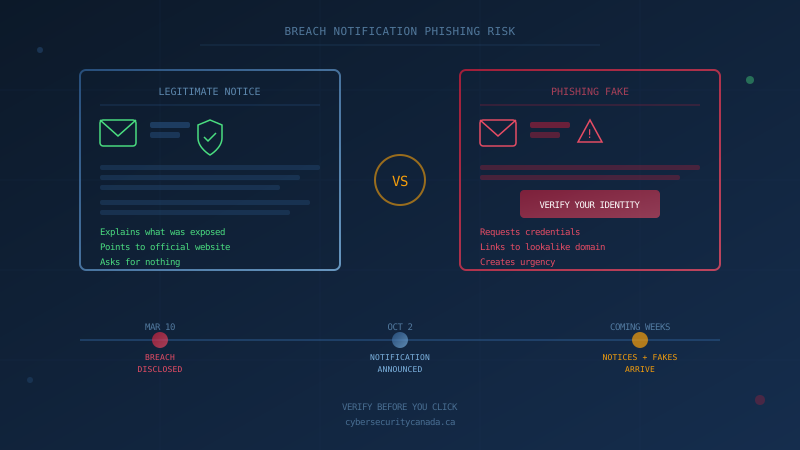
Loblaw announced on October 2, 2026, that it will begin notifying customers affected by its March 2026 data breach in the coming weeks. The Loblaw data breach exposed names, addresses, phone numbers, email addresses, dates of birth, loyalty account numbers, certain purchase order details, and incomplete payment card information, according to Loblaw's official update. For Canadian small businesses, the concern is not the breach itself but what comes next: phishing emails and texts impersonating that legitimate notification.
Breach announcements create an opportunity for scammers. Customers who use the PC Optimum app and other Loblaw apps that use PCid may now be expecting an email that says "we regret to inform you." An inbox that would normally be suspicious of such a message may treat it as overdue. The Canadian Anti-Fraud Centre warns that "if you have been part of a breach or a victim of identity theft, fraudsters will use the information as a tool to steal your money."
The Office of the Privacy Commissioner of Canada's guidance on what to do when you receive a breach notification advises recipients to read the notice carefully, stay vigilant because fraudsters may wait before trying to steal your information, and contact the organization directly if you have questions about the communication.
What Did Loblaw Actually Say About the Breach?
Loblaw first disclosed the incident on March 10, 2026, stating that an unauthorized third party accessed names, phone numbers, and email addresses. At that time, Loblaw said passwords, health information, and credit card data were not compromised, and PC Financial was not affected. On October 2, 2026, Loblaw published an update that lists a broader set of information than the March statement: names, addresses, phone numbers, email addresses, dates of birth, loyalty account numbers, certain purchase order details, and incomplete payment card information. CP24 reported the March disclosure, and Grocery Business Magazine covered the October update.
Loblaw stated it will begin notifying impacted customers directly in the coming weeks. The company also encouraged customers to "continue practicing caution in relation to unexpected emails, calls or texts asking for personal information or asking you to click a link or download an attachment."
How Do Fake Loblaw Data Breach Notifications Work?
Phishing campaigns that impersonate breach notifications follow a consistent pattern. The attacker sends an email or text with correct branding, the recipient's name (often scraped from a prior data dump), and a subject line matching legitimate wording. The message claims your data was affected and asks you to "verify your identity" or "secure your account" by clicking a link.
The link leads to a fake login page or a form requesting your password, credit card, or Social Insurance Number. Once entered, attackers use the credentials for account takeover, financial fraud, or to launch business email compromise attacks against your contacts.
The timing is the whole trick: you are already expecting an email, so your normal suspicion is lowered. Legitimate notices explain what was exposed and point you to the company's official page. They do not ask you to click a link to confirm your identity or enter sensitive information.
What Should Canadian Businesses Tell Staff Right Now?
If your employees use the PC Optimum app or other Loblaw apps that use PCid, they may receive a real notification and multiple fakes. Share these five rules with your team this week:
- Never click a link in an unexpected breach notification. Open a new browser tab, go to the company's official website, and check the newsroom or your account from there.
- A real notice tells you what was exposed and asks for nothing. A phishing email pretends to inform you but needs something from you: a click, a password, a card number.
- Verify before acting. If a message is urgent and unexpected, treat urgency as a red flag. Real institutions do not demand immediate action by email.
- Report suspicious messages. A reported phishing attempt lets IT warn the rest of the team before someone else clicks. Forward suspicious emails to your IT lead or security contact.
- Enable multi-factor authentication on every account that supports it. If credentials are phished, MFA stops the attacker from using them.
For a broader guide to Canadian brand phishing lures (CRA, Interac, Canada Post), see our phishing playbook for SMBs.
What Does PIPEDA Require If Your Business Has a Breach?
The Loblaw incident is a reminder that your own business may one day need to notify customers. Under the Personal Information Protection and Electronic Documents Act (PIPEDA), organizations must meet three obligations when a breach occurs:
-
Report to the Privacy Commissioner. If a breach of security safeguards involving personal information creates a "real risk of significant harm" (RROSH), you must report it to the Office of the Privacy Commissioner of Canada as soon as feasible. The OPC's guidance on mandatory breach reporting explains the threshold and required content.
-
Notify affected individuals. When a breach poses RROSH, you must notify affected individuals directly (by mail, email, phone, or in person). The notification must describe the circumstances, the information involved, the steps the organization has taken, and the steps individuals can take to protect themselves.
-
Keep records of all breaches. The Breach of Security Safeguards Regulations under PIPEDA require organizations to maintain a record of every breach for at least 24 months, whether or not it met the reporting threshold. These records must contain enough detail for the OPC to verify compliance if requested.
"Significant harm" under PIPEDA includes financial loss, identity theft, damage to reputation, and loss of employment or business opportunities. For more detail on the current enforcement landscape, see our guide to PIPEDA enforcement.
One Question to Ask Your IT Lead This Week
Before the next breach notification lands in an employee inbox (real or fake), ask your IT lead or provider: "Do we have a documented process for what happens when an employee reports clicking a suspicious link, and have we communicated that process to the team?"
If the answer is unclear, you have a starting point. Our free cybersecurity assessment evaluates your organization against the Canadian Centre for Cyber Security's Baseline Controls, including incident response and security training, in under 30 minutes.
How prepared is your business?
Find out where you stand against Canada's 13 Baseline Cyber Security Controls. The assessment takes under 30 minutes and your answers stay in your browser.
Check Your ScoreFrequently Asked Questions
What personal information was exposed in the Loblaw data breach?
Loblaw's October 2, 2026 update states the information varied by customer but included names, addresses, phone numbers, email addresses, dates of birth, loyalty account numbers, certain purchase order details, and incomplete payment card information. In March 2026, Loblaw had stated that passwords, health information, and credit card data were not compromised, and that PC Financial was not affected. The October update lists incomplete payment card information among the exposed data types.
How can I tell a real Loblaw breach notification from a phishing email?
A legitimate breach notice explains what was exposed and what steps the company has taken. It does not ask you to click a link to verify your identity, enter credentials, or provide your Social Insurance Number or credit card details. Go directly to loblaw.ca and check the company's official statement rather than clicking links in any message.
What are the PIPEDA breach notification requirements for Canadian businesses?
Under PIPEDA, organizations must report breaches involving personal information to the Office of the Privacy Commissioner of Canada when there is a real risk of significant harm. They must also notify affected individuals directly as soon as feasible. The Breach of Security Safeguards Regulations require organizations to keep records of all breaches for at least 24 months, even if no report was required.
What should I do if an employee clicks a fake breach notification link?
Treat it as a credential compromise. Reset the affected password immediately, revoke active sessions, enable MFA if it was not already on, and review account activity for unauthorized access. If banking or personal information was entered, contact the bank within hours. Document the incident and assess whether any customer or employee data may have been exposed, which could trigger your own PIPEDA reporting obligations.
Cite This Page
Suggested citation:
Cybersecurity Canada (2026). Loblaw Data Breach Update: How to Protect Your Business from Fake Notification Scams. Retrieved from https://cybersecuritycanada.ca/news/posts/loblaw-data-breach-phishing-scams-how-canadian-smbs-should-respond/
Permanent URL: https://cybersecuritycanada.ca/news/posts/loblaw-data-breach-phishing-scams-how-canadian-smbs-should-respond/ · Published October 13, 2026
Disclaimer: This article is intended for general informational purposes only and does not constitute professional cybersecurity, legal, IT, or compliance advice. While we strive to ensure accuracy, the cybersecurity landscape changes rapidly and information may become outdated. Organizations should consult with qualified cybersecurity professionals and legal counsel to assess their specific situation and develop appropriate security policies. Use of this information is at your own risk. See our Privacy Policy for more information.
Cybersecurity Canada is an independent resource and is not affiliated with, endorsed by, or connected to the Canadian Centre for Cyber Security, the Communications Security Establishment, or the Government of Canada.
How does your organization measure up?
Take our free cybersecurity assessment based on the Canadian Centre for Cyber Security's Baseline Controls. 50 questions, under 30 minutes, 100% confidential. Your answers never leave your browser.
Take the Free Assessment