Patch Management Best Practices for Canadian Small Businesses

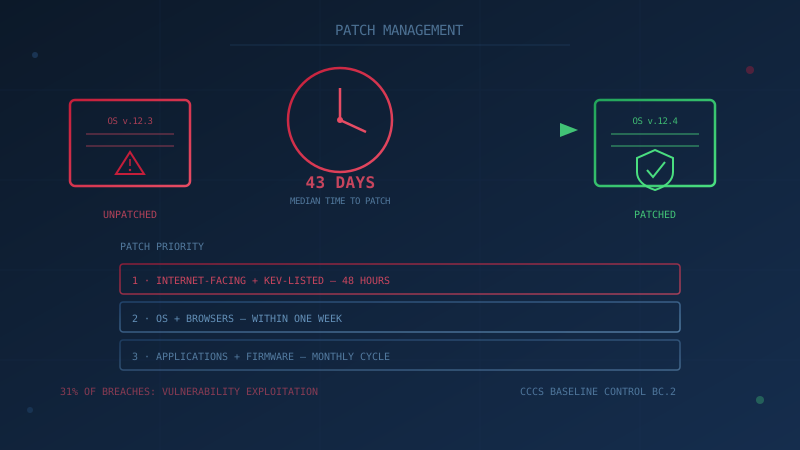
Vulnerability exploitation overtook stolen or guessed credentials as the leading way attackers get into a business network in 2025, according to Verizon's 2026 Data Breach Investigations Report — the first time in the report's 19-year history that credential theft has not held the top spot. Patch management, once treated as routine IT housekeeping, is now one of the most consequential security decisions a Canadian small business makes.
The same report found that 31% of breaches began with exploitation of a known vulnerability, up from 20% the year before — a 55% year-over-year increase. Attackers are moving faster; most businesses are not. The median time for organizations to fully patch a vulnerability rose to 43 days in 2025, up from 32 days the prior year, and companies patched only 26% of the vulnerabilities on CISA's Known Exploited Vulnerabilities (KEV) catalog, down from 38% the year before.
For a Canadian SMB without a dedicated IT security team, that gap between "patch available" and "patch applied" is exactly where ransomware crews and opportunistic attackers operate.
What Counts as Patch Management?
Patch management is the ongoing process of identifying, testing, and installing vendor-released updates that fix security vulnerabilities and bugs across an organization's technology. It applies to more than just Windows Update — it covers operating systems, business applications (accounting software, CRM, practice management systems), web browsers and their extensions, firmware on routers and firewalls, and any server or cloud infrastructure a business manages directly.
The Canadian Centre for Cyber Security (CCCS) lists patch management as Baseline Control BC.2 in its 13 Baseline Cyber Security Controls for small and medium organizations — one tier below authentication and alongside anti-malware and secure configuration as the foundational controls every business should have in place.
Why Unpatched Software Is Now the Top Breach Cause
Unpatched software gives an attacker a documented, often publicly explained way in. Once a vendor discloses a vulnerability — and assigns it a CVSS severity score — proof-of-concept exploit code frequently appears within days, and mass scanning for unpatched, internet-facing systems begins almost immediately.
This is precisely the pattern behind incidents like the Windows Notepad vulnerability and the Notepad++ supply chain attack covered on this site: a known flaw, a fix available, and a window during which unpatched systems remain exposed. The 2026 DBIR data shows that window is widening, not closing — even top-performing organizations remediate only 30-40% of KEV-listed vulnerabilities within the first week, and 60-70% of KEV vulnerabilities remain open past day seven regardless of how mature the organization's security program is.
Attackers don't need to target a specific Canadian business to exploit this gap. Once a vulnerability is publicly disclosed, automated internet-wide scanning tools identify every reachable system still running the vulnerable version within hours to days — the same "spray and scan" approach used against thousands of organizations simultaneously. A small business rarely gets attacked because someone singled it out; far more often, it gets attacked because it was one of the systems still exposed when the scan ran.
Beyond Operating Systems: What Else Needs Patching
Patch management is frequently treated as synonymous with "install Windows updates," but the same discipline applies to a much longer list of technology a typical business runs:
- Business applications — accounting software, practice or case management systems, point-of-sale software, and any line-of-business application with its own update cycle separate from the operating system.
- Web browsers and extensions — browsers update frequently and largely automatically, but third-party browser extensions often don't, and a vulnerable extension has the same access to browsing sessions as the browser itself.
- Network equipment firmware — routers, firewalls, and Wi-Fi access points run their own software, which needs updating just as much as a laptop does, and is frequently forgotten because it doesn't prompt the way a desktop operating system does.
- Server and cloud infrastructure — any server or cloud-hosted system a business manages directly, including the underlying platform software, not just the application running on it.
- Mobile devices — phones and tablets used for business email or file access should be included in the same update discipline as desktops.
How Quickly Should Critical Patches Be Applied?
Critical, actively exploited vulnerabilities should be patched as soon as possible after a fix is released and briefly tested — the CCCS baseline guidance for this control points toward 48 hours as a practical target for high-severity, internet-facing issues. Lower-severity or non-exploited vulnerabilities can follow a scheduled monthly patch cycle without meaningfully increasing risk.
A simple, workable tiering for a small business looks like this:
- Emergency (within 48 hours): Internet-facing systems — websites, VPNs, remote access tools, email servers — and anything appearing on CISA's Known Exploited Vulnerabilities catalog.
- High priority (within one week): Operating systems and browsers across all employee devices.
- Routine (monthly cycle): Business applications, plugins, and firmware that are not directly internet-facing.
- End-of-life review (ongoing): Software that no longer receives security updates from the vendor should be replaced or isolated — it cannot be patched at all.
Old flaws stay dangerous long after the fix ships. In October 2026, joint advisory AA26-281A listed eight vulnerabilities that China-linked hackers had successfully exploited, every one of them disclosed between 2014 and 2023, as covered in our AA26-281A breakdown.
Is Automatic Updating Safe for a Small Business?
For most small and medium organizations, yes. CCCS baseline guidance recommends enabling automatic updates for operating systems and common business software as the default approach, because the everyday risk of running unpatched software outweighs the occasional risk of an automatic update briefly disrupting a workflow. Organizations running custom-built or legacy line-of-business applications may need a short testing step — deploying to a small pilot group first — before pushing an update organization-wide, but that testing window should be measured in hours or days, not weeks.
Testing Patches Without Falling Behind
The most common reason a business delays patching isn't ignorance of the risk — it's fear that an update will break something that matters, like a custom accounting integration or specialized line-of-business software. That's a legitimate concern, but it's usually solved with a short, disciplined testing step rather than an indefinite delay:
- Deploy the patch to one or two non-critical devices, or a small pilot group, first.
- Give it 24-48 hours — long enough to catch an obvious conflict, short enough not to leave the rest of the organization exposed.
- If nothing breaks, deploy organization-wide immediately. If something does, that's valuable information before it affects everyone.
For critical, actively exploited vulnerabilities on internet-facing systems, this testing window should be compressed or skipped entirely — the risk of a brief compatibility issue is smaller than the risk of remaining exposed to a known, actively exploited flaw.
A Practical Patch Management Checklist
- Build an inventory first. List every operating system, application, and network device in use. You cannot patch what you don't know exists — and unmanaged or "shadow IT" software is disproportionately likely to be missed.
- Turn on automatic updates everywhere the CCCS guidance supports it — Windows, macOS, major browsers, and cloud business applications.
- Assign ownership. One person (even in a five-person company) should be accountable for confirming patches actually installed, not just that they were offered.
- Prioritize by exposure, using the tiering above — internet-facing and KEV-listed vulnerabilities first.
- Retire end-of-life software. If a vendor no longer issues security patches for a product, it is a permanent, growing risk, not a one-time gap.
- Review monthly. A short standing check-in — even 15 minutes — to confirm nothing has silently fallen out of the update cycle.
What This Costs a Canadian Business to Get Wrong
IBM's 2026 Cost of a Data Breach Report puts the average cost of a data breach for a Canadian organization at a record CA$7.11 million, the highest figure recorded since the study began, with the average breach now taking 205 days to fully contain. Supply-chain compromise — frequently rooted in an unpatched or outdated dependency — was identified as the single largest factor driving up breach costs in Canada this year, adding roughly CA$367,899 on average. Patch management will not eliminate that risk on its own, but it closes the specific, well-documented door that vulnerability exploitation now uses more than any other.
Reliable patching works alongside the rest of the CCCS Baseline Controls rather than replacing them — pair it with multi-factor authentication and a tested incident response plan so a missed patch doesn't become a business-ending event on its own.
Not sure where your organization's patching stands today? Our free cybersecurity assessment, built around the CCCS Baseline Controls, takes under 30 minutes and never sends your answers off your device.
How prepared is your business?
Find out where you stand against Canada's 13 Baseline Cyber Security Controls. The assessment takes under 30 minutes and your answers stay in your browser.
Check Your ScoreFrequently Asked Questions
What is patch management?
Patch management is the ongoing process of identifying, testing, and installing updates — patches — released by software and hardware vendors to fix security vulnerabilities and bugs. It covers operating systems, business applications, browsers, plugins, firmware, and network equipment, and is listed as Baseline Control BC.2 by the Canadian Centre for Cyber Security.
How quickly should a small business apply security patches?
Critical, actively exploited vulnerabilities should be patched as soon as possible — the Canadian Centre for Cyber Security's guidance on this control points toward 48 hours as a practical target once a fix is available and tested. Routine, non-critical updates can follow a monthly cycle. The right pace depends on whether the affected system is internet-facing and how severe the vulnerability is.
Why do so many businesses fall behind on patching?
Verizon's 2026 Data Breach Investigations Report found the median time to fully patch a vulnerability had grown to 43 days, up from 32 days the year before, even as attackers moved faster. Common reasons include fear of a patch breaking a business application, no inventory of what software is actually running, and no one person clearly responsible for the task.
Is automatic updating safe for a small business?
For most small and medium organizations, yes. The Canadian Centre for Cyber Security's baseline guidance recommends enabling automatic updates for operating systems and common business software, since the risk of an update briefly disrupting a workflow is generally smaller than the risk of running unpatched software. Larger organizations with custom or legacy applications may need a staged testing step before wide deployment.
What should be patched first if a business is behind?
Start with internet-facing systems (websites, VPNs, remote access tools, email servers), then operating systems and browsers, then anything listed on CISA's Known Exploited Vulnerabilities catalog, then everything else. An accurate inventory of installed software and devices has to come first — you cannot patch what you don't know you have.
Cite This Page
Suggested citation:
Cybersecurity Canada (2026). Patch Management Best Practices for Canadian Small Businesses. Retrieved from https://cybersecuritycanada.ca/news/posts/patch-management-best-practices-for-canadian-small-businesses/
Permanent URL: https://cybersecuritycanada.ca/news/posts/patch-management-best-practices-for-canadian-small-businesses/ · Published July 9, 2026
Disclaimer: This article is intended for general informational purposes only and does not constitute professional cybersecurity, legal, IT, or compliance advice. While we strive to ensure accuracy, the cybersecurity landscape changes rapidly and information may become outdated. Organizations should consult with qualified cybersecurity professionals and legal counsel to assess their specific situation and develop appropriate security policies. Use of this information is at your own risk. See our Privacy Policy for more information.
Cybersecurity Canada is an independent resource and is not affiliated with, endorsed by, or connected to the Canadian Centre for Cyber Security, the Communications Security Establishment, or the Government of Canada.
How does your organization measure up?
Take our free cybersecurity assessment based on the Canadian Centre for Cyber Security's Baseline Controls. 50 questions, under 30 minutes, 100% confidential. Your answers never leave your browser.
Take the Free Assessment