Amazon Prime Day Scams: How Canadians Can Shop Safely During the June 23–26 Sale
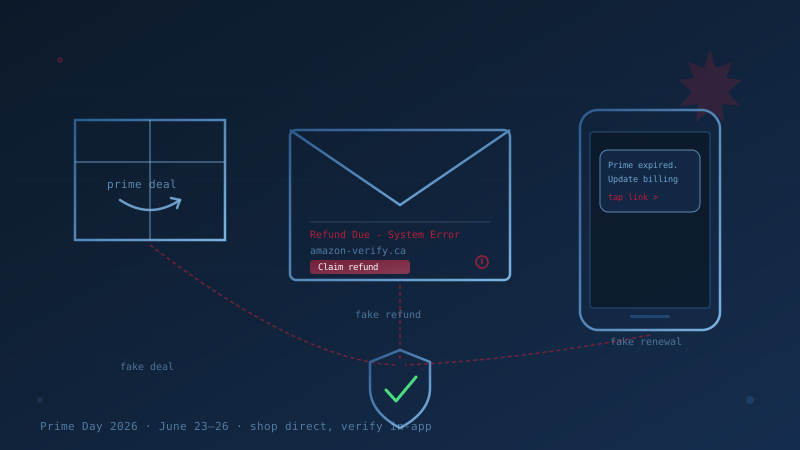
Amazon Prime Day 2026 runs June 23 through June 26 — a four-day sale across 26 countries, and one of the busiest online shopping windows of the year. It is also one of the most reliable windows for fraud. Ahead of the 2025 event, Check Point Research found that more than 1,000 new web domains using Amazon's name appeared in a single month, and 87 percent of them were flagged as malicious or suspicious. Separately, researchers at NordVPN counted over 120,000 fake sites impersonating Amazon in a two-month span — roughly 92,000 built to steal logins, 21,000 to deliver malware, and 11,000 to sell goods that never ship.
The lure is simple: shoppers expect a flood of "your order," "refund," and "delivery" messages during a sale, so a fake one blends in. For Canadians, the stakes are real. The Canadian Anti-Fraud Centre says Canadians lost a record $704 million to fraud in 2025, and that figure reflects only the 5 to 10 percent of cases that get reported. This post is a plain-language guide to the Prime Day scams you and your staff will actually see between June 23 and 26 — and the handful of habits that defeat almost all of them.
What Are the Most Common Amazon Prime Day Scams?
The most common Prime Day scams are fake order or refund notifications, "your account is suspended" messages, fake delivery alerts, and lookalike Amazon websites — all designed to capture your Amazon password or your payment card. They arrive by email, text, and phone, and they spike sharply during the sale because a single fraudulent message hides easily among the legitimate ones a shopper is already expecting.
The four patterns to know:
- Fake order and refund alerts. An email or text says there's a problem with an order you didn't place, or that you're owed a refund. Check Point intercepted a 2025 campaign using the subject line "Refund Due – Amazon System Error." The goal is to make you click to "fix" or "claim" something.
- "Your Prime membership has expired." A message warns that your membership lapsed and payment failed, with a button to "update your billing." The page that opens is a copy of the Amazon sign-in screen built to harvest your credentials and card.
- Fake delivery problems. A text claims a parcel couldn't be delivered and a small fee or address confirmation is needed — the same playbook as the Canada Post smishing scams Canadians see year-round, re-skinned with Amazon branding.
- Lookalike deal sites. A search ad or social post promotes an unbeatable Prime Day price on a popular product, leading to a domain like
amazon-deals-ca.shopthat takes your card details and delivers nothing.
How Can You Tell a Real Amazon Message From a Fake One?
You can tell most fakes apart by ignoring the message itself and checking your account directly. Real Amazon order, refund, and delivery information always appears inside your account when you open the Amazon app or type amazon.ca into your browser yourself. If a notice exists only in an email, text, or call — and not in your account — it is not real.
A few reliable tells, since attackers are good at copying the rest:
- Urgency and threats. "Your account will be closed in 24 hours," "act now," "your order will be cancelled." Real retailers do not threaten you into clicking.
- Requests for payment by gift card, e-Transfer, or crypto. Amazon never asks you to settle an account problem with Amazon gift cards. A request to "verify" your account by buying gift cards is always a scam.
- Links that don't go to amazon.ca or amazon.com. Hover over (or long-press) a link before tapping.
amazon.account-verify.comandamzn-ca-secure.netare not Amazon. The real domain comes before the final slash. - Requests for your password, full card number, SIN, or one-time code. Amazon will never call, text, or email asking you to read back a verification code or confirm your full card number.
For a deeper checklist of the behavioural red flags that apply to any phishing message, see our guide to recognizing phishing emails.
Why Prime Day Scams Are a Business Problem, Not Just a Personal One
Prime Day scams matter to employers because employees shop on the same phones and laptops they use for work. A staff member who enters their Amazon password on a fake site during a lunch-break deal hunt has just handed an attacker a working credential — and most people reuse passwords, so that same email-and-password pair may unlock the company email, payroll portal, or cloud accounts.
That is exactly how a personal-life scam becomes a business email compromise or a ransomware foothold. The mitigations are the same ones the Canadian Centre for Cyber Security's baseline controls already ask of every Canadian business: unique passwords, multi-factor authentication, and staff who know what a lure looks like. A short, timely reminder to your team the week before June 23 costs nothing and closes the most common door.
Seven Habits That Defeat Almost Every Prime Day Scam
The defence is procedural, not visual — by the time you're studying a logo, the attacker is already winning. These seven habits hold up across every variant:
- Never click a link in an order, refund, or delivery message. Open the Amazon app or type the address yourself and check from there.
- Turn on multi-factor authentication (Amazon calls it Two-Step Verification) on your account. If your password is phished, MFA is what stops it being used.
- Use a unique password for Amazon. A password manager makes this painless and means a leak on one site can't unlock the rest.
- Pay with a credit card, not a debit card or e-Transfer. Credit cards offer the strongest fraud chargeback protection in Canada.
- Be suspicious of any "deal" that arrives by ad, DM, or text rather than from Amazon's own site. If the price is impossible, the site usually is too.
- Never buy gift cards to "resolve" an account or tax issue. No legitimate company or government agency is paid in gift cards.
- Slow down. Urgency is the scammer's only real weapon. A 30-second pause to log in directly defeats almost all of these schemes.
How to Report an Amazon Prime Day Scam in Canada
Reporting is quick and genuinely useful — it feeds the intelligence police, banks, and Amazon use to take fraudulent sites down. If you receive a suspicious Amazon message:
- Forward phishing emails to Amazon at
reportascam@amazon.com(orstop-spoofing@amazon.com), and report through Amazon's Report a scam page. - Report to the Canadian Anti-Fraud Centre at 1-888-495-8501 or online at reportcyberandfraud.canada.ca, whether or not you lost money.
- If you entered your password, change it immediately, turn on Two-Step Verification, and change it anywhere else you reused it.
- If you entered card details, call your bank or card issuer right away to flag the card and watch for unauthorized charges.
For employees, treat a credential entered on a fake site as a workplace incident, not just a personal mistake — tell IT so business passwords can be reset before an attacker uses them.
Where This Fits in Your Cybersecurity Program
Prime Day scam defence sits inside two of the Canadian Centre for Cyber Security's 13 baseline controls: security awareness training and authentication. A team that recognizes lures and accounts protected by MFA will absorb a seasonal scam surge that would otherwise turn into stolen credentials. If you want a quick read on where your business stands across all 13 areas, the free cybersecurity assessment takes about twenty minutes and produces a written report tied to the baseline controls.
Frequently Asked Questions
When is Amazon Prime Day 2026?
Amazon Prime Day 2026 runs from June 23 to June 26 — a four-day event in 26 countries, including Canada. It is earlier than in recent years, when the sale was held in July. Because the dates are public and heavily promoted, fraudsters time their fake-site and phishing campaigns to the same window, so the safest assumption is that scam volume is highest during and just before the sale.
Does Amazon call or text customers about account problems?
Amazon does not call, text, or email asking you to confirm your password, read back a one-time verification code, or pay to "reactivate" your account. Real order, refund, delivery, and membership details always appear inside your Amazon account when you open the app or go to amazon.ca yourself. Any message that exists only in your inbox or as a text — and not in your account — should be treated as fraudulent.
Is it safe to click Prime Day deal links from ads or social media?
Treat them with caution. Many Prime Day scams use search ads, social posts, and direct messages that lead to lookalike sites built to capture your card details. The safer habit is to ignore the link and search for the product inside the Amazon app or on amazon.ca directly. A deal that only exists through an unfamiliar link or an unbelievable price is the most common Prime Day trap.
What should I do if I entered my Amazon password on a fake site?
Change your Amazon password immediately and turn on Two-Step Verification. Because most people reuse passwords, change it anywhere else you used the same one — especially your email and any work accounts. If you entered card details, contact your bank right away. Then report the scam to Amazon and the Canadian Anti-Fraud Centre. If it happened on a work device or with a work account, tell your IT or security contact so business credentials can be reset.
How can employers protect their business during Prime Day?
Send staff a brief reminder before June 23 that Prime Day scams are circulating, require multi-factor authentication on business accounts, and encourage unique passwords through a password manager. These steps stop a phished personal credential from becoming a business breach. They are also part of the broader security awareness training and authentication controls every Canadian SMB should already have in place.
Cite This Page
Suggested citation:
Cybersecurity Canada (2026). Amazon Prime Day Scams: How Canadians Can Shop Safely During the June 23–26 Sale. Retrieved from https://cybersecuritycanada.ca/news/posts/amazon-prime-day-scams-how-canadians-can-shop-safely/
Permanent URL: https://cybersecuritycanada.ca/news/posts/amazon-prime-day-scams-how-canadians-can-shop-safely/ · Published June 20, 2026
Disclaimer: This article is intended for general informational purposes only and does not constitute professional cybersecurity, legal, IT, or compliance advice. While we strive to ensure accuracy, the cybersecurity landscape changes rapidly and information may become outdated. Organizations should consult with qualified cybersecurity professionals and legal counsel to assess their specific situation and develop appropriate security policies. Use of this information is at your own risk. See our Privacy Policy for more information.
Cybersecurity Canada is an independent resource and is not affiliated with, endorsed by, or connected to the Canadian Centre for Cyber Security, the Communications Security Establishment, or the Government of Canada.
How does your organization measure up?
Take our free cybersecurity assessment based on the Canadian Centre for Cyber Security's Baseline Controls. 50 questions, under 30 minutes, 100% confidential — your answers never leave your browser.
Take the Free Assessment