Antivirus and Anti-Malware: What Canadian Small Businesses Actually Need

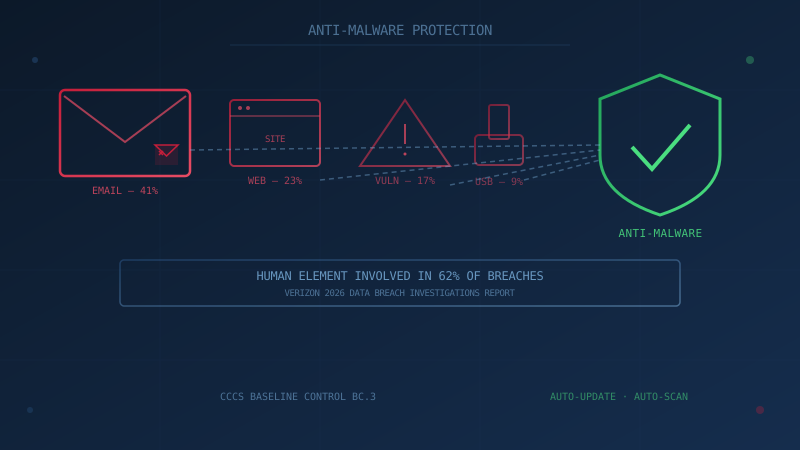
Antivirus for business is no longer a scanner someone remembers to run on Friday afternoon. The Canadian Centre for Cyber Security's baseline cyber security controls say organizations should "enable anti-malware solutions that update and scan automatically," and its guidance on choosing the best cyber security solution for your organization (ITSM.10.023) recommends anti-virus, anti-malware and endpoint detection and response (EDR) software. This guide covers what a Canadian small business actually needs, what Windows already includes, and when paid endpoint protection is worth the money.
The threat keeps growing. Verizon's 2026 Data Breach Investigations Report found ransomware in 48% of breaches, up from 44% in the previous report, and exploitation of software vulnerabilities was the most common way attackers got in, at 31%. Anti-malware is not a substitute for patching or for training people to spot a convincing phishing email, but it is the automated layer that can stop malicious code once it reaches a device.
What Antivirus Does a Business Need?
A business needs anti-malware on every device that can run it, set to update and scan automatically, and a way to confirm that it is working. That is baseline control BC.3.1 from the Canadian Centre for Cyber Security. The Cyber Centre's ITSM.10.023 goes further and recommends anti-virus, anti-malware and EDR software from a reputable provider, and its malware guidance for organizations (ITSAP.00.057) lists the same three tools.
Our anti-malware control page summarizes what BC.3 asks for in detail. This page is about the buying decision.
Antivirus, endpoint protection and EDR: what is the difference?
- Antivirus or anti-malware: software on each device that blocks and removes malicious programs (viruses, ransomware, spyware, trojans and worms). Microsoft Defender Antivirus is built into Windows.
- Endpoint protection: the same protection, managed from one console so you can see every device's status, push settings and get alerts in one place.
- Endpoint detection and response (EDR): adds continuous monitoring and collection of device activity, with automated response and investigation tools. The Cyber Centre's incident reporting guidance (ITSM.00.140) suggests EDR to help detect and respond to anomalous system activity.
- Managed detection and response (MDR): a service where an outside team watches the EDR alerts and responds for you. See our guide to managed detection and response.
Is Windows Defender Enough?
For most small businesses, yes. Microsoft says Defender Antivirus is built into Windows and provides real-time protection against viruses and malware, so a business running current Windows already has an anti-malware product rather than a trial. It meets the BC.3.1 expectation when automatic updates and scanning stay turned on, which is the default.
Where a paid endpoint protection or EDR product earns its cost is central management across many devices, more detailed logging and investigation tools, and faster response when something is found. Those features matter more as headcount and device count grow, or when a business handles sensitive client or financial data.
A quick test: if you can answer "which of our devices are protected and up to date?" in under five minutes without checking each machine, your current setup is probably adequate, whether it is Defender or something else. If answering means walking around the office checking screens, the gap is visibility and management, which is exactly what endpoint protection and EDR platforms are built to solve.
What Should You Ask Before Buying Endpoint Protection?
The most useful questions are about coverage, management and who responds, not brand names. The Cyber Centre's baseline asks for anti-malware "as feasible on all connected devices" that updates and scans automatically, and ITSM.10.023 adds EDR. A product that meets those expectations but that nobody monitors leaves the same gap as having no product at all.
- Does it update and scan automatically on every device we own, including Macs and servers?
- Can we see every device's protection status from one console?
- Does it include EDR, or is EDR a separate tier?
- Who reads the alerts, and at what hours? If the answer is nobody, consider an MDR service.
- Does it overlap with what we already pay for? Microsoft 365 business plans and Windows may already cover part of this.
Ransomware and the Value of Behavioural Detection
Ransomware is where behavioural detection matters most. Signature-based detection can only catch ransomware variants someone has already seen and catalogued. Behavioural detection watches for the pattern ransomware creates no matter which strain is running: a process rapidly reading, encrypting and rewriting large numbers of files in a short window. Ransomware authors change their code constantly to evade signature matching, but mass encryption of a file system is much harder to disguise.
This is also why anti-malware, even when it works exactly as intended, is not a substitute for tested backups. It reduces the odds of a successful ransomware infection but cannot guarantee prevention against a genuinely new variant.
Where Does Anti-Malware Fit Among Other Defences?
Anti-malware is strongest as one layer among several:
- Patching: vulnerability exploitation was the most common initial access route in the 2026 DBIR, so prompt patch management closes the door anti-malware cannot.
- Email filtering: catching malicious attachments and links before they reach an inbox. The baseline says organizations should filter spam or email with malicious attachments or links.
- Endpoint anti-malware: scanning files and watching behaviour on the device itself, the last automated line of defence.
- Browser security: modern browsers include built-in warnings for known malicious and phishing sites, and keeping browsers patched matters as much as the anti-malware layer.
- Removable media controls: restricting or scanning USB drives.
Email Filtering Deserves as Much Attention as the Endpoint
Microsoft 365 and Google Workspace both include email security features that scan attachments and links before delivery. Both work better with properly configured domain authentication (SPF, DKIM and DMARC records), which makes it harder for attackers to spoof your domain in emails to customers or partners. Most businesses already have a baseline version of this filtering in their email subscription. The usual gap is that it is not fully configured, not that it needs to be bought separately.
Browser Security and Mobile Devices
Browser extensions are a frequently overlooked risk. An extension can be granted broad access to what a user sees and types, and a malicious one operates inside a trusted application. Review which extensions are installed across the organization from time to time, and remove anything not actively needed.
For phones and tablets used for business email, banking or file access, keep operating systems updated, install apps only from official stores (Google Play, Apple App Store), and turn on whatever mobile threat protection your email platform or mobile device management (MDM) tool offers.
A Practical Setup Checklist
- Confirm anti-malware is actually running on every device, not just assumed to be. Disabled or expired protection often goes unnoticed.
- Enable automatic updates and automatic scanning. The Cyber Centre's baseline control BC.3.1 calls for both.
- Turn on email attachment and link scanning at the mail platform level.
- Schedule full scans outside business hours if performance is a concern on older hardware.
- Extend coverage to mobile devices used for business email or files, at minimum through operating system updates and official app stores.
- Pair software with people. Anti-malware plus employee security awareness training closes far more of the gap than either does alone. Verizon's 2026 DBIR found a human element present in 62% of breaches.
Why This Still Matters When Ransomware Is the Headline Risk
Anti-malware rarely makes headlines on its own, but it is often the control that decides whether a ransomware infection is caught at the download stage or discovered after files are encrypted. It is inexpensive, often already included in software a business pays for anyway, and it is one of the 13 baseline controls the Cyber Centre recommends for every small and medium organization.
One question to ask your IT lead this week: "Can you show me, from one screen, that every one of our devices has anti-malware running and up to date?" If the answer is no, start there. Our free cybersecurity assessment covers anti-malware alongside the rest of the 13 Baseline Controls, takes under 30 minutes, and your answers never leave your browser.
How prepared is your business?
Find out where you stand against Canada's 13 Baseline Cyber Security Controls. The assessment takes under 30 minutes and your answers stay in your browser.
Check Your ScoreFrequently Asked Questions
What antivirus does a business need?
At minimum, anti-malware on every device that can run it, set to update and scan automatically. That is the Canadian Centre for Cyber Security's baseline control BC.3.1. The Cyber Centre's guidance on choosing security solutions also recommends anti-virus, anti-malware and endpoint detection and response (EDR) software. For most small businesses, the real decision is whether built-in protection plus good management is enough, or whether EDR is worth adding.
Is Windows Defender enough for a small business?
For many small businesses, yes. Microsoft Defender Antivirus is built into Windows and provides real-time protection against viruses and malware. It meets the Canadian Centre for Cyber Security's baseline expectation of anti-malware that updates and scans automatically when those settings stay on. Businesses with many devices, or with sensitive client or financial data, may still want central management and endpoint detection and response (EDR).
What is the difference between antivirus, endpoint protection and EDR?
Antivirus or anti-malware blocks and removes malicious software on a device. Endpoint protection usually means the same protection managed from one console across all devices. Endpoint detection and response (EDR) adds continuous monitoring and collection of device activity, with automated response and investigation tools, so an attack that gets past prevention can be detected and contained.
How do attackers most commonly get into a business network?
Verizon's 2026 Data Breach Investigations Report found that exploiting software vulnerabilities was the most common initial access route in breaches, at 31%, and that ransomware was present in 48% of breaches. That is why anti-malware works best alongside prompt patching, email filtering and staff training rather than on its own.
What's the difference between antivirus and anti-malware?
In practice, the terms are used almost interchangeably today. 'Antivirus' historically referred to signature-based detection of known viruses; 'anti-malware' is the broader term covering viruses, ransomware, spyware, trojans, worms and other malicious software. The Canadian Centre for Cyber Security uses both words side by side in its guidance. Modern products marketed as either term generally detect both known and unknown threats.
Does anti-malware software slow down computers?
Modern anti-malware tools, including Microsoft Defender, are built to run with minimal performance impact on current hardware. Older or underpowered machines can slow down during full system scans. Scheduling full scans outside business hours usually solves this.
Do businesses need anti-malware on phones and tablets too?
The Canadian Centre for Cyber Security's baseline asks for anti-virus and anti-malware software as feasible on all connected devices. On phones and tablets used for business email or files, at minimum keep the operating system updated, install apps only from official stores, and turn on any mobile threat protection offered through your email or device management platform.
Cite This Page
Suggested citation:
Cybersecurity Canada (2026). Antivirus and Anti-Malware: What Canadian Small Businesses Actually Need. Retrieved from https://cybersecuritycanada.ca/news/posts/antivirus-and-anti-malware-what-canadian-small-businesses-actually-need/
Permanent URL: https://cybersecuritycanada.ca/news/posts/antivirus-and-anti-malware-what-canadian-small-businesses-actually-need/ · Last updated October 23, 2026
Disclaimer: This article is intended for general informational purposes only and does not constitute professional cybersecurity, legal, IT, or compliance advice. While we strive to ensure accuracy, the cybersecurity landscape changes rapidly and information may become outdated. Organizations should consult with qualified cybersecurity professionals and legal counsel to assess their specific situation and develop appropriate security policies. Use of this information is at your own risk. See our Privacy Policy for more information.
Cybersecurity Canada is an independent resource and is not affiliated with, endorsed by, or connected to the Canadian Centre for Cyber Security, the Communications Security Establishment, or the Government of Canada.
How does your organization measure up?
Take our free cybersecurity assessment based on the Canadian Centre for Cyber Security's Baseline Controls. 50 questions, under 30 minutes, 100% confidential. Your answers never leave your browser.
Take the Free Assessment