Secure Configuration and Hardening Checklist for Small Business IT

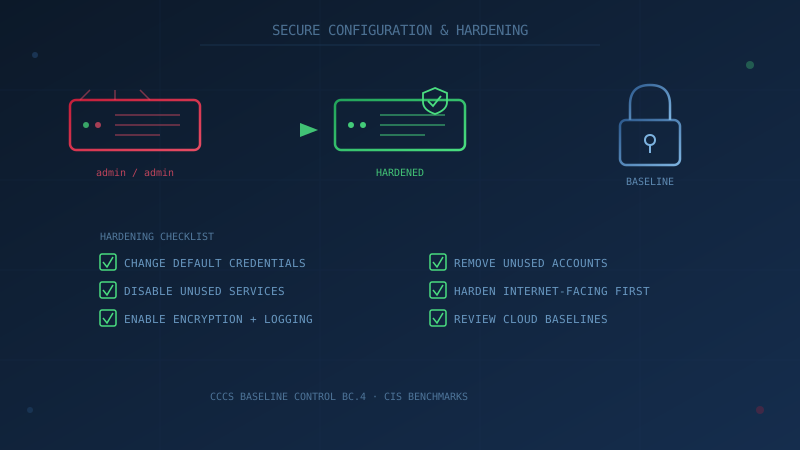
Most business hardware and software still ships configured for convenience, not security: a default administrator username and password, extra services running that nobody uses, and access settings left as permissive as possible so setup goes smoothly. Secure configuration — also called hardening — is the deliberate process of changing those defaults before an attacker finds them first.
The Canadian Centre for Cyber Security (CCCS) lists secure configuration as Baseline Control BC.4, positioned directly alongside patch management and anti-malware protection as one of the foundational controls every Canadian organization should have in place. Unlike patching, which fixes a flaw the vendor already knows about, hardening addresses risk that exists by design, in how a system is set up — a fully patched server can still be trivially compromised if it's still running its default administrator password.
What Secure Configuration Actually Means
Secure configuration means changing the default settings on devices, software, and network equipment to reduce the number of ways an attacker can get in — what security teams call the attack surface. In practical terms, that covers four broad areas:
- Credentials — replacing default administrator usernames and passwords on every device and account.
- Services and features — disabling anything installed or enabled by default that the business doesn't actually use.
- Built-in protections — turning on the security features that ship disabled by default, such as host firewalls, disk encryption, and audit logging.
- Accounts and access — removing accounts nobody needs, including ones left behind by former employees, old vendors, or a previous IT provider.
The CCCS guidance for this control frames it as a foundational measure precisely because it is cheap, requires no new purchase in most cases, and closes off risk that exists purely because a device or account was never reconfigured after setup.
Why Default Settings Are a Real Risk, Not a Theoretical One
Manufacturers and software vendors configure new products for the broadest possible compatibility and the easiest possible setup — not for any individual business's security needs. That usually means a documented default administrator account, unnecessary network services left running and reachable, and permissive default access rules. None of that is secret: default credentials for networking equipment, IoT devices, and common business software are widely and publicly documented, and automated scanning tools exist specifically to find internet-facing systems still using them.
This is exactly the gap that separates secure configuration from most other controls: it doesn't require a sophisticated attacker or a novel technique. It requires only that a device was never reconfigured after it came out of the box.
CIS Benchmarks: A Reference, Not a Requirement to Do Everything
The Center for Internet Security (CIS) publishes CIS Benchmarks — consensus-based, vendor-specific secure configuration guides — covering more than 100 products across 25-plus vendor families, including Windows, macOS, major browsers, and cloud platforms such as Microsoft 365 and AWS. They're available as free PDF downloads for non-commercial use directly from CIS.
A small business does not need to implement every recommendation in a full CIS Benchmark document — some are written with large enterprises in mind and go well beyond what a five- or fifty-person company needs. But they're a genuinely useful reference the first time you're configuring a new server, a new cloud tenant, or a new piece of network equipment, and a good source to hand to an IT provider and ask, "have we done the basics from this?"
To make that concrete, a typical CIS Benchmark for a desktop operating system runs to dozens or hundreds of individual settings, but the recurring themes across nearly all of them are the same handful of ideas: disable or rename default administrator and guest accounts, require a lock screen after a short period of inactivity, disable legacy authentication and communication protocols that exist only for backward compatibility, restrict which users can install software, and turn on audit logging so unusual activity leaves a record. A small business that consistently applies just those five themes across its devices, servers, and cloud accounts has captured most of the practical benefit of a full benchmark without needing to work through every line item.
Network Equipment: The Most Commonly Skipped Hardening Target
Routers, Wi-Fi access points, and firewalls are frequently the least-hardened devices in a small business, precisely because they're set up once, tucked in a closet, and rarely touched again. That makes them a persistent target: security researchers routinely find networking and IoT-class devices — office routers, smart cameras, connected thermostats — still reachable with unrotated factory-default credentials years after installation, because nothing about daily operations ever prompts anyone to log in and check. A basic network hardening pass should cover:
- Changing the default administrator username and password on every router, access point, and firewall.
- Disabling remote administration access from the public internet unless it's specifically required and protected with MFA.
- Disabling WPS (Wi-Fi Protected Setup) on wireless access points, a convenience feature with a long history of security weaknesses.
- Separating guest or visitor Wi-Fi from the network business devices and servers sit on.
- Keeping router and firewall firmware on the same update discipline described in this site's patch management guidance — hardening and patching are complementary, not substitutes for each other.
A Practical Hardening Checklist for Canadian SMBs
1. Change every default credential
Every device and platform that shipped with a default administrator username or password — routers, firewalls, printers, network-attached storage, IoT devices, and any pre-built software installation — should have that credential changed before the device goes into production use, not sometime later. Pair this with a proper password policy and, wherever supported, multi-factor authentication on administrative accounts specifically.
2. Disable unused services and features
Most operating systems, routers, and business software enable more features than a typical small business will ever use — remote management interfaces, file sharing protocols, guest network access, legacy protocols kept only for backward compatibility. Each enabled service is a potential entry point. Disable anything not in active use, and document why anything unusual is left on.
Government agencies lead with this step too. The October 2026 joint advisory AA26-281A, co-authored by the Canadian Centre for Cyber Security, lists disabling unused services and ports first among its key actions, as our AA26-281A summary explains.
3. Turn on the protections that ship disabled
Host-based firewalls, full-disk encryption (BitLocker on Windows, FileVault on macOS), and security logging are frequently available out of the box but not enabled by default. Enabling them costs nothing beyond the time to do it and materially reduces risk if a laptop is lost or stolen, or if a device is compromised and an investigator later needs to know what happened.
4. Remove accounts nobody needs
Former-employee accounts, default guest accounts, accounts created by a previous IT provider or vendor for a one-time project, and generic shared logins are all liabilities that accumulate quietly over time. A recurring account review — quarterly is reasonable for most small businesses — catches what onboarding and offboarding processes miss.
5. Harden anything reachable from the public internet first
Routers, firewalls, remote access and VPN tools, and any server or cloud account with a public-facing address should be the first priority, because these are exactly what automated internet-wide scanning finds fastest. An unhardened internal workstation is a real risk; an unhardened internet-facing router is an open invitation.
6. Apply secure baselines to cloud services, not just physical hardware
Cloud misconfiguration — an overly permissive storage bucket, an admin console left with default sharing settings, an API left open — is now as common a source of exposure as an unpatched on-premises server. Microsoft 365, Google Workspace, and major cloud platforms all publish their own security baseline recommendations, and CIS Benchmarks cover many of them directly. For a typical Canadian SMB running Microsoft 365 or Google Workspace, the highest-value cloud hardening steps are usually: disabling legacy authentication protocols that don't support MFA, reviewing and restricting default external file-sharing settings so documents aren't shareable outside the organization by default, requiring MFA on all administrator accounts specifically (not just regular users), and reviewing which third-party applications have been granted access to company email or files through OAuth connections — a category of access that's easy to grant once and then forget about entirely.
This work sits close to access control as a control area — hardening a cloud platform's configuration and managing who has access to it are really two sides of the same problem, and it's worth reviewing both at the same time rather than treating them as separate projects.
7. Review vendor and third-party default configurations
Software and hardware provided by suppliers, contractors, and managed service providers sometimes arrives with vendor-side default settings that were never reviewed against your business's own security needs. This overlaps with vendor and third-party risk more broadly — a secure configuration review should be part of onboarding any new vendor-supplied system, not an afterthought.
8. Document the baseline and check it periodically
Once systems are hardened, write down what "correctly configured" looks like for your organization — even a simple checklist is enough for a small business. Configuration drifts over time as software updates reset settings, new employees make changes, or a quick fix during a busy week never gets reverted. A periodic review (quarterly or after any major change) catches drift before it becomes a gap.
For businesses managing more than a handful of devices, this is also where configuration management tools start earning their cost. Microsoft Intune, Group Policy (for organizations still running on-premises Active Directory), and equivalent mobile device management platforms let a baseline configuration be defined once and applied — and re-applied automatically if a device drifts from it — across every managed device, rather than relying on someone remembering to check each machine individually. A five-person business can reasonably manage this with a checklist and a recurring calendar reminder; a fifty-person business generally cannot, and should budget for the tooling instead.
How This Fits With the Rest of the Baseline Controls
Secure configuration doesn't operate in isolation. It's most effective paired with the controls it sits alongside in the CCCS Baseline Controls: patch management closes known software flaws, anti-malware catches what still gets through, and access control and authentication limit what a compromised account can actually reach even if hardening missed something. None of the 13 controls is sufficient alone — together they remove the easy, low-effort paths into a business that opportunistic attackers rely on.
Secure configuration also tends to be one of the least expensive controls to implement, since in most cases it requires no new software purchase — only the time to review and change settings that are already there. For a small business working through the Baseline Controls in order of cost-to-effort ratio, this is typically one of the highest-value places to start.
It's also increasingly visible to outside parties. Cyber insurance applications now commonly ask specific questions about administrative account controls, remote access configuration, and whether default credentials have been changed on network equipment — not just whether anti-malware or MFA are in place. A business that can answer those questions with confidence, because it has actually gone through a hardening pass rather than assuming the defaults were fine, is in a materially stronger position both for underwriting and, if the worst happens, for demonstrating reasonable security measures were in place.
Not sure where your organization's configuration stands today? Our free cybersecurity assessment, built around all 13 of the CCCS Baseline Controls, takes under 30 minutes and keeps your answers entirely in your browser — nothing is sent to us.
How prepared is your business?
Find out where you stand against Canada's 13 Baseline Cyber Security Controls. The assessment takes under 30 minutes and your answers stay in your browser.
Check Your ScoreFrequently Asked Questions
What does secure configuration mean for a small business?
Secure configuration, or hardening, means changing the default settings on devices, software, and network equipment to reduce the number of ways an attacker can get in. In practice this means changing default administrator passwords, disabling features and services the business doesn't use, turning on built-in protections like firewalls and disk encryption, and removing accounts nobody needs anymore. The Canadian Centre for Cyber Security lists this as Baseline Control BC.4.
What are CIS Benchmarks and does a small business need them?
CIS Benchmarks are consensus-based, vendor-specific configuration guides published by the Center for Internet Security, covering more than 100 products and 25-plus vendor families — operating systems, browsers, cloud platforms, and more. They are free to download as PDFs for non-commercial use. A small business does not need to implement every recommendation in a full CIS Benchmark, but the documents are a useful reference when configuring a new server, cloud account, or piece of network equipment for the first time.
Why do default settings create risk in the first place?
Manufacturers configure new devices and software for easy setup, broad compatibility, and the widest possible use case — not for any one business's security needs. That typically means default administrator accounts and passwords, unnecessary services and ports left open, and permissive access settings, all of which are publicly documented and easy for an attacker to look up and try.
How is secure configuration different from patch management?
Patch management fixes known software flaws that the vendor has already identified and released a fix for. Secure configuration addresses risk built into how a system is set up, independent of whether it's fully patched — a fully patched server with a default admin password and unnecessary services running is still an easy target. The two controls work together and are listed back-to-back in the CCCS Baseline Controls.
Where should a small business start hardening first?
Start with anything reachable from the public internet — routers, firewalls, remote access tools, and any server or cloud account with a public-facing address — since these are what automated scanning tools find first. From there, move to changing default credentials organization-wide, disabling unused accounts and services, and enabling encryption on laptops and mobile devices.
Cite This Page
Suggested citation:
Cybersecurity Canada (2026). Secure Configuration and Hardening Checklist for Small Business IT. Retrieved from https://cybersecuritycanada.ca/news/posts/secure-configuration-and-hardening-checklist-for-small-business-it/
Permanent URL: https://cybersecuritycanada.ca/news/posts/secure-configuration-and-hardening-checklist-for-small-business-it/ · Published August 19, 2026
Disclaimer: This article is intended for general informational purposes only and does not constitute professional cybersecurity, legal, IT, or compliance advice. While we strive to ensure accuracy, the cybersecurity landscape changes rapidly and information may become outdated. Organizations should consult with qualified cybersecurity professionals and legal counsel to assess their specific situation and develop appropriate security policies. Use of this information is at your own risk. See our Privacy Policy for more information.
Cybersecurity Canada is an independent resource and is not affiliated with, endorsed by, or connected to the Canadian Centre for Cyber Security, the Communications Security Establishment, or the Government of Canada.
How does your organization measure up?
Take our free cybersecurity assessment based on the Canadian Centre for Cyber Security's Baseline Controls. 50 questions, under 30 minutes, 100% confidential. Your answers never leave your browser.
Take the Free Assessment