Employee Offboarding Security Checklist for Canada

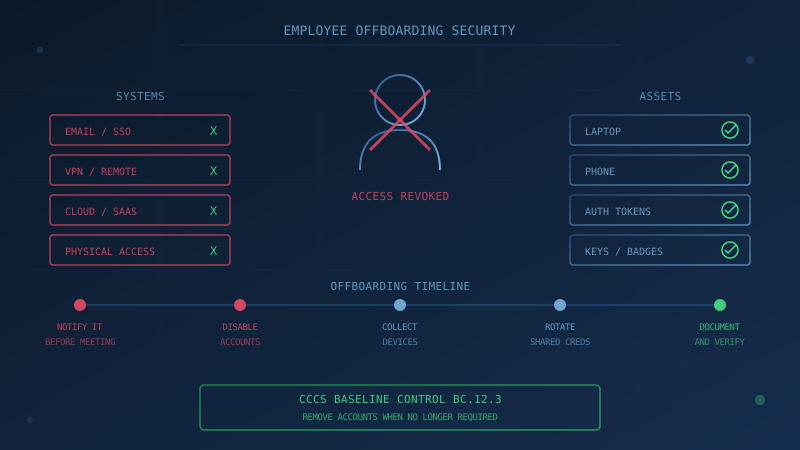
Revoke system access the same day an employee departs, terminate credentials and authenticators, recover company devices, and change any shared passwords the departing employee knew. These steps form the foundation of secure employee offboarding for Canadian businesses. According to the Deloitte and Canadian Insider Risk Management Centre of Excellence 2025-2026 cross-sector survey, nearly 73% of surveyed organizations reported at least one insider threat incident in the past 12 months, yet only 70% have formalized offboarding procedures. The Canadian Centre for Cyber Security's baseline control BC.12.3 requires organizations to remove accounts and functionality when employees no longer require them. This guide provides a security checklist for Canadian businesses handling employee departures. This is informational context (not legal advice).
What Should Happen on an Employee's Last Day?
Access should be disabled the same day the employee departs. The Canadian Centre for Cyber Security's ITSP.10.033 personnel security guidance states that upon termination, organizations should disable system access within an organization-defined time period, and "terminate or revoke any authenticators and credentials associated with the individual." The guidance is explicit that "the timely execution of termination actions is essential for individuals who have been terminated for cause" and notes that "organizations should consider disabling the system accounts of individuals who are being terminated prior to the individuals being notified."
The same CCCS guidance requires organizations to "retrieve all security-related, organizational system-related property" including hardware authentication tokens, keys, identification cards, and building passes.
A 2024 internal audit of Shared Services Canada's personnel offboarding processes found that the Digital Identity and Directory Management team "defines 1 day as the ideal standard for access revocation," though only 21% of records were actually revoked within that timeframe. That gap between policy and practice is a measurable security risk.
What Systems Need Access Revoked?
A complete offboarding process must cover every system the employee could access, not just the obvious ones. The Canadian Centre for Cyber Security's guidance on securing access controls (ITSM.30.010) describes offboarding as "a complex process" and lists elements to consider, including decentralized authentication, sessions with unexpired tokens, on-premises accounts such as Active Directory, cloud accounts such as Office 365 and Azure AD, federated accounts, and third-party software as a service accounts with separate authentication.
The same ITSM.30.010 guidance recommends an offboarding process that includes:
- Automate processes as much as possible
- Disable accounts
- Revoke certificates and tokens from accounts
- Revoke authentication tokens from cloud services
- Disable access to devices that have access through bring-your-own-device (BYOD) capabilities
- Wipe organizational data from BYODs
For SaaS and cloud services not connected to single sign-on, each platform needs individual attention. Shadow IT accounts created without IT approval are easy to miss during offboarding. This connects to vendor and third-party risk, where your organization's data may live in systems you do not fully control.
What Does CCCS Baseline Control BC.12.3 Require?
The Baseline Cyber Security Controls for Small and Medium Organizations states in BC.12.3 that "organizations should remove accounts and/or functionality when employees no longer require these for their tasks." The example given is "when employees leave the organization," but the same principle applies to role changes, contractor engagements ending, and access that was granted for a specific project.
BC.12.3 connects to the broader access control framework in the baseline controls. BC.12.1 requires organizations to "provision accounts with the minimum functionality necessary for tasks." BC.12.2 restricts administrator accounts to administrative activities only. When these controls are followed during employment, offboarding becomes simpler because there is less unnecessary access to revoke.
For businesses that outsource IT, the responsibility remains with you. The CCCS guidance Cyber security considerations for consumers of managed services (ITSM.50.030) states that "your organization is the data owner and is legally responsible for data security" even when a managed service provider runs your systems. Your managed service provider or IT support company may execute the technical steps, but the business must verify they are completed.
What About Shared Passwords and Service Accounts?
Change any shared credentials the departing employee had access to. The Canadian Centre for Cyber Security's ITSM.10.094 guidance on managing administrative privileges states that organizations should "review all user accounts regularly, especially administrative accounts and privileges, to validate that they are still required by the assigned users" and determine "whether any need to be reassigned or removed based on your business needs and security requirements."
ITSM.10.094 specifies conditions for disabling or deactivating accounts including "when shared, group, emergency, or temporary accounts are no longer required" and "when employees, or contractors, leave the organization."
The practical steps include:
- Rotate passwords for any shared accounts the employee could access
- Review and revoke access to password manager vaults (see our guide to password security)
- Change credentials for service accounts the employee knew about
- Update any API keys or tokens the employee had access to
- Transfer ownership of files, mailboxes, and shared resources to a designated account
What Does PIPEDA Require for Offboarding?
PIPEDA does not use the word "offboarding," but its safeguards and accountability principles apply to departing employees. PIPEDA Principle 4.7.5 states: "Care shall be used in the disposal or destruction of personal information, to prevent unauthorized parties from gaining access to the information."
This applies to the customer and business information a departing employee had access to. A former employee with lingering access to customer records is exactly the scenario Principle 4.7.5 addresses.
The Office of the Privacy Commissioner of Canada's workplace privacy guidance confirms that "privacy obligations relating to employee information generally apply not only to current employees, but also to prospective and former employees." When an employee leaves, you must continue to protect any personal information about them that you retain for legitimate purposes (final pay, references, regulatory records), and you must protect the personal information of others that the departing employee could access.
Principle 4.1.4 requires organizations to implement policies and practices to give effect to the principles, including "implementing procedures to protect personal information" and "training staff and communicating to staff information about the organization's policies and practices." This includes exit procedures.
How Should Involuntary Terminations Differ?
For involuntary terminations, disable access before or at the moment of notification. The CCCS ITSP.10.033 personnel security guidance states that "in certain situations, organizations should consider disabling the system accounts of individuals who are being terminated prior to the individuals being notified."
CISA's 2024 guide on managing risk of adverse employee separations recommends that before the termination meeting, organizations should "notify IT and the Security Office of the date and time of the notification of separation meeting and remove all physical and logical access at an appropriate time based on risk. Remove the ability of the employee to access systems remotely."
The risk is not theoretical. The Deloitte/CInRM CoE survey found that negligence remains the most commonly reported insider threat (92% of organizations tracking intent reported at least one negligence incident), but malicious insider activity is also common: 44% of organizations reported fraud incidents and 41% reported personal information theft. An employee departing under difficult circumstances has both motive and (if access is not revoked) opportunity.
What Physical Assets Need to Be Recovered?
Collect all company-owned devices and security-related property. The CCCS personnel security guidance requires organizations to "retrieve all security-related, organizational system-related property" including:
- Laptops and computers
- Mobile phones and tablets
- Hardware authentication tokens (YubiKeys, RSA tokens)
- Keys and access cards
- Identification badges
- Building passes
For devices that cannot be recovered (lost, damaged, or in a remote employee's possession), remote wipe capabilities become essential. This connects to mobile security and BYOD policies, where the ability to wipe corporate data from personal devices should be established before offboarding situations arise.
The CCCS baseline control BC.13.2 requires organizations to "have processes for the sanitization or destruction of portable media prior to disposal." Recovered devices should be wiped before being reassigned or disposed of.
What Documentation Should You Keep?
Keep records of what was revoked and when. If a former employee's credentials are later used in a breach, you need to demonstrate that access was properly terminated. Documentation should include:
- Date and time each account was disabled
- List of systems where access was revoked
- Recovery of physical assets (signed receipt)
- Exit interview completion (if conducted)
- Any post-employment acknowledgements signed
The CCCS personnel security guidance recommends that "exit interviews ensure that terminated individuals understand the security constraints imposed by being former employees and that proper accountability is achieved for system-related property." Security topics should include "reminding individuals of non-disclosure agreements and potential limitations on future employment."
For businesses with security clearances or handling government contracts, documentation requirements are more stringent. The CCCS guidance notes that "CSOs or delegated officials, in consultation with human resources advisors, must develop procedures and ensure that debriefings and reclamations are scheduled and conducted as a component of the overall termination process."
One Question to Ask Your IT Provider
"When an employee left in the last six months, how quickly was their access revoked, and can you show me the record?"
If your IT lead or managed service provider cannot answer this question with a specific date and a log showing what was disabled, your offboarding process needs attention.
Where Does Your Business Stand on Access Control?
Understanding your offboarding security starts with knowing your current access control practices. Our free cybersecurity assessment evaluates your organization against the Canadian Centre for Cyber Security's 13 Baseline Control areas, including access control (BC.12). The assessment covers 50 questions, takes under 30 minutes, and your answers stay in your browser. The results show which control areas need attention, so you know where to strengthen your offboarding procedures.
How prepared is your business?
Find out where you stand against Canada's 13 Baseline Cyber Security Controls. The assessment takes under 30 minutes and your answers stay in your browser.
Check Your ScoreFrequently Asked Questions
How quickly should you revoke an employee's access when they leave?
Access should be disabled the same day the employee departs, or before notification in cases of involuntary termination for cause. The Canadian Centre for Cyber Security's ITSP.10.033 personnel security guidance states that organizations should disable system access upon termination within an organization-defined time period. In a 2024 internal audit, Shared Services Canada's Digital Identity and Directory Management team defined 1 day as the ideal standard for access revocation.
What does the CCCS baseline say about removing accounts when employees leave?
Baseline control BC.12.3 states that organizations should remove accounts and functionality when employees no longer require these for their tasks. The control's example is when employees leave the organization, and the same principle reasonably extends to role changes and contractor engagements ending.
Does PIPEDA require anything about offboarding?
PIPEDA Principle 4.7.5 states that care shall be used in the disposal or destruction of personal information to prevent unauthorized parties from gaining access. Principle 4.1.4 requires organizations to implement procedures to protect personal information and train staff on policies. These requirements apply to the information a departing employee had access to and any personal information about the employee held after departure.
What should you do about shared passwords when an employee leaves?
Change any shared credentials the departing employee had access to immediately. The Canadian Centre for Cyber Security's ITSM.10.094 states that when reviewing accounts and privileges, organizations should determine whether any need to be reassigned or removed when employees leave the organization. This includes service accounts and shared systems.
How many Canadian organizations have formal offboarding procedures?
According to the Deloitte and Canadian Insider Risk Management Centre of Excellence 2025-2026 cross-sector survey, 70% of surveyed organizations had formalized offboarding procedures. The same survey found that nearly 73% of organizations reported at least one insider threat incident in the past 12 months.
Cite This Page
Suggested citation:
Cybersecurity Canada (2026). Employee Offboarding Security Checklist for Canada. Retrieved from https://cybersecuritycanada.ca/news/posts/employee-offboarding-security-checklist-canadian-business/
Permanent URL: https://cybersecuritycanada.ca/news/posts/employee-offboarding-security-checklist-canadian-business/ · Published October 29, 2026
Disclaimer: This article is intended for general informational purposes only and does not constitute professional cybersecurity, legal, IT, or compliance advice. While we strive to ensure accuracy, the cybersecurity landscape changes rapidly and information may become outdated. Organizations should consult with qualified cybersecurity professionals and legal counsel to assess their specific situation and develop appropriate security policies. Use of this information is at your own risk. See our Privacy Policy for more information.
Cybersecurity Canada is an independent resource and is not affiliated with, endorsed by, or connected to the Canadian Centre for Cyber Security, the Communications Security Establishment, or the Government of Canada.
How does your organization measure up?
Take our free cybersecurity assessment based on the Canadian Centre for Cyber Security's Baseline Controls. 50 questions, under 30 minutes, 100% confidential. Your answers never leave your browser.
Take the Free Assessment