DMARC for Canadian Businesses: Stop Email Spoofing

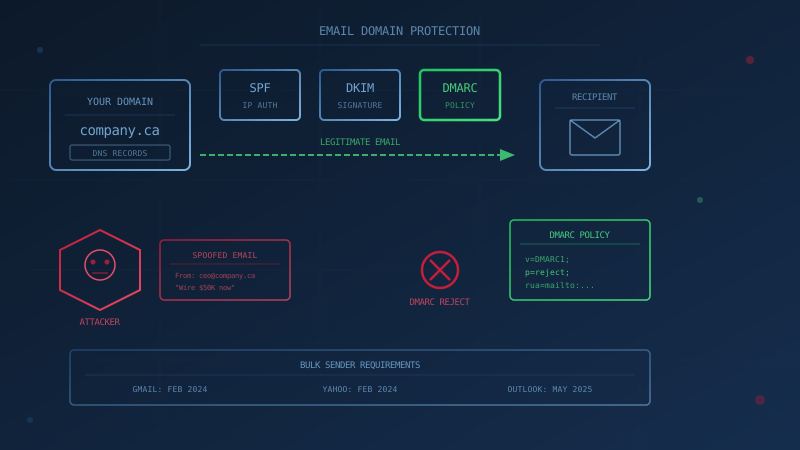
DMARC, combined with SPF and DKIM, prevents attackers from sending emails that appear to come from your business domain. The Canadian Centre for Cyber Security's Implementation guidance: email domain protection (ITSP.40.065 v1.1) states that these three protocols "act jointly to protect email domains from being spoofed" and that "for complete protection, you must implement all three protocols and configure them to instruct recipients to reject inauthentic messages." For Canadian businesses, this matters because spear phishing caused $67.9 million in reported losses in 2025, according to the Canadian Anti-Fraud Centre's Top 10 frauds in 2025. The CAFC describes spear phishing as fraudsters pretending to be legitimate sources, such as executives or suppliers, often with a sender address that appears to be the real one, a tactic it calls spoofing. A domain without DMARC enforcement can be spoofed to impersonate a trusted contact and redirect payments.
What Do SPF, DKIM and DMARC Actually Do?
SPF (Sender Policy Framework), DKIM (DomainKeys Identified Mail) and DMARC each solve a different part of the email authentication problem.
SPF lists which IP addresses are authorized to send email on your domain's behalf. You publish an SPF record in your DNS, and receiving mail servers check whether incoming messages came from an authorized source. SPF is defined in RFC 7208. If a message arrives from an IP address not in your SPF record, it can be marked as suspicious or rejected.
DKIM adds a cryptographic signature to outgoing messages. You publish a public key in your DNS, and your mail server signs each message with the corresponding private key. Receiving servers verify the signature to confirm the message was authorized by your domain and was not altered in transit. DKIM is defined in RFC 6376.
DMARC ties SPF and DKIM together and adds a policy layer. It requires that at least one of SPF or DKIM passes and that the authenticated domain aligns with the visible "From" address. Without DMARC, an attacker could pass SPF using their own domain while displaying your domain in the From field, and recipients would see your domain name. DMARC also enables reporting: receiving servers send you aggregate reports showing who is sending email using your domain, so you can identify unauthorized senders. DMARC is defined in RFC 7489.
Why Can a Domain Without DMARC Be Used in Invoice Fraud?
A domain without DMARC enforcement can be spoofed because SPF and DKIM alone do not require the authenticated domain to match the From address the recipient sees. The Canadian Centre for Cyber Security's ITSP.40.065 explains that SPF uses "the domain of the SMTP HELO or envelope from email address...which is used by email servers in the background" and DKIM uses "the domain that is specified in the DKIM header." Neither requires those domains to match the visible From address that the recipient sees.
An attacker can therefore send a message that passes SPF and DKIM using a domain they control, while setting the From header to your domain. Unless you have published an enforcing DMARC policy (p=quarantine or p=reject), receiving mail servers have no instruction to reject such messages.
In business email compromise and payment redirection fraud, attackers commonly impersonate suppliers or executives to request wire transfers or banking changes. If your domain has no DMARC record or only p=none, receiving servers have no instruction from you to block spoofed messages, so they may still be delivered to your customers or partners.
What Does the Canadian Centre for Cyber Security Recommend?
The CCCS publishes two key documents on email domain protection.
Implementation guidance: email domain protection (ITSP.40.065 v1.1), published August 2021, provides a detailed implementation plan. It recommends: deploying DMARC with p=none and aggregate reporting to assess your current state; identifying all authorized senders; deploying SPF and DKIM for all domains and senders; monitoring DMARC reports and correcting misconfigurations; then gradually increasing enforcement from p=none to p=quarantine to p=reject. For non-mail domains (domains that do not send email), the guidance recommends publishing SPF records with "v=spf1 -all" and DMARC records with p=reject.
Baseline Cyber Security Controls for Small and Medium Organizations addresses email authentication under control BC.9 (Establish Basic Perimeter Defences). Control BC.9.7 states that organizations should "ensure the implementation of DMARC on all of the organization's email services." Control BC.9.8 states that "Organizations should implement email filtering at points of ingress and egress."
For Government of Canada domains, the Government of Canada's Email Management Services Configuration Requirements mandate implementing DMARC with "a minimum DMARC policy to check inbound and outbound email of 'p=none'" and then "implementing a DMARC policy of 'p=quarantine' or 'p=reject,' applied in a phased manner with consideration of the departmental risk profile."
What Do Gmail, Yahoo and Outlook Require From Bulk Senders?
Major mailbox providers now require SPF, DKIM and DMARC for bulk senders. If your business sends newsletters, invoices or marketing emails, you likely qualify.
Google Gmail: Starting February 1, 2024, according to Google's Email sender guidelines, domains sending 5,000 or more messages per day to personal Gmail accounts must implement SPF and DKIM, publish a DMARC record with at least p=none, and ensure that either SPF or DKIM aligns with the From domain. All senders (regardless of volume) must implement SPF or DKIM. Messages that fail these requirements may be rejected or marked as spam.
Yahoo: Starting February 2024, according to Yahoo's Sender Best Practices, bulk senders must implement both SPF and DKIM, publish a valid DMARC policy with at least p=none, and ensure the From domain aligns with either the SPF or DKIM domain. Yahoo also requires a functioning one-click unsubscribe header for marketing messages.
Microsoft Outlook.com: Starting May 5, 2025, according to Microsoft's postmaster policies, domains sending more than 5,000 emails per day to Outlook consumer accounts (including Hotmail, Live.com and MSN) must pass SPF and DKIM, publish a DMARC record, and have SPF or DKIM align with the From domain. Noncompliant messages from high-volume senders will initially be sent to junk and may eventually be rejected with error code 550 5.7.515, as documented on Microsoft Support.
How Do You Implement DMARC for Canadian Businesses?
The CCCS recommends a phased approach in ITSP.40.065. Here is the practical rollout path.
Step 1: Inventory All Senders
Before changing any DNS records, identify every system that sends email using your domain. This typically includes your primary email platform (Microsoft 365 or Google Workspace), CRM systems, invoicing and accounting software, newsletter and marketing tools, support ticket systems, and any applications that send automated notifications. Each of these services will need to be authorized in your SPF record and may need DKIM configured.
Step 2: Publish SPF
Create an SPF TXT record at your domain's root that lists all authorized sending sources. For example, a domain using Microsoft 365 might use:
v=spf1 include:spf.protection.outlook.com -all
If you use multiple services, add each one. Watch the 10 DNS lookup limit defined in RFC 7208: the include, a, mx, ptr, exists and redirect mechanisms each count as one lookup, and nested includes add up. Exceeding 10 lookups causes a permanent error. To stay under the limit, consolidate includes where possible, replace stable hosts with direct ip4 or ip6 entries, and remove services you no longer use.
Step 3: Enable DKIM
Configure DKIM signing for each service that sends email on your behalf. In Microsoft 365, you enable DKIM in the Microsoft Defender portal for each domain. In Google Workspace, you generate a DKIM key in the Admin console and publish the provided TXT record in your DNS. Third-party services (CRM, newsletter tools, invoicing software) typically provide their own DKIM records for you to publish.
Step 4: Publish DMARC With p=none
Start with a monitoring-only policy. Publish a DMARC TXT record at _dmarc.yourdomain.com:
v=DMARC1; p=none; rua=mailto:dmarc-reports@yourdomain.com
The rua tag specifies where you want to receive aggregate reports. These XML reports show which IP addresses sent email using your domain and whether they passed or failed SPF and DKIM. The CCCS notes that these XML reports should be processed by an automated system and that there are many open source, free, and commercial offerings that can process DMARC reports on your behalf.
Step 5: Review Reports and Fix Failures
Collect reports long enough to see every regular sender, including monthly jobs such as invoicing or payroll runs. Look for legitimate services that are failing authentication because SPF or DKIM is misconfigured. Common issues include third-party services you forgot to add to SPF, services that need DKIM enabled, and forwarded messages that break SPF (consider ARC for forwarding scenarios). Correct each failure before moving to enforcement.
Step 6: Move to p=quarantine, Then p=reject
Once you are confident that all legitimate senders pass authentication, increase enforcement. You can use the pct tag to apply the policy to only a percentage of messages initially:
v=DMARC1; p=quarantine; pct=10; rua=mailto:dmarc-reports@yourdomain.com
Monitor for any new failures, then gradually increase pct to 100. After quarantine is stable, move to p=reject for full protection.
Step 7: Protect Non-Sending Domains
If you own domains that do not send email (parked domains, redirects, brand protection registrations), configure them to reject all email. Publish:
v=spf1 -all
And a DMARC record with:
v=DMARC1; p=reject
This prevents attackers from using your unused domains for spoofing.
Does This Fit Into the Baseline Controls?
DMARC implementation maps to control BC.9 (Network Security) in the Canadian Centre for Cyber Security's Baseline Cyber Security Controls.
Our free cybersecurity assessment asks whether you have implemented DMARC, SPF and DKIM along with email filtering, as one of 50 questions based on the CCCS baseline controls, and takes under 30 minutes. If the answer is no or uncertain, that is a gap worth closing before the next invoice fraud attempt lands in someone's inbox.
One Question to Ask Your IT Provider
"What is our current DMARC policy, and are we receiving and reviewing DMARC aggregate reports?"
If the answer is that there is no DMARC record, or the policy is p=none with no one reviewing reports, or no one knows, that conversation is where your email domain protection work should start. The attacker impersonating your domain to defraud your customers will not wait for you to get around to it.
How prepared is your business?
Find out where you stand against Canada's 13 Baseline Cyber Security Controls. The assessment takes under 30 minutes and your answers stay in your browser.
Check Your ScoreFrequently Asked Questions
What is DMARC and why do Canadian businesses need it?
DMARC (Domain-based Message Authentication, Reporting and Conformance) is an email authentication protocol that prevents attackers from sending emails that appear to come from your domain. According to the Canadian Centre for Cyber Security's Implementation guidance: email domain protection (ITSP.40.065 v1.1), DMARC works with SPF and DKIM to let you instruct receiving mail servers to reject spoofed messages. Without DMARC, attackers can impersonate your domain in invoice fraud and payment redirection schemes. Spear phishing, which the CAFC describes as fraudsters impersonating trusted senders such as executives or suppliers, cost Canadians $67.9 million in reported losses in 2025, according to the Canadian Anti-Fraud Centre.
Do Google, Yahoo and Microsoft require DMARC?
Yes, for bulk senders. Starting February 1, 2024, Gmail requires senders of 5,000 or more messages per day to Gmail accounts to set up SPF, DKIM and a DMARC record with at least p=none, and Yahoo applied similar requirements to bulk senders from February 2024. Starting May 5, 2025, Outlook.com applies the same requirements to domains sending more than 5,000 emails per day. Messages that fail may be junked or rejected.
What is the SPF 10 DNS lookup limit?
RFC 7208 limits SPF record evaluation to 10 DNS-querying terms, including include, a, mx, ptr, exists and redirect mechanisms. When you add multiple third-party services to your SPF record, each include statement counts toward this limit. Exceeding 10 lookups causes a permanent error (permerror), and receiving servers may treat the SPF check as failed. To stay under the limit, consolidate includes, replace stable hosts with ip4 or ip6 entries, and remove unused services.
How long does DMARC implementation take?
Rollout time depends on how many systems send email on your domain's behalf. The Canadian Centre for Cyber Security recommends starting with DMARC p=none to collect reports, identifying all authorized senders, configuring SPF and DKIM for each, monitoring reports for failures, then gradually moving to p=quarantine and p=reject. Rushing to p=reject without reviewing reports can block legitimate email.
Does the Canadian government require DMARC for businesses?
The Government of Canada requires DMARC for its own domains under the Government of Canada's Email Management Services Configuration Requirements, which mandate implementing a DMARC policy of p=quarantine or p=reject, applied in a phased manner, for government email services. For private sector businesses, the Canadian Centre for Cyber Security's Baseline Cyber Security Controls for Small and Medium Organizations (control BC.9.7) recommends that organizations ensure the implementation of DMARC on all email services.
Cite This Page
Suggested citation:
Cybersecurity Canada (2026). DMARC for Canadian Businesses: Stop Email Spoofing. Retrieved from https://cybersecuritycanada.ca/news/posts/dmarc-for-canadian-businesses-stop-email-spoofing/
Permanent URL: https://cybersecuritycanada.ca/news/posts/dmarc-for-canadian-businesses-stop-email-spoofing/ · Published October 24, 2026
Disclaimer: This article is intended for general informational purposes only and does not constitute professional cybersecurity, legal, IT, or compliance advice. While we strive to ensure accuracy, the cybersecurity landscape changes rapidly and information may become outdated. Organizations should consult with qualified cybersecurity professionals and legal counsel to assess their specific situation and develop appropriate security policies. Use of this information is at your own risk. See our Privacy Policy for more information.
Cybersecurity Canada is an independent resource and is not affiliated with, endorsed by, or connected to the Canadian Centre for Cyber Security, the Communications Security Establishment, or the Government of Canada.
How does your organization measure up?
Take our free cybersecurity assessment based on the Canadian Centre for Cyber Security's Baseline Controls. 50 questions, under 30 minutes, 100% confidential. Your answers never leave your browser.
Take the Free Assessment