Cyber Security Awareness Month Canada 2026: A Practical Checklist for Small Businesses
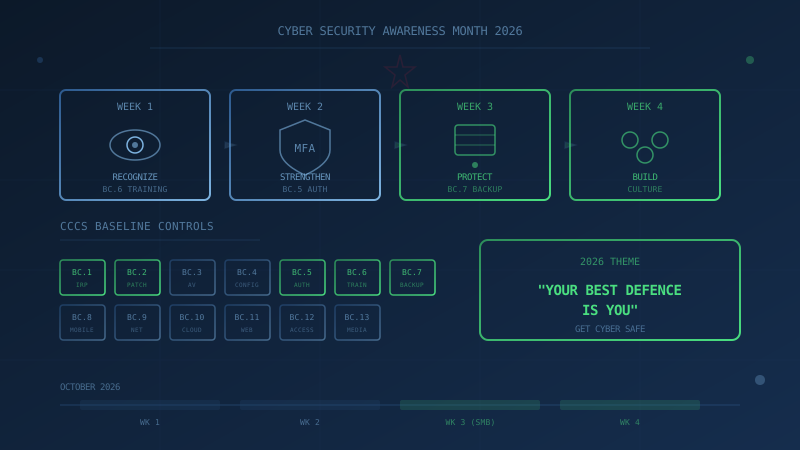
October 2026 marks Cyber Security Awareness Month in Canada. This year's theme from the Government of Canada's Get Cyber Safe campaign is "Your best defence is you." The message is straightforward: small actions and good cyber security habits can make a big difference. Checking suspicious messages, enabling multi-factor authentication, and using strong passwords are the kinds of everyday steps that stop many common attacks.
For Canadian small businesses, October is an opportunity to move beyond awareness and take concrete action. The checklist below maps the four weekly themes from Get Cyber Safe to specific controls from the Canadian Centre for Cyber Security's Baseline Cyber Security Controls (ITSM.10.089), giving you practical steps your team can implement this month.
What Is Cyber Security Awareness Month and Who Runs It?
Cyber Security Awareness Month is an internationally recognized campaign held every October. In Canada, Get Cyber Safe leads the campaign on behalf of the Communications Security Establishment Canada, with advice and guidance from the Canadian Centre for Cyber Security. According to Get Cyber Safe's official campaign page, the goal is to help Canadians stay secure online by teaching simple steps to protect themselves and their devices.
The 2026 campaign runs weekly themes throughout October:
- Week 1: Recognize cyber threats (phishing, AI-generated scams)
- Week 2: Strengthen your defences (passwords, multi-factor authentication)
- Week 3: Protect your information (including Small Business Week)
- Week 4: Build your cyber security community
Each theme translates directly to actions small businesses can take, and each action maps to one or more of the 13 Baseline Controls.
Why Should Canadian Small Businesses Care About Cyber Month?
Small and medium businesses often assume they are not targets for cybercriminals. The CCCS Baseline Controls document itself states that small and medium organizations "are most likely to face cyber threat activity in the form of cybercrime that often has immediate financial or privacy implications." Threat actors target Canadian businesses for customer data, financial information, payment systems, and proprietary data.
The Baseline Controls exist because implementing enterprise-grade security is beyond the resources of most small businesses. The CCCS designed these controls to apply the 80/20 principle: achieve 80% of the security benefit from 20% of the effort. Cyber Security Awareness Month is the right time to assess where your organization stands.
How Can Your Team Recognize Cyber Threats This Week?
Week 1 of Cyber Month focuses on recognizing phishing, fake messages, and AI-powered scams. The campaign emphasizes pausing before you click, reply, or share information. For businesses, this maps directly to Security Awareness Training (BC.6).
What BC.6 recommends: The CCCS recommends that organizations educate all staff on recognizing phishing emails, suspicious links, and social engineering techniques. Training should be practical, relevant, and ongoing rather than a one-time annual exercise.
October action items:
- Share Get Cyber Safe's seven red flags of phishing with your team
- Discuss a recent phishing example in your next team meeting
- Remind staff to report suspicious messages without fear of blame
- Consider a brief phishing simulation if you have the capability
This single week of focused attention on phishing recognition addresses BC.6 and creates habits that reduce risk year-round.
How Do You Strengthen Defences with Passwords and MFA?
Week 2 focuses on passwords, password managers, and multi-factor authentication. Get Cyber Safe's materials highlight that these tools make staying secure easier. This maps directly to Authentication (BC.5).
What BC.5 recommends: The CCCS strongly recommends implementing multi-factor authentication on all accounts where it is available, with priority given to email, remote access, cloud services, administrative accounts, and financial systems. The CCCS also recommends using password managers and adopting passphrases over short complex passwords (per ITSAP.30.032).
October action items:
- Audit which business accounts have MFA enabled (start with email)
- Enable MFA on any accounts where it is available but not yet active
- Evaluate whether your team uses a password manager; if not, choose one
- Update your password policy to require minimum 12 characters and encourage passphrases
- Identify and eliminate shared accounts where possible
MFA is one of the single most effective controls against credential-based attacks. According to the authentication pillar page, even when a password is compromised, MFA prevents attackers from accessing the account without the additional factor.
What Steps Protect Your Business Information During Small Business Week?
Week 3 of Cyber Month coincides with Small Business Week in Canada. Get Cyber Safe provides resources specifically for small businesses, focusing on protecting information when banking, shopping, or using online services. For businesses, this connects to multiple controls: Data Backup (BC.7), Patch Management (BC.2), and Incident Response (BC.1).
What the Baseline Controls recommend:
- BC.7 (Backup): Back up important information and systems regularly. Store at least one backup copy offline or offsite, disconnected from the network. Test backup restoration regularly.
- BC.2 (Patching): Enable automatic updates where possible. Prioritize critical patches. Maintain an asset inventory so no system is overlooked.
- BC.1 (Incident Response): Develop and maintain an incident response plan. The plan should be documented, regularly tested, and known to all relevant personnel.
October action items:
- Verify your backups are running and at least one copy is offline or offsite
- Test restoring from backup to confirm data is actually recoverable
- Check that automatic updates are enabled on workstations and servers
- Review your asset inventory for any software reaching end-of-life
- If you do not have an incident response plan, download the CyberSecure Canada IRP template and start drafting
These actions address three of the 13 Baseline Controls in a single week. Tested backups are your last line of defence against ransomware; patching closes the vulnerabilities attackers exploit; and an incident response plan reduces chaos when something goes wrong.
How Do You Build Lasting Cyber Security Habits After October?
Week 4 encourages sharing what you have learned and helping others stay safe. For businesses, this is about building a security culture that persists beyond Cyber Month. The CCCS guidance for Security Awareness Training (BC.6) emphasizes that training should be ongoing, not a one-time event.
October action items:
- Schedule monthly security touchpoints (even five minutes in a team meeting)
- Designate someone to share relevant Canadian cyber incident news
- Create a reporting culture where staff feel comfortable flagging suspicious activity
- Review your security practices quarterly, not just annually
The goal is not perfect compliance. The goal is continuous improvement. Organizations that build security awareness into their regular operations are more resilient than those who treat it as an annual checkbox.
What Are the 13 Baseline Controls at a Glance?
The Canadian Centre for Cyber Security's Baseline Controls cover 13 areas. This October checklist touches on six of them, but the remaining controls matter too:
- Incident Response (BC.1)
- Patch Management (BC.2)
- Anti-Malware (BC.3)
- Secure Configuration (BC.4)
- Authentication (BC.5)
- Security Awareness Training (BC.6)
- Data Backup (BC.7)
- Mobile Device Security (BC.8)
- Network Security (BC.9)
- Cloud Services Security (BC.10)
- Web Application Security (BC.11)
- Access Control (BC.12)
- Portable Media (BC.13)
Each control area links to a dedicated pillar page explaining what the CCCS recommends and how to implement it.
What Is the Next Step for Your Business?
Cyber Security Awareness Month is a starting point, not a destination. The checklist above covers actions for October, but understanding your overall security posture requires assessing all 13 control areas.
Our free assessment evaluates your organization against all 13 CCCS Baseline Controls. It takes under 30 minutes, your answers remain entirely in your browser, and you receive a score, a letter grade, and prioritized recommendations. No signup, no email required, no data collection.
Start with this month's checklist. Then measure where you stand across all 13 controls.
How prepared is your business?
Find out where you stand against Canada's 13 Baseline Cyber Security Controls. The assessment takes under 30 minutes and your answers stay in your browser.
Check Your ScoreFrequently Asked Questions
What is Cyber Security Awareness Month in Canada?
Cyber Security Awareness Month is an internationally recognized campaign held every October to help the public learn about the importance of cyber security. In Canada, the campaign is led by Get Cyber Safe, on behalf of the Communications Security Establishment Canada, with advice from the Canadian Centre for Cyber Security. The 2026 theme is 'Your best defence is you.'
What is the 2026 Cyber Month theme in Canada?
The 2026 Cyber Security Awareness Month theme from Get Cyber Safe is 'Your best defence is you.' The campaign focuses on building everyday habits that make a difference: recognizing phishing and AI-generated scams, enabling multi-factor authentication, and using strong passwords. Week 3 of the campaign coincides with Small Business Week in Canada.
How do the CCCS Baseline Controls help Canadian small businesses?
The Canadian Centre for Cyber Security's 13 Baseline Cyber Security Controls (ITSM.10.089) provide a practical framework for small and medium organizations to improve their security posture. The controls cover areas like incident response, patching, authentication, employee training, backups, and more. They are designed to achieve significant risk reduction without requiring enterprise-level resources.
Cite This Page
Suggested citation:
Cybersecurity Canada (2026). Cyber Security Awareness Month Canada 2026: A Practical Checklist for Small Businesses. Retrieved from https://cybersecuritycanada.ca/news/posts/cyber-security-awareness-month-canada-2026-small-business-checklist/
Permanent URL: https://cybersecuritycanada.ca/news/posts/cyber-security-awareness-month-canada-2026-small-business-checklist/ · Published October 8, 2026
Disclaimer: This article is intended for general informational purposes only and does not constitute professional cybersecurity, legal, IT, or compliance advice. While we strive to ensure accuracy, the cybersecurity landscape changes rapidly and information may become outdated. Organizations should consult with qualified cybersecurity professionals and legal counsel to assess their specific situation and develop appropriate security policies. Use of this information is at your own risk. See our Privacy Policy for more information.
Cybersecurity Canada is an independent resource and is not affiliated with, endorsed by, or connected to the Canadian Centre for Cyber Security, the Communications Security Establishment, or the Government of Canada.
How does your organization measure up?
Take our free cybersecurity assessment based on the Canadian Centre for Cyber Security's Baseline Controls. 50 questions, under 30 minutes, 100% confidential. Your answers never leave your browser.
Take the Free Assessment