Network Security Services for Canadian Small Businesses: What They Should Cover
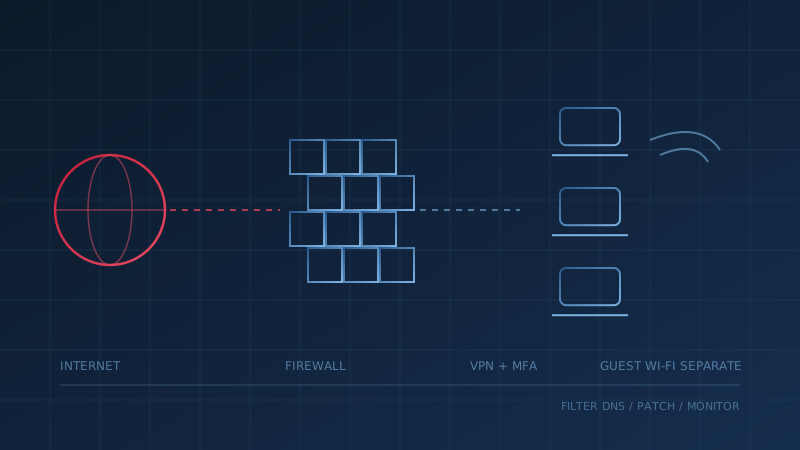
Network security services protect the connections your business runs on: the firewall between your office and the internet, the Wi-Fi your staff and guests use, the VPN that remote employees connect through, and the traffic moving across all of it. For a Canadian small business, the Canadian Centre for Cyber Security sets out the expected minimum in its baseline cyber security controls for small and medium organizations, under the control titled "Establish Basic Perimeter Defences."
That baseline is short and practical. It does not require an enterprise security stack. It does require that someone has set up the right pieces, keeps them updated, and knows what they are seeing. This guide breaks network security services into those pieces so you can check what your business has today.
What Do Network Security Services Include?
Network security services cover six jobs: a boundary firewall, secure remote access, secure Wi-Fi, DNS filtering, keeping network devices updated, and monitoring. The Cyber Centre's baseline says organizations "should implement dedicated firewalls at the boundaries between corporate networks and the Internet," install a DNS firewall to block known malicious domains, and require a VPN with two-factor authentication for remote access into the network.
In practice, a complete set looks like this:
- A dedicated firewall at the internet boundary, configured to allow only the traffic the business needs.
- Secure remote access through a VPN gateway, with two-factor authentication for every user.
- Secure Wi-Fi using WPA2 or better, with the Wi-Fi network filtered by a firewall before it reaches the rest of the network.
- A separate guest network that never connects to internal systems like printers or file shares.
- DNS filtering that stops devices from reaching known malicious websites.
- Updates and monitoring for routers, firewalls and access points, plus someone reviewing what the firewall reports.
Our network security control page explains the core measures in plain language, including firewalls, segmentation, Wi-Fi and DNS security.
What Does the Cyber Centre's Baseline Expect?
The baseline sets clear, testable expectations rather than vague goals. Beyond the boundary firewall and DNS filtering, it says remote access should run through a VPN using two-factor authentication, with "a firewall must exist between the VPN termination point and the internal network." It calls for WPA2 or better on internal Wi-Fi, and says a public Wi-Fi network for visitors should "never" connect to internal networks or resources such as printers.
Two other points are easy to miss:
- Payment systems. The baseline says organizations should segment point-of-sale terminals and financial systems, isolating them from the internet and the rest of the corporate network with a firewall.
- Device firewalls. Under the separate "Enable Security Software" control, it says organizations should activate the software firewalls included on their devices, unless a comparable alternative is in place.
The baseline controls are voluntary guidance from the Cyber Centre, not a law. They are still a reasonable yardstick for judging any provider's proposal.
Why Do Routers and Firewalls Get Attacked?
Network devices face the internet directly, so they are among the first things attackers probe. Verizon's 2025 Data Breach Investigations Report found that exploitation of vulnerabilities as a way in grew by 34%, "with a significant focus on zero-day exploits targeting perimeter devices and VPNs." The same report found exploitation of vulnerabilities was behind 20% of initial access.
Small offices add a second problem: the firewall is installed once and then forgotten. Our secure configuration and hardening checklist recommends changing the default administrator password on every router, access point and firewall, and putting router and firewall firmware on the same update discipline as computers. Internet-facing devices like routers, firewalls and VPN tools should be first in line.
Who Watches the Network?
A firewall that nobody reviews blocks the obvious and records the rest. Monitoring is the part many small businesses skip. In Statistics Canada's 2023 Canadian Survey of Cyber Security and Cybercrime, the most common cyber security activity reported by businesses was monitoring network and business systems, at 46%. In other words, more than half of businesses did not report doing it.
This is where the type of provider matters. As our guide to choosing a cybersecurity provider puts it, an MSP that sets up your firewall "is not necessarily monitoring it for threats at 2 a.m." The Cyber Centre's guide ITSM.10.023 lists "managing firewalls, intrusion detection systems (IDS), threat defense technologies and VPNs" among the services a managed security service provider can offer. If you want someone acting on alerts around the clock, our guide to managed detection and response covers what that service adds.
What Should You Ask a Network Security Provider?
Ask questions that produce specific, checkable answers. ITSM.10.023 notes that if a full managed security provider is not affordable, many internet service providers sell firewall and anti-malware add-ons, and it suggests asking whether they offer intrusion prevention and notify customers of infections. Whoever you use, get these answers in writing:
- What firewall protects our internet connection, and who manages its updates?
- Is remote access through a VPN with two-factor authentication, or is anything exposed directly to the internet?
- Is guest Wi-Fi fully separate from our internal network?
- Do we have DNS filtering on the office network and on laptops when staff work elsewhere?
- Who reviews firewall and VPN alerts, and how quickly?
- Are our payment systems on their own network segment?
Where Does Network Security Fit With Everything Else?
Network security is one of the Cyber Centre's 13 baseline controls, not a replacement for the others. A strong firewall does not stop a phishing email that steals a password, or ransomware launched from a laptop that is already inside. It works alongside patching, multi-factor authentication, backups and endpoint protection.
The question to ask your IT lead this week: "If someone tried to log in to our VPN or firewall from overseas tonight, would anyone see it?" To check network security alongside the other baseline controls, take our free cybersecurity assessment. It takes under 30 minutes and shows where your business stands.
How prepared is your business?
Find out where you stand against Canada's 13 Baseline Cyber Security Controls. The assessment takes under 30 minutes and your answers stay in your browser.
Check Your ScoreFrequently Asked Questions
What do network security services include?
For a small business, network security services usually cover a dedicated firewall at the internet boundary, secure remote access through a VPN with two-factor authentication, secure Wi-Fi with guest traffic kept separate, DNS filtering to block known malicious domains, firmware updates for network devices, and monitoring of network activity. The Canadian Centre for Cyber Security describes these measures under its baseline control for basic perimeter defences.
Does a small business need a dedicated firewall?
The Canadian Centre for Cyber Security's baseline controls for small and medium organizations say organizations should implement dedicated firewalls at the boundaries between corporate networks and the internet, and should also turn on the software firewalls included on their devices. A consumer router's built-in protection may not give you the control or logging a business needs, so ask your provider what is actually in place.
What is the difference between network security and endpoint security?
Network security protects the connections: the firewall, Wi-Fi, VPN and the traffic moving between your devices and the internet. Endpoint security protects the devices themselves, such as laptops, servers and phones, with tools like anti-malware and endpoint detection and response. The Cyber Centre's baseline controls treat them as separate controls, and a small business needs both.
Can my internet service provider handle network security?
Some can provide part of it. The Canadian Centre for Cyber Security notes that many internet service providers offer anti-virus, anti-malware and firewall software as paid add-ons, and suggests asking whether they offer intrusion prevention and notify customers of infections. Those add-ons rarely include someone reviewing your network activity, so confirm who watches the alerts.
Cite This Page
Suggested citation:
Cybersecurity Canada (2026). Network Security Services for Canadian Small Businesses: What They Should Cover. Retrieved from https://cybersecuritycanada.ca/news/posts/network-security-services-canadian-small-business/
Permanent URL: https://cybersecuritycanada.ca/news/posts/network-security-services-canadian-small-business/ · Published September 26, 2026
Disclaimer: This article is intended for general informational purposes only and does not constitute professional cybersecurity, legal, IT, or compliance advice. While we strive to ensure accuracy, the cybersecurity landscape changes rapidly and information may become outdated. Organizations should consult with qualified cybersecurity professionals and legal counsel to assess their specific situation and develop appropriate security policies. Use of this information is at your own risk. See our Privacy Policy for more information.
Cybersecurity Canada is an independent resource and is not affiliated with, endorsed by, or connected to the Canadian Centre for Cyber Security, the Communications Security Establishment, or the Government of Canada.
How does your organization measure up?
Take our free cybersecurity assessment based on the Canadian Centre for Cyber Security's Baseline Controls. 50 questions, under 30 minutes, 100% confidential. Your answers never leave your browser.
Take the Free Assessment