Cyber Attack Readiness Self-Check: 10 Signs Your Canadian Small Business Is Prepared
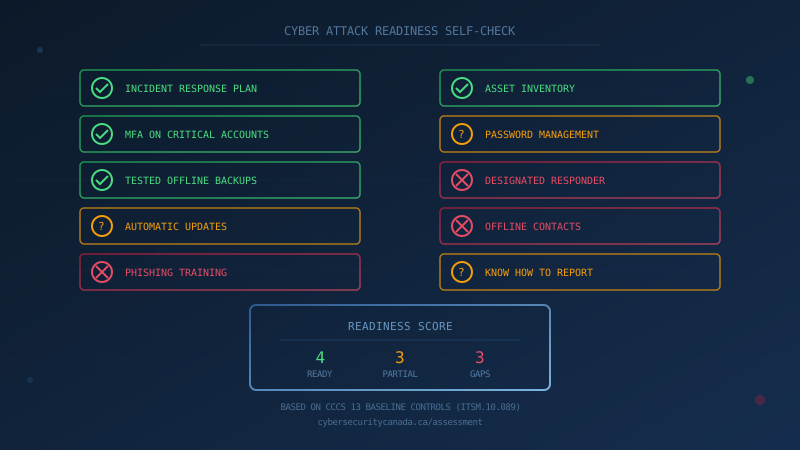
How Do I Know If My Small Business Is Ready for a Cyber Attack?
Your business is ready for a cyber attack if you can answer yes to these 10 questions: you have a written incident response plan, MFA is enabled on all critical accounts, your backups are tested and stored offline, automatic updates are turned on, employees have received phishing training within the past year, you know where all your data is stored, you have a current asset inventory, your passwords are managed securely, you have a designated person responsible for security incidents, and you know how to report an attack. If you cannot confidently answer yes to most of these, start with a structured self-assessment.
- Incident response plan exists and has been tested
- MFA enabled on email, remote access, and admin accounts
- Backups verified and at least one copy stored offline or offsite
- Automatic updates enabled for operating systems and critical software
- Employees trained to recognize phishing in the past 12 months
- Current inventory of devices, software, and data storage locations
- Passwords managed through a password manager or secure process
- Someone designated to handle security incidents
- Contact information for IT support and incident responders written down
- Knowledge of how to report an incident to the RCMP and Cyber Centre
Most Canadian small businesses cannot confidently answer these questions. According to Statistics Canada's 2023 Canadian Survey of Cyber Security and Cybercrime, only 26% of Canadian businesses have written cybersecurity policies. The Insurance Bureau of Canada's 2025 survey found that only 47% of SMB owners say their business is prepared for a cyber attack. Meanwhile, BDC research shows 73% of Canadian small businesses have already experienced a cybersecurity incident.
This gap between perceived readiness and actual preparedness is why structured assessment matters. The Canadian Centre for Cyber Security's 13 Baseline Controls provide a framework for measuring readiness. The sections below explain what each sign of readiness looks like in practice.
Sign 1: You Have a Written Incident Response Plan
A written incident response plan (IRP) is the first of the CCCS Baseline Controls for a reason. According to the CCCS foundational actions guidance (ITSAP.10.300), "by having an incident response plan, your organization will be prepared to respond to and recover from incidents when they happen."
What a ready business has:
- A documented plan describing how the organization will respond to incidents of varying types
- Named individuals responsible for handling incidents (internal teams, IT providers, or external support)
- Contact information for IT partners, providers, and stakeholders written down and accessible offline
- A plan that has been tested and updated with lessons learned
If your contact list is only on the computer that just got encrypted, you are not ready. Print the essentials or keep them in a separate location.
Sign 2: MFA Is Enabled on Critical Accounts
Multi-factor authentication is one of the most effective defences against credential theft. The CCCS guidance asks: "Have you set up MFA on devices and accounts?"
What a ready business has:
- MFA enabled on email (Microsoft 365, Google Workspace, or similar)
- MFA on remote access (VPN, remote desktop)
- MFA on administrative and privileged accounts
- MFA on backup systems and infrastructure
Missing MFA is the most common reason cyber insurance claims are denied. The City of Hamilton's ransomware claim was reportedly denied because MFA was not fully deployed. If you have not audited MFA coverage across your critical systems, you are not ready.
Sign 3: Your Backups Are Tested and Stored Offline
The CCCS foundational guidance asks five questions about backup readiness:
- Have you identified which business information and software is essential?
- Have you determined how often you will back up?
- Have you backed up systems containing essential business information?
- Have you tested your backups and your recovery process?
- Are your backups stored securely (offsite, offline, unconnected to your systems)?
Many businesses assume their backups work until they need them. A 2024 test restore that fails is a problem you can fix. A test restore that fails during a ransomware attack is a business-ending event. If you cannot confirm that at least one backup copy is stored offline and that you have successfully restored from it within the past year, you are not ready.
Sign 4: Automatic Updates Are Enabled
The CCCS guidance is direct: "Postponing or ignoring updates and patches leaves your OS and applications vulnerable to cyber threats. Threat actors look for known vulnerabilities, backdoors and other ways to access your networks, systems, and information."
What a ready business has:
- Automatic updates enabled for operating systems
- Automatic updates enabled for critical applications
- A process for tracking what software is in use
- A plan for replacing unsupported or legacy systems that can no longer be updated
If your systems are still prompting you to install updates from months ago, you are not ready. If you are running Windows 10 beyond its end-of-support date without a migration plan, you are not ready.
Sign 5: Employees Have Received Phishing Training
Human error remains one of the most common entry points for cyber attacks. The Get Cyber Safe guide for small businesses emphasizes training as a core component of cyber security.
The CCCS asks:
- Do your employees know how to identify suspicious links or email attachments?
- Do you offer cyber security training to all employees?
- Do your employees know how to respond to unsolicited phone calls, text messages, or emails?
- Do you have a phishing awareness program?
If your last training session was more than 12 months ago, or if it consisted only of reading a policy document, you are not ready. Practical, regular training that includes examples and encourages reporting is what makes a difference.
Sign 6: You Know Where Your Data Is Stored
You cannot protect what you do not know you have. The CCCS recommends taking regular inventory of your assets to identify those of high value that you want to protect.
Assets to inventory include:
- Desktop and mobile devices (computers, laptops, tablets, phones)
- Storage devices (hard drives, USB keys)
- Internet-connected devices (point-of-sale systems, smart security systems, IoT devices)
- Digital assets and services (social media accounts, websites, cloud services, online bookkeeping)
If you do not know whether customer data is stored on a local server, a cloud service, or an employee's personal laptop, you are not ready. An accurate asset inventory is the foundation of every other security control.
Sign 7: Your Passwords Are Managed Securely
The CCCS guidance asks: "Do you use a password manager or do you have a process for physically writing down and securely storing passwords?"
What a ready business has:
- Different complex passwords (at least 12 characters) for each account
- A password manager or a documented secure storage process
- A policy for changing passwords after suspected compromise
- All default vendor-supplied passwords changed
If your team shares passwords in spreadsheets, sticky notes, or chat messages, you are not ready. Password managers like Bitwarden or 1Password reduce friction and improve security.
Sign 8: Someone Is Designated to Handle Security Incidents
Every organization needs someone accountable for responding when something goes wrong. This does not have to be a dedicated security professional. In a small business, it might be the owner, a general manager, or an IT coordinator.
What a ready business has:
- A named individual responsible for coordinating incident response
- That person's contact information documented and accessible offline
- Clarity on whether to call internal IT, a managed service provider, or external incident responders
- That person trained on the basics of the incident response plan
If nobody knows who is in charge during an incident, you are not ready.
Sign 9: Contact Information Is Written Down and Accessible Offline
The CCCS guidance explicitly asks: "Do you have the contact information for your points of contact (IT partners, providers, and stakeholders) written down and accessible even if your systems and devices are inaccessible?"
This sounds obvious, but many businesses store all their emergency contacts in email or online documents. If ransomware encrypts your systems, you cannot access that information.
What a ready business has:
- Printed or offline copies of emergency contacts
- IT provider or MSP contact information
- Cyber insurer's incident notification number
- Local police non-emergency line
- RCMP reporting system URL (reportcyberandfraud.canada.ca)
- Cyber Centre contact information (1-833-CYBER-88)
Sign 10: You Know How to Report an Incident
Knowing where to report a cyber attack is part of readiness. In Canada, the primary reporting channels are:
- National Cybercrime and Fraud Reporting System (RCMP/CAFC): for cybercrime and fraud
- Local police: for investigation and file numbers your insurer may require
- Office of the Privacy Commissioner: for PIPEDA breach reporting when personal data is exposed
- Canadian Centre for Cyber Security: for technical guidance and critical infrastructure incidents
If you have not documented these contacts in your incident response plan, you are not ready.
What If You Cannot Answer Yes to Most of These?
Most Canadian small businesses will find gaps when they work through this list. That is normal. The point is not perfection but knowing where you stand so you can prioritize improvements.
The CCCS designed the Baseline Controls using the 80/20 principle: achieve 80% of the security benefit from 20% of the effort. You do not need to implement enterprise-grade security overnight. Start with the controls that address your biggest risks.
One question to ask your IT lead or provider this week: "Can you show me our incident response plan, our backup test results from the past 12 months, and a list of accounts where MFA is enabled?"
If the answer is unclear, you have your starting point.
Assess Your Readiness
Our free cybersecurity assessment evaluates your organization against all 13 CCCS Baseline Controls. It takes under 30 minutes, runs entirely in your browser, and provides a score with specific recommendations for each control area. No signup required, no data collected.
Start with the assessment, identify your gaps, and build from there.
How prepared is your business?
Find out where you stand against Canada's 13 Baseline Cyber Security Controls. The assessment takes under 30 minutes and your answers stay in your browser.
Check Your ScoreFrequently Asked Questions
How do I know if my small business is ready for a cyber attack?
Your business is ready if you can answer yes to these questions: Do you have a written incident response plan? Is MFA enabled on email and remote access? Are backups tested and stored offline? Are operating systems and software set to update automatically? Have employees received phishing training in the past 12 months? The CCCS Baseline Controls provide a complete framework for assessing readiness.
What is the most important sign of cyber attack readiness?
Having a written, tested incident response plan is the single most important sign of readiness. The Canadian Centre for Cyber Security lists incident response planning as the first of its 13 Baseline Controls. A plan ensures you know who to call, what to do, and how to recover before an attack occurs.
What percentage of Canadian businesses are prepared for a cyber attack?
Only 26% of Canadian businesses have written cybersecurity policies, according to Statistics Canada's 2023 Canadian Survey of Cyber Security and Cybercrime. The Insurance Bureau of Canada found that only 47% of SMB owners say their business is prepared for a cyber attack, and fewer than half have implemented any form of cyber defence.
How often should a small business test its cyber attack readiness?
Test your readiness at least quarterly. The CCCS recommends regular review of incident response plans and backup restoration procedures. Cyber Security Awareness Month in October is a useful annual milestone for a comprehensive review, but monthly security touchpoints help build lasting habits.
Cite This Page
Suggested citation:
Cybersecurity Canada (2026). Cyber Attack Readiness Self-Check: 10 Signs Your Canadian Small Business Is Prepared. Retrieved from https://cybersecuritycanada.ca/news/posts/cyber-attack-readiness-self-check-canadian-small-business/
Permanent URL: https://cybersecuritycanada.ca/news/posts/cyber-attack-readiness-self-check-canadian-small-business/ · Published October 12, 2026
Disclaimer: This article is intended for general informational purposes only and does not constitute professional cybersecurity, legal, IT, or compliance advice. While we strive to ensure accuracy, the cybersecurity landscape changes rapidly and information may become outdated. Organizations should consult with qualified cybersecurity professionals and legal counsel to assess their specific situation and develop appropriate security policies. Use of this information is at your own risk. See our Privacy Policy for more information.
Cybersecurity Canada is an independent resource and is not affiliated with, endorsed by, or connected to the Canadian Centre for Cyber Security, the Communications Security Establishment, or the Government of Canada.
How does your organization measure up?
Take our free cybersecurity assessment based on the Canadian Centre for Cyber Security's Baseline Controls. 50 questions, under 30 minutes, 100% confidential. Your answers never leave your browser.
Take the Free Assessment