Business Continuity Plan Canada: A Guide for Small Business

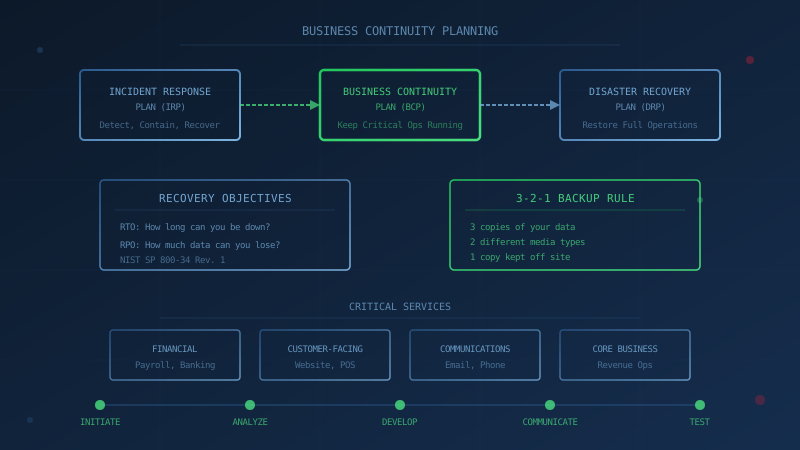
A business continuity plan (BCP) documents how your Canadian small business will keep critical operations running during a disruption, whether from a ransomware attack, power outage, or natural disaster. The Canadian Centre for Cyber Security's Developing your business continuity plan (ITSAP.10.005) states that a BCP identifies risks, critical operations, and the steps needed to minimize disruptions until your operations can be fully restored. Without one, your team has to work out priorities, roles and workarounds in the middle of the incident.
What Is a Business Continuity Plan for Canadian Small Business?
A business continuity plan is a documented set of procedures that allows your organization to continue delivering critical services during and after a disruption. According to the Canadian Centre for Cyber Security (CCCS), a BCP "will identify the risks from various threats and the impact they would have on your organization" and outlines "the main assets, roles, responsibilities, and processes required to minimize disruptions and keep critical business functions running until your operations can be fully restored."
For a small business, this means answering practical questions before a crisis hits: Which services must keep running? Who decides what happens? How do staff communicate if email is down? How do customers pay if the payment system is offline? The answers go into the plan, and the plan gets tested.
The CCCS frames business continuity as a lifecycle with five steps: initiate (define goals and assemble a team), analyze (conduct a threat and risk assessment and business impact analysis), develop and implement (create recovery strategies), communicate and integrate (share the plan with employees), and test and validate (exercise the plan regularly). Small businesses can follow this structure without enterprise budgets.
How Does a BCP Differ From a Disaster Recovery Plan and an Incident Response Plan?
Canadian small businesses often hear about business continuity plans, disaster recovery plans, and incident response plans as if they are interchangeable. They are not. The Canadian Centre for Cyber Security's Improving cyber security resilience through emergency preparedness planning (ITSM.10.014) defines each one clearly:
- Incident Response Plan (IRP): An IRP includes "the processes, procedures, and documentation related to how your organization detects, responds to, and recovers from a specific incident." It is event focused, specific to a security incident like a cyber attack. The IRP activates first when ransomware hits or credentials are stolen.
- Business Continuity Plan (BCP): A BCP is "a specific plan to recover services most critical to an organization's operations as quickly as possible." It keeps essential operations running (payroll, customer service, critical communications) while the incident is being handled and systems are being restored.
- Disaster Recovery Plan (DRP): A DRP is "a holistic plan to return your organization to full operations after a disaster." The same publication notes that most DRPs include a shift in the physical location of server infrastructure or client endpoints.
In practice, the three plans work together. If your business is hit by ransomware, your incident response plan tells you how to contain the threat. Your business continuity plan keeps critical services running while systems are down. Your disaster recovery plan, which can include your IT recovery plan, returns the business to full operations. Our guide to building an incident response plan covers the IRP side in detail.
What Are RTO and RPO, and Why Do They Matter?
Recovery Time Objective (RTO) is how long a system can be down before the impact becomes unacceptable, and Recovery Point Objective (RPO) is how much recent data you can afford to lose. Together they set your backup frequency and recovery approach. The CCCS IT recovery guidance lists both as key measures, and NIST defines them in detail.
NIST SP 800-34 Rev. 1, the Contingency Planning Guide for Federal Information Systems, defines these terms. According to NIST:
- Recovery Time Objective (RTO): "The maximum amount of time that a system resource can remain unavailable before there is an unacceptable impact on other system resources, supported mission/business processes, and the MTD [Maximum Tolerable Downtime]." In plain terms, RTO is how long you can be down before the damage becomes unacceptable.
- Recovery Point Objective (RPO): "The point in time, prior to a disruption or system outage, to which mission/business process data can be recovered (given the most recent backup copy of the data) after an outage." In plain terms, RPO is how much data you can afford to lose.
The Canadian Centre for Cyber Security's Developing your IT recovery plan (ITSAP.40.004) uses these same concepts and adds a third: Maximum Tolerable Downtime (MTD), which is "the total length of time that a process can be unavailable without causing significant harm to your business."
For a Canadian small business, setting RTO and RPO for each critical system determines your backup frequency and recovery approach. If your accounting system has a 4-hour RPO, you need backups at least every 4 hours. If your e-commerce site has a 2-hour RTO, you need a recovery method that can restore it within 2 hours. Ransomware will test these numbers for real.
What Should a Business Continuity Plan Include?
The CCCS guidance (ITSAP.10.005) outlines what belongs in a BCP. Here is a practical structure for Canadian small businesses, drawn from that guidance:
1. Critical Services and Their Owners
Identify which services must keep running for your business to survive. For most small businesses, this includes:
- Financial operations (payroll, accounts receivable, banking access)
- Customer-facing services (website, booking system, point of sale)
- Internal communications (email, phone, messaging)
- Core business processes (the specific work that generates revenue)
For each critical service, name the person responsible for it and a backup contact. The CCCS recommends creating a response team with members from various operational areas, each knowing "the threats that could affect your organization and the level of impact of the associated risks."
2. RTO and RPO for Each Critical System
Set explicit recovery targets. How long can each system be down before the business is seriously harmed? How much data can you afford to lose from each system? Write these numbers down. They drive every other decision.
3. Backup and Recovery Strategy
The CCCS Tips for backing up your information (ITSAP.40.002) recommends the 3-2-1 rule: three copies of your data (one original and two backups), saved on two different media types, with one copy kept off site. Making that off site copy an offline one adds protection against ransomware.
Critically, the CCCS states that "offline backups (sometimes called cold backups) remain unconnected to your organizations' systems and are only connected when they are required. Because these offline backups are not connected, they remain unaffected by many cyber threats, like ransomware, that can compromise all systems and devices on your network."
The CCCS Baseline Cyber Security Controls for Small and Medium Organizations (control BC.7) states that long-term backups must be stored offline, and that organizations should "regularly verify that back-up and restore mechanisms operate as expected." If you have not tested a restore, you do not know if your backups work. Our post on backup and recovery assumptions that fail covers the most common gaps.
4. Alternate Ways to Operate
Your BCP should answer: if the normal way of doing something is unavailable, what is the backup?
- Communications: If email is down, how do staff and customers reach you? A phone tree, a personal cell number, a backup email domain?
- Payments: If the payment terminal or e-commerce site is offline, can you accept cheques, e-transfers, or payments through a backup card reader temporarily?
- Payroll: If your payroll system is encrypted, how do you pay employees? Do you have a paper backup of account details?
- Remote work: If your office is inaccessible, can staff work from home? Do they have the access and equipment to do so?
The CCCS guidance recommends identifying "an alternate work site and an employee relocation plan" and consolidating "a list of alternate resources and suppliers."
5. Contacts List
Include contact information for:
- Your IT support or managed service provider
- Your cyber insurance carrier (if applicable)
- Legal counsel familiar with privacy and breach notification
- The Canadian Centre for Cyber Security: 1-833-CYBER-88 (1-833-292-3788)
- Local police non-emergency line
- The Canadian Anti-Fraud Centre: 1-888-495-8501
- The National Cybercrime and Fraud Reporting System: reportcyberandfraud.canada.ca
Our guide on how to report a cyber attack in Canada explains when to contact each agency and what information to have ready.
6. Testing Schedule
The CCCS states that "your BCP needs to be tested, reviewed, and updated regularly" and that "learning opportunities like seminars, tabletop exercises, and live simulations will assess your response team's preparedness and identify any weak points in your plan."
For a small business, testing can be simple:
- Tabletop exercise: Walk through a scenario (ransomware encrypts your server on a Monday morning) and ask what happens at each step. Where does the plan break down?
- Communication test: Verify that every phone number and email in the plan still works and reaches the right person.
- Backup restore test: Attempt a full restore of a critical system from backup. Measure how long it takes. Confirm the data is intact.
Annual testing is a reasonable minimum. More frequent testing (quarterly or after significant changes) catches problems sooner.
How Does This Relate to the CCCS Baseline Controls?
Business continuity planning connects to multiple areas of the Canadian Centre for Cyber Security's Baseline Cyber Security Controls:
- BC.1 (Incident Response Planning): Your IRP and BCP should reference each other. The IRP handles the incident; the BCP keeps critical operations running.
- BC.7 (Data Backup): Your backup strategy directly supports business continuity. Offline backups and tested restores are essential.
- BC.6 (Security Awareness): Employees need to know the plan exists, where to find it, and what their role is during a disruption.
An effective BCP does not exist in isolation. It depends on having the right controls in place before an incident occurs.
One Question to Ask Your IT Provider
"When did we last restore our critical systems from backup, and how long did it take?"
If the answer is "never" or "I don't know," that conversation is where your business continuity work should start. A backup that has never been restored is a backup you are hoping works. Ransomware attackers will not wait for you to test it first.
Start With an Assessment
Building a business continuity plan begins with understanding where your organization stands today. Our free cybersecurity assessment evaluates your practices against all 13 Baseline Control areas, including incident response and data backup. It takes under 30 minutes and shows you where the gaps are, so you know what your BCP needs to address.
How prepared is your business?
Find out where you stand against Canada's 13 Baseline Cyber Security Controls. The assessment takes under 30 minutes and your answers stay in your browser.
Check Your ScoreFrequently Asked Questions
What is a business continuity plan for Canadian small business?
A business continuity plan (BCP) identifies risks, critical operations, and the steps needed to keep your most important business functions running during a disruption. The Canadian Centre for Cyber Security's Developing your business continuity plan (ITSAP.10.005) states that a BCP will identify the risks from various threats and the impact they would have on your organization, and outlines the main assets, roles, responsibilities, and processes required to minimize disruptions and keep critical business functions running until your operations can be fully restored.
What is the difference between a BCP, a disaster recovery plan, and an incident response plan?
According to the Canadian Centre for Cyber Security's Improving cyber security resilience through emergency preparedness planning (ITSM.10.014), an incident response plan is event focused and specific to a security incident, a business continuity plan is a specific plan to quickly resume only the most critical operations, and a disaster recovery plan is a holistic plan to return your organization to full operations after a disaster. The three plans work together: the IRP handles the active threat, the BCP keeps critical services running, and the DRP restores everything else.
What are RTO and RPO and why do they matter for business continuity?
Recovery Time Objective (RTO) is the maximum amount of time a system can remain unavailable before there is an unacceptable impact on business processes, according to NIST SP 800-34 Rev. 1. Recovery Point Objective (RPO) is the point in time before a disruption to which data can be recovered from the most recent backup. RTO answers how long you can be down; RPO answers how much data you can afford to lose. Setting both for each critical system determines your backup frequency and recovery strategy.
What does the CCCS recommend for backups in a business continuity plan?
The Canadian Centre for Cyber Security's Tips for backing up your information (ITSAP.40.002) recommends the 3-2-1 rule: three copies of your data (one original and two backups), saved on two different media types, with one copy kept off site. The same guidance explains that offline backups remain unconnected to your systems and are only connected when required, so they remain unaffected by many cyber threats, like ransomware, that can compromise all systems and devices on your network.
How often should a Canadian small business test its business continuity plan?
The Canadian Centre for Cyber Security's ITSAP.10.005 guidance states that your BCP needs to be tested, reviewed, and updated regularly, and that learning opportunities like seminars, tabletop exercises, and live simulations will assess your response team's preparedness and identify any weak points. Testing validates your recovery procedures, training initiatives, and technical solutions. The CCCS does not set a fixed interval, so many small businesses test at least once a year and again after major changes.
Cite This Page
Suggested citation:
Cybersecurity Canada (2026). Business Continuity Plan Canada: A Guide for Small Business. Retrieved from https://cybersecuritycanada.ca/news/posts/business-continuity-plan-canada-small-business-guide/
Permanent URL: https://cybersecuritycanada.ca/news/posts/business-continuity-plan-canada-small-business-guide/ · Published October 26, 2026
Disclaimer: This article is intended for general informational purposes only and does not constitute professional cybersecurity, legal, IT, or compliance advice. While we strive to ensure accuracy, the cybersecurity landscape changes rapidly and information may become outdated. Organizations should consult with qualified cybersecurity professionals and legal counsel to assess their specific situation and develop appropriate security policies. Use of this information is at your own risk. See our Privacy Policy for more information.
Cybersecurity Canada is an independent resource and is not affiliated with, endorsed by, or connected to the Canadian Centre for Cyber Security, the Communications Security Establishment, or the Government of Canada.
How does your organization measure up?
Take our free cybersecurity assessment based on the Canadian Centre for Cyber Security's Baseline Controls. 50 questions, under 30 minutes, 100% confidential. Your answers never leave your browser.
Take the Free Assessment