Cybersecurity for Nonprofits Canada

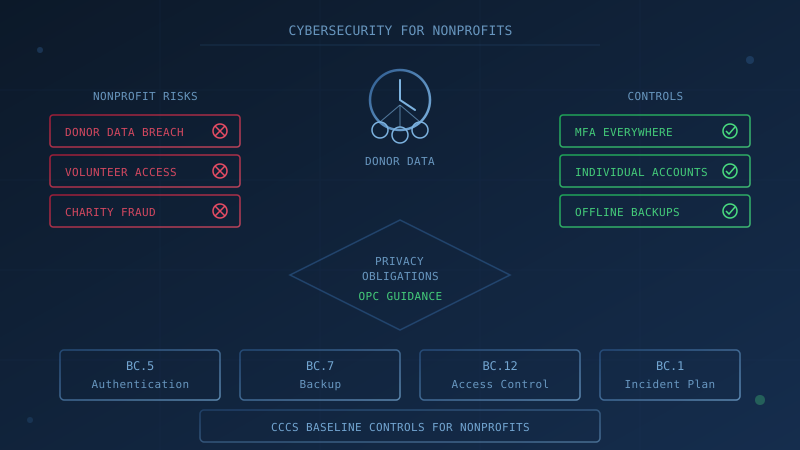
Canadian nonprofits and charities hold donor contact details, payment information, client records, and volunteer data, yet often operate with limited IT budgets and no dedicated security staff. Cybersecurity for nonprofits in Canada means implementing the same baseline controls that protect small businesses, with specific attention to donor data protection, volunteer access management, and the security of donation platforms. In April 2026, the Kinsmen Foundation of Saskatchewan disclosed a cyber incident that ultimately affected donor contact information and, for some individuals, Social Insurance Numbers and health information. This guide covers which privacy laws apply to Canadian nonprofits, what controls to implement first, and how to manage the access challenges that come with volunteer workforces. This is informational context (not legal advice); consult a privacy lawyer for your specific situation.
Does PIPEDA Apply to Canadian Nonprofits and Charities?
The Office of the Privacy Commissioner of Canada states that "non-profit organizations are usually not subject to the Personal Information Protection and Electronic Documents Act (PIPEDA) because they do not typically engage in commercial activities."
However, nonprofit status does not automatically exempt your organization. PIPEDA defines commercial activity as "any particular transaction, act or conduct or any regular course of conduct that is of a commercial character, including the selling, bartering or leasing of donor, membership or other fundraising lists." The OPC explains that "selling, bartering or leasing a membership list or a list of donors is considered a commercial activity."
The OPC lists activities that are not considered commercial under PIPEDA:
- collecting membership fees
- organizing club activities
- compiling a list of members' names and addresses
- mailing out newsletters
- fundraising
If your nonprofit sells, barters or leases donor or membership lists, PIPEDA applies to that activity. Even if PIPEDA does not apply to your organization, the OPC recommends following PIPEDA fair information principles as a best practice.
Provincial privacy laws may also apply. In Alberta and British Columbia, the Personal Information Protection Act (PIPA) covers private sector organizations including some nonprofits. In Quebec, the Act Respecting the Protection of Personal Information in the Private Sector applies. See our guide to Canada's privacy landscape for more on provincial laws.
Why Do Cybercriminals Target Nonprofits and Charities?
Nonprofits hold exactly what cybercriminals want: personal information, payment card data, and access to funds. Three factors make charities attractive targets.
Sensitive Data Combined With Limited Resources: Donor databases contain names, addresses, phone numbers, email addresses, payment information, and donation histories. Client records at service-delivery nonprofits (settlement agencies, food banks, health charities) may include even more sensitive information. The Kinsmen Foundation of Saskatchewan disclosed in August 2026 that a cyber incident in April exposed donor contact information and email addresses. An August update stated that for an additional group of individuals, "Social Insurance Numbers and health information required to process grant applications were also affected." CBC News reported that potentially leaked information included donor names, email addresses, telephone numbers, residential addresses and donation amounts.
Trust and Brand Recognition: Attackers impersonate charities to steal from donors. The Canada Revenue Agency's scam warnings describe charity-related fraud where "scammers are pretending to be from a real registered charity or asking you to donate to a fake charity to collect money or your personal and financial information." The CRA also warns charities directly: scammers make a donation by cheque, then claim they made a mistake and ask for a refund. When the original transaction is stopped, the charity loses the refunded amount.
Volunteer and Shared Access: Nonprofit workforces include paid staff, volunteers, and board members who may need access to donor databases, email accounts, or financial systems. Turnover can be high. Shared passwords and accounts that are not deactivated when someone leaves create opportunities for unauthorized access.
What Cyber Incidents Have Affected Canadian Nonprofits?
Two documented Canadian nonprofit incidents from 2026 show the range of risks.
Kinsmen Foundation (April 2026): The Saskatchewan charity behind TeleMiracle disclosed a cyber incident in which an unauthorized third party accessed donor contact information and email addresses. The foundation initially contacted affected donors in May 2026. In August 2026, the foundation updated its disclosure: for an additional group of individuals, "Social Insurance Numbers and health information required to process grant applications were also affected." The foundation engaged TransUnion Canada to offer one year of complimentary credit monitoring to affected individuals. CBC News reported that Saskatoon police are investigating.
Crime Stoppers (March 2026): A data breach at P3 Global Intel, the company that manages tip submission platforms for Crime Stoppers programs across Canada, exposed more than 1.5 million anonymous crime tips submitted over 25 years, according to CBC News. The BC Office of the Information and Privacy Commissioner launched an investigation into whether BC Crime Stoppers met its obligation under BC PIPA to take reasonable steps to safeguard personal information. Several Crime Stoppers chapters temporarily suspended participation or stopped accepting tips. This incident illustrates third-party vendor risk: the breach occurred at a service provider, but the impact fell on the nonprofits that relied on the platform.
What Security Controls Should Canadian Nonprofits Implement?
The Canadian Centre for Cyber Security's Baseline Cyber Security Controls for Small and Medium Organizations apply to nonprofits just as they do to businesses. The controls are designed for organizations with fewer than 500 employees and are voluntary guidance, not law. Our guide to Canada's Baseline Cyber Security Controls explains each control in detail.
Several controls directly address the risks nonprofits face.
Multi-Factor Authentication (BC.5): BC.5.1 states that "organizations should implement two-factor authentication wherever possible" with particular priority on "financial accounts, system administrators, cloud administration, privileged users, and senior executives." For a nonprofit, that means MFA on email, donor management systems, online banking, and donation platforms. Each staff member and volunteer with system access should have their own login with MFA enabled.
Backup and Encryption (BC.7): BC.7.1 states that "organizations should back up systems that contain essential business information, and ensure that recovery mechanisms effectively and efficiently restore these systems from back-ups." BC.7.2 requires that "long term backups (e.g. weekly backups) must be stored offline." Donor databases and financial records must be included. Tested, offline backups are the last line of defence against ransomware.
Access Control (BC.12): BC.12.3 states that "organizations should remove accounts and/or functionality when employees no longer require these for their tasks." For nonprofits, the same principle applies to volunteers, board members, and contractors. Our employee offboarding checklist covers the process; adapt it for volunteer departures.
Incident Response Plan (BC.1): BC.1.2 states that "organizations should have a written incident response plan that details who is responsible for handling incidents including any relevant contact information for communicating to external parties, stakeholders and regulators." For a nonprofit, the plan should address how to notify affected donors, the privacy commissioner (if applicable), your board of directors, and funders.
How Should Nonprofits Handle Volunteer and Shared Access?
Volunteer workforces create access control challenges that businesses rarely face. Someone may help with a fundraising event once a year, serve on a committee for two years, or provide ongoing database support. Each scenario requires different access.
Give Each Person Their Own Account: Avoid shared passwords and generic accounts (like "volunteer@yourcharity.ca"). When everyone uses the same password, you cannot tell who did what, and you cannot revoke one person's access without changing everyone's password. BC.12 of the Baseline Controls assumes individual accounts; shared accounts undermine it.
Grant Minimum Necessary Access: BC.12.1 states that "organizations should provision accounts with the minimum functionality necessary for tasks." A volunteer staffing a registration table does not need access to the full donor database. A board member reviewing financials does not need access to modify them. Configure systems so each person sees only what they need.
Remove Access Promptly When Engagement Ends: The Kinsmen Foundation incident shows why donor data must be protected carefully. When a volunteer's term ends, their access to donor information should end the same day. The CCCS guidance on securing access controls describes offboarding as "a complex process" and recommends automating processes as much as possible, disabling accounts, revoking certificates and tokens, and revoking authentication tokens from cloud services.
Document Who Has Access to What: Keep a list of everyone with access to each system. Review it quarterly, before and after major events, and whenever there is significant turnover.
What About Donation Platform Security?
Online donation platforms handle payment card data on your behalf. Ask your platform provider:
- Is MFA required for administrative accounts?
- Is the platform PCI DSS compliant for payment processing?
- What is the notification process if the provider experiences a breach?
- Where is donor data stored and who has access?
BC.10 of the Baseline Controls addresses cloud and outsourced IT services. It recommends that organizations "require that all their cloud service providers share an AICPA SSAE 18 SOC 3 report that states that they achieved Trust Service Principles compliance." Not all donation platforms have SOC reports, but asking the question signals that you take security seriously.
Review your platform's data retention settings. Do you need to keep credit card information on file, or can donors re-enter it for each donation? Storing less sensitive data reduces your exposure if a breach occurs.
Are There Scams That Target Charities Directly?
Yes. The Canada Revenue Agency warns about scams targeting charities: "Scammers make a donation to a charity by cheque, then contact the charity afterwards pretending they made a mistake by donating too much, typically saying they accidentally added an extra digit." The scammer asks for a refund. When the original cheque is stopped or bounces, the charity has sent real money and received nothing.
The CRA advises charities to:
- Allow enough time (for example, one week) for transactions to complete before processing refunds
- Avoid refunding the donation, since a registered charity cannot usually return a donor's donation
- Report fraud to local police and the Canadian Anti-Fraud Centre
One Question to Ask Your IT Provider
"Is multi-factor authentication enabled on our email, donor management system, and online banking, and how quickly would we know if someone accessed donor data who should not have?"
If your IT lead, managed service provider, or the volunteer who handles your technology cannot answer this question, that conversation is where your cybersecurity review should start.
Assess Your Nonprofit's Cybersecurity Posture
Our free cybersecurity assessment evaluates your organization against the Canadian Centre for Cyber Security's 13 Baseline Control areas. The assessment covers 50 questions, takes under 30 minutes, and is based on the CCCS baseline controls. Your answers stay in your browser. Progress is saved locally for 48 hours. No signup is required. The results show which control areas need attention, so you know where to focus your cybersecurity investment. The assessment is not a privacy audit or compliance certification; for those questions, consult a privacy lawyer or your provincial privacy commissioner.
How prepared is your business?
Find out where you stand against Canada's 13 Baseline Cyber Security Controls. The assessment takes under 30 minutes and your answers stay in your browser.
Check Your ScoreFrequently Asked Questions
Does PIPEDA apply to Canadian nonprofits and charities?
The Office of the Privacy Commissioner of Canada states that non-profit organizations are usually not subject to PIPEDA because they do not typically engage in commercial activities. However, PIPEDA defines commercial activity as including the selling, bartering or leasing of donor, membership or other fundraising lists. If your nonprofit sells, barters or leases donor lists, PIPEDA applies. Fundraising itself is not commercial activity, but sharing the resulting lists can be. Provincial laws like Alberta PIPA, BC PIPA and Quebec's private sector privacy act may also apply.
Why are nonprofits and charities targeted by cybercriminals?
Nonprofits hold sensitive personal information (donor contact details, payment data, client records) while often operating with limited IT budgets and minimal dedicated security staff. The Kinsmen Foundation of Saskatchewan disclosed in August 2026 that an April cyber incident exposed donor contact information, and for some individuals, Social Insurance Numbers and health information. Attackers know that smaller organizations may lack mature defences.
What cybersecurity controls should Canadian nonprofits implement?
The Canadian Centre for Cyber Security's Baseline Cyber Security Controls for Small and Medium Organizations apply to nonprofits just as they do to businesses. Key controls include multi-factor authentication wherever possible (BC.5), tested offline backups (BC.7), a written incident response plan (BC.1), and removing accounts when staff or volunteers leave (BC.12). These controls address the most common threats at a manageable cost.
How should nonprofits manage volunteer access to systems?
Give volunteers access only to what they need for their role and remove that access when their engagement ends. The Canadian Centre for Cyber Security's baseline control BC.12.3 states that organizations should remove accounts and functionality when employees no longer require these for their tasks. The same principle applies to volunteers. Avoid shared passwords; each person should have their own login with multi-factor authentication enabled.
Are there scams that target charities directly?
Yes. The Canada Revenue Agency warns that scammers make a donation to a charity by cheque, then contact the charity claiming they made a mistake and donated too much, asking for a refund. If the initial transaction is then stopped by the scammer, the charity loses the refunded amount. The CRA advises charities to allow enough time for transactions to complete before issuing refunds and to avoid refunding donations since a registered charity cannot usually return a donor's donation.
Cite This Page
Suggested citation:
Cybersecurity Canada (2026). Cybersecurity for Nonprofits Canada. Retrieved from https://cybersecuritycanada.ca/news/posts/cybersecurity-for-nonprofits-canada/
Permanent URL: https://cybersecuritycanada.ca/news/posts/cybersecurity-for-nonprofits-canada/ · Published November 5, 2026
Disclaimer: This article is intended for general informational purposes only and does not constitute professional cybersecurity, legal, IT, or compliance advice. While we strive to ensure accuracy, the cybersecurity landscape changes rapidly and information may become outdated. Organizations should consult with qualified cybersecurity professionals and legal counsel to assess their specific situation and develop appropriate security policies. Use of this information is at your own risk. See our Privacy Policy for more information.
Cybersecurity Canada is an independent resource and is not affiliated with, endorsed by, or connected to the Canadian Centre for Cyber Security, the Communications Security Establishment, or the Government of Canada.
How does your organization measure up?
Take our free cybersecurity assessment based on the Canadian Centre for Cyber Security's Baseline Controls. 50 questions, under 30 minutes, 100% confidential. Your answers never leave your browser.
Take the Free Assessment