Canadian Time Zone Changes: IT Checks

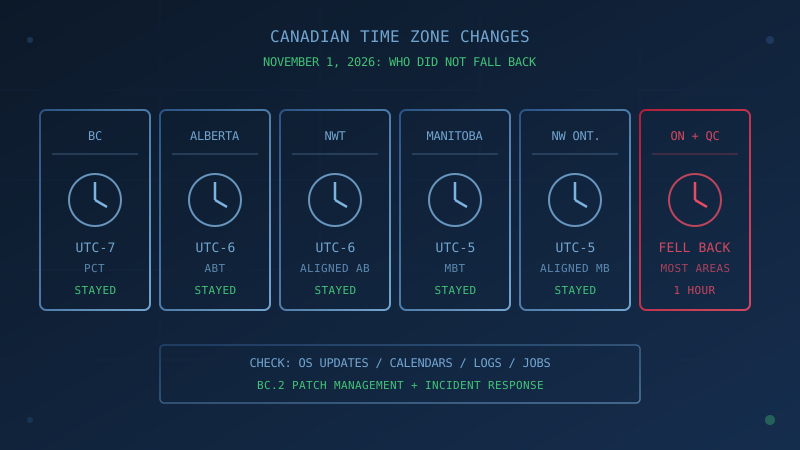
Canadian time zone changes reached their deadline on November 1, 2026. When most of the country fell back an hour, British Columbia, Alberta, Manitoba and parts of the Northwest Territories and northwestern Ontario did not. Google Canada summed it up: "on November 1st, Canadians in British Columbia, Alberta, Manitoba, parts of Northwestern Ontario and Northwest Territories won't be moving their clocks back." For a small business, the change is mostly a patching and calendar job, with a few security details that are easy to miss.
Which provinces stopped changing their clocks on November 1, 2026?
Three provinces, affected parts of the Northwest Territories and northwestern Ontario now stay on what used to be their summer offset all year, so their clocks did not move on November 1. According to each government and Microsoft's Canada 2026 guidance, as of November 1, 2026:
| Region | New name | Offset all year | Source |
|---|---|---|---|
| Most of British Columbia | Pacific time (PCT) | UTC-7 | Province of BC |
| Southeastern BC (including Cranbrook, Fernie, Golden) | Mountain daylight time, aligned with Alberta | UTC-6 | Province of BC |
| Alberta | Alberta Time (ABT) | UTC-6 | Government of Alberta |
| Affected NWT locations, including Yellowknife and Inuvik | Aligned with Alberta | UTC-6 | Microsoft guidance |
| Manitoba | Manitoba Standard Time (MBT) | UTC-5 | Government of Manitoba |
| Parts of northwestern Ontario | Aligned with Manitoba | UTC-5 | Microsoft guidance |
Yukon made the change in 2020 and Saskatchewan "did away with the practice decades ago," CBC News reports. Most of Ontario and Quebec fell back as usual, which is why CBC News reports that most of BC is now "two hours behind Ontario and much of Quebec." The gaps between Canadian offices changed overnight.
Why do devices and calendars still show the wrong hour?
Devices and calendars rely on time zone data that had to be updated on short notice. Manitoba says "Most modern phones and computers will update automatically because they use the IANA Time Zone Database." Google warned on October 23, 2026 that its updates, "due to short notice, may not reach every user in time," and that some Android and Chrome devices and Google Calendar might still switch to standard time.
Calendars carry an extra risk because events already booked were stored with the old rules. Manitoba's guidance says "Events created before the IANA Time Zone Database was updated or created using another calendar platform may display an hour earlier or later than intended." Google's Workspace admin article gives cut-off dates: affected BC events are those "created before July 20, 2026," Alberta and Yellowknife events created before September 8, 2026, Inuvik events created before September 28, 2026, and Manitoba and Rainy River events created before mid October 2026.
Which systems do Canadian time zone changes affect first?
Start with the systems where a wrong hour costs money or creates a security gap. The Government of Manitoba published one of the clearest business checklists, and it is a useful starting point for businesses in the other affected regions. It says to "prioritize business-critical systems where an incorrect hour could affect operations," including:
- employee scheduling and workforce-management systems
- payroll and timekeeping
- Microsoft 365, Google Workspace and other calendars
- booking and reservation systems
- transaction or batch-processing systems
- servers, databases and cloud services
- security systems and timestamped records
- automated jobs and scheduled integrations
- custom or legacy business applications
Manitoba also warns that "applications using custom time-zone settings, hard-coded dates, application-specific logic or other non-standard configurations may require additional validation or updates."
What do Microsoft 365 and Google Workspace each require?
Both platforms need user or admin action, but the fixes differ. Microsoft says "Existing calendar events do not migrate automatically," while Google said it would automatically shift most affected events in October 2026. Microsoft's guidance page (revised October 30, 2026) and Google's admin article set out the remaining work:
Microsoft 365
- Install the latest Windows updates. Microsoft warns that "Devices on unsupported Windows versions will not receive the time zone update."
- Move users to the new zone in Windows and Outlook. Microsoft's Outlook support article says "For meetings with attendees, only the Organizer can make the change," and that updating a recurring series resets its exceptions.
- Expect an Exchange Online PowerShell cmdlet for non-recurring meetings, which Microsoft lists as "releasing by November 4, 2026." The same page's recommended actions for admins still show an October 28 target, so check the page before planning around either date.
- Check automations. Microsoft says Power Automate will show "a 1-hour drift" from November 1, 2026 when flows use US-linked zones, and lists temporary mappings: Yukon for BC, Saskatchewan for Alberta, Bogota for Manitoba.
Google Workspace
- Have users review flagged events in Google Calendar on the web. Google says it "only shows the in-product warning banners and one-click fixes on the web version of Calendar."
- Fix recurring events with exceptions and invitations from Outlook users by hand. Google "won't automatically update all affected events, including invitations from Outlook users."
- Do not run bulk scripts. Google says "If you run automated client-side scripts, this might corrupt calendar data."
- Recheck rooms, since Google warns "room conflicts are likely to occur when meetings shift."
Our Microsoft 365 security guide for Canadian small businesses covers a related setting worth checking while you are in the admin centre: audit logging is not on by default for Business Basic, Business Standard and Business Premium.
How does the time change connect to Canada's Baseline Controls?
The Canadian Centre for Cyber Security's 13 Baseline Controls already cover most of this work. Based on the Microsoft, Google and Manitoba guidance above, a clock change tests three existing controls:
- Patch management. The time zone fixes shipped as ordinary operating system and app updates, so this is patch management (Baseline Control BC.2) work. That page notes that "enabling automatic updates is the most effective way to stay current with security patches," and Microsoft says unsupported Windows versions will not get the time zone update at all.
- Authentication. Authenticator app codes under RFC 6238 are based on "Unix time (i.e., the number of seconds elapsed since midnight UTC of January 1, 1970)," so a wrong zone label does not break them. A clock that someone moves by an hour does. Microsoft's Kerberos guidance advises a 5-minute maximum clock difference for Windows domain sign-ins. Tell staff to change the time zone, not the clock.
- Incident response. Your incident response plan depends on alerts and firewall logs to spot unusual activity. If some systems log in local time and others in UTC, or still apply the old offset, building a timeline after an incident takes longer. The IANA 2026b release notes that BC timestamps in the time zone database now "use the abbreviation MST," which can surprise anyone reading Vancouver logs.
Could scammers use the time change?
Plan as if they will. Criminals routinely copy trusted names and topical events; as our Canadian brand phishing playbook puts it, "They just need to time it right and copy the look."
We have not seen public reporting of a campaign tied to the time zone change as of November 1, 2026. Still, tell staff that real fixes come through Windows Update, phone and computer system updates, app stores and your IT provider. Treat any email offering a "time zone patch" or a link to "resync" a calendar as suspicious.
Alberta's advice for a device that still shows the wrong time is a safe script to share: "first install the latest available software updates and check that automatic date, time and time zone settings are turned on."
One Question to Ask Your IT Provider
"Which of our devices, calendars and scheduled jobs still use the old time zone rules, and which security logs would show the wrong time?"
If the answer is unclear, start with the October updates and the systems on Manitoba's list above.
Assess Your Business's Cybersecurity Posture
Our free cybersecurity assessment evaluates your organization against the Canadian Centre for Cyber Security's 13 Baseline Control areas, including patch management and incident response. The assessment covers 50 questions, takes under 30 minutes, and your answers stay in your browser. Progress is saved locally for 48 hours. No signup is required.
How prepared is your business?
Find out where you stand against Canada's 13 Baseline Cyber Security Controls. The assessment takes under 30 minutes and your answers stay in your browser.
Check Your ScoreFrequently Asked Questions
Which provinces did not turn their clocks back on November 1, 2026?
British Columbia, Alberta and Manitoba ended seasonal clock changes and did not fall back on November 1, 2026. Google and Microsoft guidance also list the Northwest Territories and parts of northwestern Ontario. Yukon made the change in 2020 and Saskatchewan decades ago, according to CBC News. Most of the rest of Canada fell back as usual.
What are the new time zone names and offsets?
BC uses Pacific time (PCT) at UTC-7, except southeastern BC, which stays aligned with Alberta. Alberta uses Alberta Time (ABT) at UTC-6. Manitoba uses Manitoba Standard Time (MBT) at UTC-5. In Windows and Outlook, the new zones are (UTC-07:00) Pacific Time (British Columbia), (UTC-06:00) Mountain Time (Alberta) and (UTC-05:00) Manitoba.
Why might a meeting show up an hour off after the time zone change?
Calendar events created before a system received the new time zone data can still follow the old fall back rule. Manitoba warns that events created before the IANA Time Zone Database was updated may display an hour earlier or later than intended. Google says BC events after November 1 that were created before July 20, 2026 can appear one hour late.
Which business systems should be checked after the time zone change?
Manitoba's business guidance lists employee scheduling, payroll and timekeeping, Microsoft 365 and Google Workspace calendars, booking systems, batch processing, servers and cloud services, security systems and timestamped records, automated jobs and integrations, and custom or legacy applications.
Should employees change the clock on their computer if it shows the wrong time?
No. They should install updates and select the correct time zone. Authenticator codes and Windows domain sign-ins depend on the device's actual clock, so moving the clock an hour to make the display look right can cause sign-in failures. Alberta advises installing updates and turning on automatic date, time and time zone settings first.
Cite This Page
Suggested citation:
Cybersecurity Canada (2026). Canadian Time Zone Changes: IT Checks. Retrieved from https://cybersecuritycanada.ca/news/posts/canadian-time-zone-changes-it-checks/
Permanent URL: https://cybersecuritycanada.ca/news/posts/canadian-time-zone-changes-it-checks/ · Published November 1, 2026
Disclaimer: This article is intended for general informational purposes only and does not constitute professional cybersecurity, legal, IT, or compliance advice. While we strive to ensure accuracy, the cybersecurity landscape changes rapidly and information may become outdated. Organizations should consult with qualified cybersecurity professionals and legal counsel to assess their specific situation and develop appropriate security policies. Use of this information is at your own risk. See our Privacy Policy for more information.
Cybersecurity Canada is an independent resource and is not affiliated with, endorsed by, or connected to the Canadian Centre for Cyber Security, the Communications Security Establishment, or the Government of Canada.
How does your organization measure up?
Take our free cybersecurity assessment based on the Canadian Centre for Cyber Security's Baseline Controls. 50 questions, under 30 minutes, 100% confidential. Your answers never leave your browser.
Take the Free Assessment