Entra Connect Health Breach: Checklist for Canadian SMBs

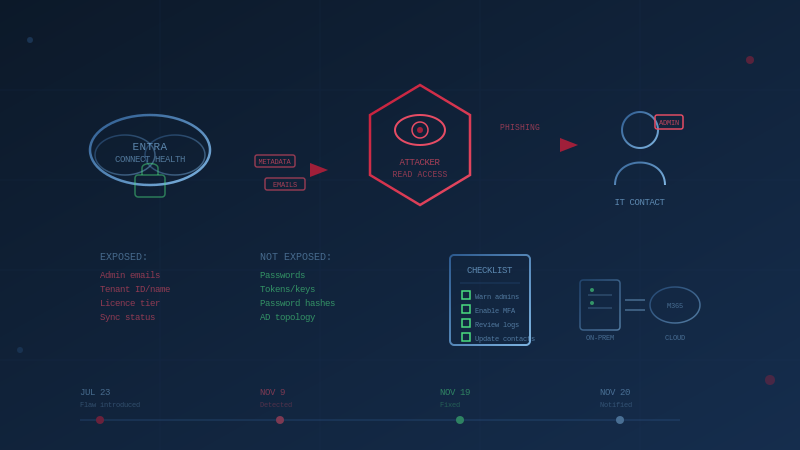
Microsoft disclosed on November 20, 2026 that attackers exploited a flaw in its Entra Connect Health service to gain unauthorized access to tenant metadata. Connect Health is a cloud monitoring service for organizations that sync user accounts between an on-premises Windows server and Microsoft 365 (a setup Microsoft calls "hybrid identity"). The flaw was introduced on July 23, 2026, discovered by Microsoft on November 9, and fixed server-side on November 19.
This is not a reset-all-passwords emergency. No passwords, authentication tokens, or valid cryptographic keys were exposed. The practical risk is what comes next: the exposed data included whether directory sync was enabled and the last sync time, which tells an attacker which organizations run hybrid identity. Combined with administrator email addresses, that information makes phishing far more convincing.
Does this affect my business?
You can check in three steps:
- Do you use Microsoft 365 for email or productivity apps? If no, you are not affected.
- Do you have an on-premises server that syncs accounts to Microsoft 365? Ask whoever manages your IT. The server typically runs software called "Entra Connect." Cloud-only organizations are less likely to be affected, though Microsoft has not confirmed this.
- Did you receive an Azure Service Health notification? Sign in to the Microsoft 365 admin centre directly (not by clicking a link in an email) and check Service Health. If you did not receive a notice, Microsoft has not told you that you were affected.
If you answered yes to all three, the exposed data may include administrator and technical contact email addresses, your tenant ID and display name, your Entra licence tier, whether directory sync is enabled, the last sync time, and an expired certificate that Microsoft says is no longer usable. According to Microsoft's statement, passwords, password hashes, authentication tokens, valid cryptographic keys, on-premises Active Directory topology, and Azure subscription data were not accessed.
What should your business do now?
-
Warn your administrators about targeted phishing. Expect emails impersonating Microsoft security alerts, referencing your real tenant name, or mentioning sync failures at accurate times. Tell staff to verify any "urgent action required" message by signing in directly to admin.microsoft.com rather than clicking links. Our guide on how to recognize phishing emails covers the warning signs.
-
Require phishing-resistant multi-factor authentication for privileged accounts. Passkeys or FIDO2 security keys provide stronger protection than SMS codes or authenticator app prompts. Microsoft's own recommendations for affected tenants include phishing-resistant MFA. Our guide to multi-factor authentication explains the difference.
-
Review Entra sign-in and audit logs. Look for unfamiliar sign-ins on administrator accounts, especially from unexpected locations. Watch for new MFA methods added without the user's knowledge.
-
Confirm the contact details in your admin portal are current. If your admin and technical contact emails are out of date, you may miss future security notifications.
-
Brief your team on the difference between sync issues and real emergencies. Attackers who know your sync schedule can craft believable lures ("Your 2:14 AM sync failed, click here to fix"). Staff should call IT rather than respond to unsolicited warnings.
A separate Connect Health flaw was fixed earlier
Cymulate researchers reported that Global Reader role holders could retrieve Connect Health agent credentials. Microsoft confirmed it resolved that issue on August 10, 2026, and Cymulate published its write-up on September 3, 2026. That flaw was different from the November breach.
How this connects to baseline security practices
The Canadian Centre for Cyber Security's Baseline Cyber Security Controls outline practical steps for small and medium organizations. Several apply here:
- Strong authentication for administrative accounts prevents attackers from using stolen contact details to phish their way in.
- Security awareness training teaches staff to recognize phishing that uses accurate internal details.
- Having an incident response plan means your team knows what to do when a vendor notifies you of exposure.
Beyond the baseline controls, keeping sign-in and audit logs gives you visibility into whether compromised information is already being used against you. Keeping your admin portal contact details current ensures you receive notifications when incidents like this occur.
What we do not yet know
Microsoft has not disclosed how many tenants were affected, who was behind the access, or when the unauthorized access began within the four-month window. The company may update its guidance. These facts are accurate as of November 23, 2026.
See where your organization stands
Hybrid identity setups require ongoing attention. The sync server connecting your office network to Microsoft 365 is a known path attackers try to exploit. If you are unsure how your business measures up against baseline security practices, our free cybersecurity assessment evaluates your organization in under 30 minutes.
How prepared is your business?
Find out where you stand against Canada's 13 Baseline Cyber Security Controls. The assessment takes under 30 minutes and your answers stay in your browser.
Check Your ScoreCite This Page
Suggested citation:
Cybersecurity Canada (2026). Entra Connect Health Breach: Checklist for Canadian SMBs. Retrieved from https://cybersecuritycanada.ca/news/posts/microsoft-entra-connect-health-breach-smb-checklist/
Permanent URL: https://cybersecuritycanada.ca/news/posts/microsoft-entra-connect-health-breach-smb-checklist/ · Published November 23, 2026
Disclaimer: This article is intended for general informational purposes only and does not constitute professional cybersecurity, legal, IT, or compliance advice. While we strive to ensure accuracy, the cybersecurity landscape changes rapidly and information may become outdated. Organizations should consult with qualified cybersecurity professionals and legal counsel to assess their specific situation and develop appropriate security policies. Use of this information is at your own risk. See our Privacy Policy for more information.
Cybersecurity Canada is an independent resource and is not affiliated with, endorsed by, or connected to the Canadian Centre for Cyber Security, the Communications Security Establishment, or the Government of Canada.
How does your organization measure up?
Take our free cybersecurity assessment based on the Canadian Centre for Cyber Security's Baseline Controls. 50 questions, under 30 minutes, 100% confidential. Your answers never leave your browser.
Take the Free Assessment