IT Help Desk Impersonation in Canada

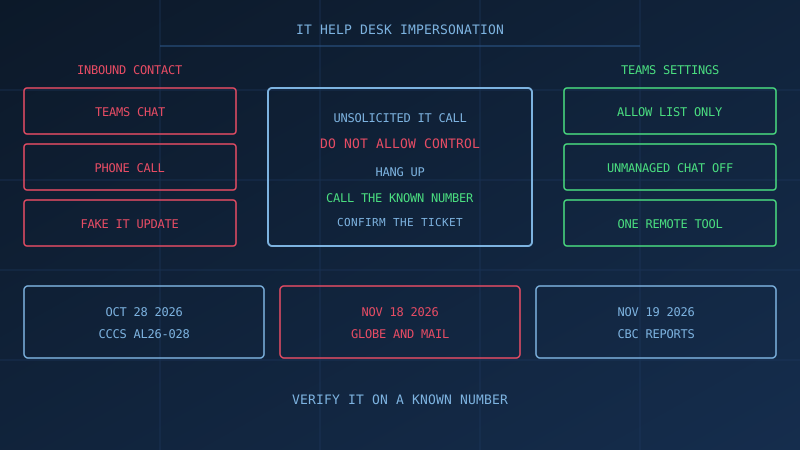
IT help desk impersonation is a Microsoft Teams chat or phone call in which the caller pretends to be your IT staff. The Globe and Mail reported on November 18, 2026 that, in at least some attacks on Canadian law firms, people posing as IT used Teams or a phone and asked for computer access to install a critical software update. The paper calls that vishing. KPMG Canada confirmed client tax documents were accessed and did not say this tactic was used against it. This is general information for a Canadian small or mid-sized firm, not legal advice.
What is IT help desk impersonation?
IT help desk impersonation is vishing aimed at staff. The Canadian Centre for Cyber Security's alert AL26-028, dated October 28, 2026, says callers impersonate internal IT or help desk staff. Calls may target a personal mobile, an office phone, or Microsoft Teams, and may spoof a help desk number.
ITSAP.00.102 (July 2026) says vishing uses voice communication to obtain sensitive information, and that caller ID can be spoofed. People posing as technical support "may even ask for your permission to access your device remotely to help install software." The Canadian Anti-Fraud Centre says: "They request access to your computer and may run programs or alter settings." Those pages do not describe the KPMG Canada incident.
What did Canadian firms confirm in November 2026?
On November 18, 2026, The Globe and Mail reported that KPMG Canada is contacting clients whose tax documents were accessed. CBC News, in a Canadian Press story posted November 19, 2026, reported the same confirmation. Spokesperson Sonja Cloutier-Bosworth told The Globe and Mail: "We are confident we have protected our clients' information and, based on our ongoing monitoring, the information impacted by this incident is not available online or being misused for any purpose."
The Globe and Mail reported that "KPMG did not say whether the same IT help desk impersonation tactic was used to gain access to some of its clients’ files." CBC reported that the firm "did not provide details about the breach, including the scope or nature of the attack."
The Globe and Mail named four law firms that suffered data breaches: McCarthy Tétrault LLP, Davies Ward Phillips & Vineberg LLP, Bennett Jones LLP, and Borden Ladner Gervais LLP. CBC named the same four and said they "had portions of their data, including client files, accessed." The Globe and Mail limited the method to "at least some of the law firm attacks," in which people posed as IT on Microsoft Teams or by phone and asked for access to install a critical software update. CBC said that, according to The Globe and Mail, vishing was behind those breaches.
Our guide to cybersecurity for law firms in Canada states that law firms "hold exactly what criminals want: confidential client information, access to trust accounts, and involvement in high-value transactions." Our guide to cybersecurity for accounting firms in Canada states that accounting and bookkeeping firms "hold exactly what cybercriminals want: social insurance numbers, tax returns, banking details, and financial statements."
How can a Microsoft Teams chat or phone call get past MFA?
Multi-factor authentication does not, by itself, stop IT help desk impersonation. AL26-028 (October 28, 2026) states that this campaign "bypasses conventional multi-factor authentication (MFA) through real-time relay." A fraudulent sign-in page "relays credentials and MFA responses to the legitimate identity provider." CBC, describing that alert, said scammers impersonating internal IT used the phone or Microsoft Teams calls, "or by directing employees to fake sign-in pages."
A second path does not collect the code. Microsoft's Quick Assist documentation says a helper can take full control, that "Anyone that has control over your device can perform actions on your device, and potentially install malicious applications," and that the helper "has the same permissions as the sharer on the device."
Microsoft's May 15, 2024 security blog states that a threat actor used Teams messages and calls "in an attempt to impersonate IT or help desk personnel," leading to Quick Assist misuse. That blog is not a finding about KPMG Canada or the four law firms. After a session, AL26-028 says the actor has been reported to add new MFA methods and to take Microsoft 365 files, including SharePoint and OneDrive.
Which Microsoft Teams external access settings should a small firm change?
Microsoft's external access documentation says all external domains are allowed by default, and that the organization settings and user policies for external access start turned on. AL26-028 says to limit Teams messages, calls, and meeting invites "to trusted or operationally required external users."
In the Teams admin center, open Users, then External access:
- Beside "Teams and Skype for Business users in external organizations," choose "Allow only specific external domains" for tenants you already work with. Microsoft says all other domains are then blocked.
- Choose "Block all external domains" if you do not need outside Teams chat or meetings. Microsoft says this prevents users from finding, calling, chatting, and setting up meetings with people external to the organization in any domain.
- Turn off "People in my organization can communicate with unmanaged Teams accounts." Microsoft's example is Microsoft Teams (free). Also leave off "External users with Teams accounts not managed by an organization can contact users in my organization."
- Leave trial-only tenants "Blocked." Microsoft says that is the default, and that those tenants cannot search for or contact your users in chats, calls, or meetings.
People from blocked domains can still join meetings anonymously if anonymous access is allowed. External access is not guest access. Microsoft says people outside the organization do not have access to your teams, sites, or other Microsoft 365 resources. Our Microsoft 365 security guide says to review whether external guests can access your Teams channels and, if external sharing is enabled, to consider restricting it to specific trusted domains.
What should a written IT verification rule say?
Write one page and date it. ITSAP.00.102 (July 2026) says: "Hang up and call back using a known, trusted number." Use a number your firm already published, not one from the chat. AL26-028 says callers "may end the call if the employee attempts independent verification."
Sign these lines:
- A Teams chat, call, or phone call you did not start is not authority to share a password, a one-time code, or control of a computer.
- If they say they are IT, ask for the ticket number, hang up, and call the number on the staff card or intranet.
- Remote access starts only after that call confirms the ticket, the employee, and the one tool you already use.
- No ticket, or no confirmation, means you stop and report the contact the same day.
The ticket number is the "shared word, code or call-back procedure" ITSAP.00.102 tells organizations to set. Our guide to employee security awareness training states that "A receptionist needs to recognize pretexting phone calls," and that an accounts payable clerk needs to verify unusual payment requests.
Microsoft's Quick Assist page says not to allow someone claiming to be "IT Support" to connect unless you started the contact, and not to provide access to anyone claiming to have an urgent need to access your device. If you use another tool, such as Remote Help, "disable or remove Quick Assist as a best practice, if it isn't used within your environment." That "prevents guests from using Quick Assist to gain access to devices within your organization." The May 15, 2024 blog says to consider blocking or uninstalling Quick Assist and other remote monitoring and management tools if they are not in use.
What should the staff script say IT will never ask?
Read this once and leave it by the IT phone number. Microsoft's Quick Assist guidance says not to connect for someone claiming to be "IT Support" unless you started the contact. The July 2026 Cyber Centre note says to train staff before sensitive information is shared by phone.
Our IT will never:
- Ask for a password, one-time code, or passkey on a contact you did not start.
- Ask to control the computer or install a critical update from that contact.
- Tell you to stay on the line and open a link.
- Object when you hang up and use the number on your card.
- Ask you to keep the call quiet.
What should you do in the first hour if someone granted access?
Disconnect before any meeting about blame. Microsoft's Quick Assist page says that if the connection looks malicious, "disconnect from the session immediately and report the concern to your local authorities and/or any relevant IT members within your organization." The May 15, 2024 security blog gives the same instruction.
Then:
- Leave the PC on. Unplug it or turn off its Wi-Fi. Our guide to the first 24 hours after a cyber attack says disconnecting affected systems from the network is correct, and that powering off devices can destroy forensic evidence in memory. Do not restart, wipe, or reinstall yet. For an account takeover, lock the affected accounts.
- Call IT on a number you already had. Do not use the chat number or the phone's callback button.
- Revoke sessions and tokens, reset the affected passwords, remove unrecognized MFA methods, review mail and files, and keep audit logs. AL26-028 lists those steps when compromise is suspected.
- Record the time, Teams display name, phone number, and any site. ITSAP.00.102 says to report the scam to the Canadian Anti-Fraud Centre with that detail.
- Our guide to how to report a cyber attack in Canada states that most businesses file through the National Cybercrime and Fraud Reporting System and contact local police, and that if personal information was exposed, PIPEDA may also require a report to the Office of the Privacy Commissioner. AL26-028 also lists contact@cyber.gc.ca.
What does PIPEDA require if client files were exposed?
Where PIPEDA applies, the Office of the Privacy Commissioner of Canada says you report a breach of security safeguards that poses a real risk of significant harm, notify affected individuals, and keep records of all breaches. Judge that risk by "the sensitivity of the personal information, as well as the probability of misuse." The page includes financial loss and identity theft.
Keep a record "whether there is a real risk of significant harm or not." The OPC says "The law requires you to keep breach records of all breaches of security safeguards for two years," and to notify people "as soon as feasible" after you decide the risk is real. "Large and small business will be subject" to those duties. Both news reports described access to tax or client files at the firms they named.
Our accounting firm guide states that firms in Alberta, British Columbia, and Quebec are generally covered by their provincial private sector privacy law instead.
Where can a small firm check these controls?
The free cybersecurity assessment for Canadian businesses states: "Evaluate your organization's security posture against the Canadian Centre for Cyber Security's Baseline Controls. 50 questions, under 30 minutes, completely confidential." It also states: "Your answers stay in your browser and are never transmitted. Progress is saved locally for 48 hours."
The same page says "No signup or email required." It also states: "It is not a security audit, compliance certification, or professional consultation."
How prepared is your business?
Find out where you stand against Canada's 13 Baseline Cyber Security Controls. The assessment takes under 30 minutes and your answers stay in your browser.
Check Your ScoreFrequently Asked Questions
What is IT help desk impersonation?
IT help desk impersonation is a form of vishing. The Canadian Centre for Cyber Security's July 2026 note, ITSAP.00.102, describes vishing as a social engineering technique that uses voice communication to get people to share sensitive information. Alert AL26-028, dated October 28, 2026, says callers impersonate internal IT or help desk staff and may use Microsoft Teams, an office phone, or a personal mobile. The Globe and Mail reported on November 18, 2026 that, in at least some attacks on Canadian law firms, the pretext included access to a computer to install a critical software update.
Did KPMG Canada say the breach used vishing?
No. The Globe and Mail reported on November 18, 2026 that KPMG Canada confirmed client tax documents were accessed, and that KPMG did not say whether IT help desk impersonation was used. CBC News, in a Canadian Press story posted November 19, 2026, reported that KPMG did not provide details about the scope or nature of the attack. Spokesperson Sonja Cloutier-Bosworth told The Globe and Mail the firm was confident, based on its monitoring, that the impacted information was not available online or being misused.
Which Microsoft Teams setting blocks unmanaged accounts?
In the Teams admin center, go to Users, then External access, and turn off People in my organization can communicate with unmanaged Teams accounts. Microsoft's documentation says that setting controls chat and meetings with Teams users who are not managed by an organization, such as Microsoft Teams (free). A related checkbox, External users with Teams accounts not managed by an organization can contact users in my organization, controls whether those users can start the chat. Microsoft also says that, by default, all external domains are allowed.
Why does multi-factor authentication not stop this?
The Cyber Centre states in alert AL26-028, dated October 28, 2026, that the campaign bypasses conventional multi-factor authentication through real-time relay. The caller directs the employee to a fraudulent sign-in page that relays credentials and MFA responses. Microsoft's Quick Assist documentation describes a different path: if the employee allows control, the helper has the same permissions as the person already signed in on that device. Anyone with that control can install applications from the open session.
What should a small firm do in the first hour?
Disconnect the remote session. Microsoft says to disconnect immediately if you suspect the person connecting is malicious, and to tell your IT staff and local authorities. Disconnect the computer from the network and do not power it off. Call your own IT provider on a number you already had, not a number from the chat. The Cyber Centre says to revoke active sessions and tokens, reset credentials, remove unauthorized MFA methods or devices, review mailbox and file activity, and preserve audit logs. This is general information, not legal advice.
Cite This Page
Suggested citation:
Cybersecurity Canada (2026). IT Help Desk Impersonation in Canada. Retrieved from https://cybersecuritycanada.ca/news/posts/it-help-desk-impersonation-in-canada/
Permanent URL: https://cybersecuritycanada.ca/news/posts/it-help-desk-impersonation-in-canada/ · Published November 20, 2026
Disclaimer: This article is intended for general informational purposes only and does not constitute professional cybersecurity, legal, IT, or compliance advice. While we strive to ensure accuracy, the cybersecurity landscape changes rapidly and information may become outdated. Organizations should consult with qualified cybersecurity professionals and legal counsel to assess their specific situation and develop appropriate security policies. Use of this information is at your own risk. See our Privacy Policy for more information.
Cybersecurity Canada is an independent resource and is not affiliated with, endorsed by, or connected to the Canadian Centre for Cyber Security, the Communications Security Establishment, or the Government of Canada.
How does your organization measure up?
Take our free cybersecurity assessment based on the Canadian Centre for Cyber Security's Baseline Controls. 50 questions, under 30 minutes, 100% confidential. Your answers never leave your browser.
Take the Free Assessment