1Password Breach: Canadian Checklist

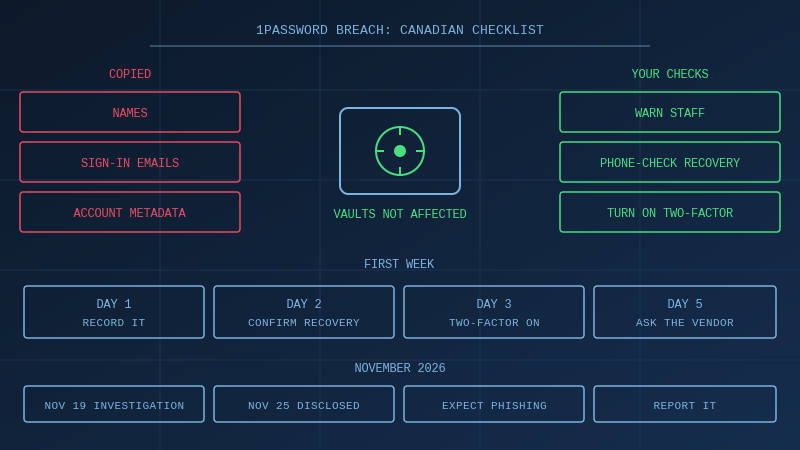
The 1Password breach, which 1Password calls a security incident, was disclosed on November 25, 2026 and exposed customer names, sign-in email addresses, and account metadata, but not password vaults. In its official update, 1Password says an attacker gained access to an employee's corporate GitHub account, pushed malicious code to backend services, and copied account records for a subset of customers. 1Password, which its privacy notice describes as "a Canadian company headquartered in Toronto," says customers do not need to change anything in their accounts.
For a Canadian small or medium organization, the risk to plan for is targeted phishing, and the incident is a good test of your vendor breach routine. As of publication, 1Password's update was the only detailed public account we could find, so this checklist relies on what 1Password has stated plus guidance from the Canadian Centre for Cyber Security (the Cyber Centre) and the Office of the Privacy Commissioner of Canada (OPC).
What did 1Password disclose on November 25, 2026?
1Password says it began investigating on November 19, 2026, after signs that an attacker had gained access to an employee's corporate GitHub account. According to the company, the attacker pushed malicious code that downloaded customer account records, copied source code from private repositories, and gained access to the system that builds and ships 1Password's software. 1Password says it rotated all credentials that may have been exposed.
The account records 1Password lists are:
- Names and email addresses
- Account and user identifiers, and account creation and last sign-in times
- Public keys, which 1Password says are public by design
- Secure Remote Password protocol parameters, which 1Password says cannot be used to access an account
- Tokens in certain emailed links for invitations, provisioning, and account recovery
- Other non-secret account metadata
1Password says vaults, the items in them, the keys that protect them, and account recovery keys were not affected, and that it does not store account passwords or Secret Keys. It says the emailed tokens only work together with a single sign-on (SSO) sign-in or a code sent to the user's registered email, that the few users with pending invitations or recoveries were notified, and that it has lengthened those codes from six digits to ten characters.
Why is phishing the main risk for Canadian teams?
The stolen records pair real names with the exact email addresses people use to sign in to 1Password. 1Password's update warns customers about "unexpected emails, texts or calls" that mention 1Password, invitations, or account recovery attempts, and says it will never ask for an account password or Secret Key. A message that greets an employee by name at the right address looks far more believable than a generic scam.
The Cyber Centre's phishing guide, Don't take the bait (ITSAP.00.101), tells organizations to set up "protocols and procedures for your employees to verify and report suspicious communications internally," to use multi-factor authentication (MFA) on all systems, and to have staff verify a sender "through a separate channel." For 1Password, that means opening the app or typing the address yourself, never following the link in the message. Our guide on how to recognize phishing emails also says to check the full sender address, not just the display name.
Does the 1Password breach trigger PIPEDA reporting for your organization?
Possibly not, but write it down either way and ask privacy counsel. The OPC's guidance on mandatory breach reporting says PIPEDA requires a report when a breach of security safeguards involves personal information under your control and it is reasonable to believe it creates a real risk of significant harm. The OPC names two factors: how sensitive the information is and how likely it is to be misused.
The same OPC page says that when an organization transfers personal information to a third party for processing, the OPC interprets the original organization as having control, but that control "needs to be assessed on a case-by-case basis." Whether your staff's names and work email addresses in a password manager account fall under that, and whether PIPEDA or another law applies to you, is not something this article can decide. What the OPC is clear on is records: it says organizations must keep records of all breaches of security safeguards, whether or not they meet the reporting threshold, for two years. Our post on new PIPEDA enforcement covers the same record-keeping duty. A short note of what 1Password told you, when, and what you did costs little.
What does the Cyber Centre say about password manager risk?
The Cyber Centre's Password managers: Security tips (ITSAP.30.025), dated February 2024, calls password managers "an attractive target" and says a compromise "through your account or through a vendor compromise" could expose all stored passwords. It recommends turning on MFA whenever possible and choosing password managers that require it.
In this incident, 1Password says vault contents were never accessed and that vault secrets are encrypted with keys only the customer holds. So the Cyber Centre's warning applies here mainly through the account side: a phished account password, Secret Key, or recovery approval is how an attacker would reach a vault. That is why MFA on the 1Password account, and on the email accounts behind it, matters more this week than mass password changes. Our post on multi-factor authentication for Canadian SMBs explains why an authenticator app is stronger than text message codes.
A seven-day checklist for Canadian organizations
- Day 1: Record the incident. Note the date 1Password published (November 25, 2026), what it said was affected, and who in your organization uses 1Password. Keep it with your other breach records.
- Day 1: Warn staff. Tell them 1Password says vaults were not affected and no account changes are needed. Tell them to expect fake invitation, recovery, or account emails, texts, and calls, and to report them instead of clicking. Our security awareness training control page suggests using a phishing campaign in the news as a teaching moment.
- Day 2: Confirm recoveries outside email. 1Password's business security best practices say owners should verify recovery requests "independently of email," face-to-face or by phone. Do not approve a recovery nobody can confirm.
- Day 3: Turn on MFA. Require it for 1Password and for every mailbox that receives 1Password invitations or recovery codes. If you use SSO, require it at the identity provider.
- Day 4: Review account activity. If you have 1Password Business, check the audit log and the sign-in attempts report for invitations, devices, or sign-in failures nobody can explain since November 19.
- Day 5: Ask the vendor question. Our guide to vendor and third-party risk suggests asking each vendor whether it will notify you of a breach and how quickly. Check what your contracts say for your other critical tools.
- Day 7: Review what came in. Count reported phishing attempts, report fraud where it occurred, and update your incident response plan with what you learned.
Where do you report a phishing attempt or fraud in Canada?
Report internally first, so IT can warn others and block the sender. The Canadian Anti-Fraud Centre says victims and witnesses can report fraud or cybercrime online at reportcyberandfraud.canada.ca, and that reports can be anonymous. If an account was taken over or money moved, the Cyber Centre's report a cyber incident page accepts reports from organizations. It notes the Cyber Centre is not a law enforcement agency and encourages victims to report cybercrime to police.
If someone claiming to be from 1Password, your bank, or the Cyber Centre calls about this incident, hang up and call back on a number you already trust. The Cyber Centre's phishing guide gives the same advice for calls that claim to come from a bank.
How can you check your baseline controls?
The free cybersecurity assessment for Canadian businesses states: "Evaluate your organization's security posture against the Canadian Centre for Cyber Security's Baseline Controls. 50 questions, under 30 minutes, completely confidential." It also states: "Your answers stay in your browser and are never transmitted." Strong user authentication and employee awareness training are two of the 13 controls it covers.
The one question to ask your IT lead or provider this week: "Who can approve a 1Password account recovery for our organization, and how do they confirm it is real before they click?"
How prepared is your business?
Find out where you stand against Canada's 13 Baseline Cyber Security Controls. The assessment takes under 30 minutes and your answers stay in your browser.
Check Your ScoreFrequently Asked Questions
What did the 1Password breach expose?
In its November 25, 2026 update, 1Password said an attacker copied account records for a subset of customers. The records include names and email addresses, account and user identifiers, account creation and last sign-in times, public keys, Secure Remote Password protocol parameters, tokens in certain emailed invitation, provisioning, and recovery links, and other non-secret metadata. 1Password said vaults, the items in them, and the keys that protect them were not affected.
Is 1Password a Canadian company?
Yes. 1Password's privacy notice says it is a Canadian company headquartered in Toronto, Ontario, and its website lists a Yonge Street address in Toronto. That does not change what customers should do. The practical steps for a Canadian organization are the same: warn staff about phishing, confirm account recoveries outside email, and record what the vendor told you.
Does a Canadian business have to report the 1Password breach to the Privacy Commissioner?
It depends, and this is a question for privacy counsel. The Office of the Privacy Commissioner of Canada says PIPEDA requires an organization to report a breach of security safeguards involving personal information under its control when it is reasonable to believe the breach creates a real risk of significant harm. The OPC says control is assessed case by case when a third party processes the information. It also says organizations must keep records of all breaches for two years.
Where should Canadian staff report a 1Password phishing attempt?
Internally first, to whoever runs IT, so others can be warned. The Canadian Anti-Fraud Centre takes fraud and cybercrime reports online at reportcyberandfraud.canada.ca, from victims or witnesses, and allows anonymous reports. The Canadian Centre for Cyber Security accepts cyber incident reports from organizations and says it is not a law enforcement agency.
Cite This Page
Suggested citation:
Cybersecurity Canada (2026). 1Password Breach: Canadian Checklist. Retrieved from https://cybersecuritycanada.ca/news/posts/1password-breach-canadian-checklist/
Permanent URL: https://cybersecuritycanada.ca/news/posts/1password-breach-canadian-checklist/ · Published November 25, 2026
Disclaimer: This article is intended for general informational purposes only and does not constitute professional cybersecurity, legal, IT, or compliance advice. While we strive to ensure accuracy, the cybersecurity landscape changes rapidly and information may become outdated. Organizations should consult with qualified cybersecurity professionals and legal counsel to assess their specific situation and develop appropriate security policies. Use of this information is at your own risk. See our Privacy Policy for more information.
Cybersecurity Canada is an independent resource and is not affiliated with, endorsed by, or connected to the Canadian Centre for Cyber Security, the Communications Security Establishment, or the Government of Canada.
How does your organization measure up?
Take our free cybersecurity assessment based on the Canadian Centre for Cyber Security's Baseline Controls. 50 questions, under 30 minutes, 100% confidential. Your answers never leave your browser.
Take the Free Assessment