Understanding CVSS Scores: What the Numbers Behind Software Vulnerabilities Actually Mean
In March 2026, Google issued an emergency security update for Chrome — its browser used by an estimated 3.5 billion people worldwide — patching two zero-day vulnerabilities that were already being exploited in the wild. Around the same time, a flaw in the Erlang/OTP SSH server received the highest possible severity rating: a perfect 10.0 out of 10. And in February 2026, a vulnerability in Windows Notepad was rated 8.8 out of 10.
If you run a business, you have probably seen these numbers in headlines. But what do they actually mean? And how should they change the way you respond?
What Is a CVSS Score?
CVSS stands for the Common Vulnerability Scoring System. It is an open, standardized framework maintained by FIRST.org that assigns a numerical score to security vulnerabilities on a scale from 0.0 to 10.0. The higher the number, the more severe the flaw.
Think of it like a severity rating for a building code violation. A score of 2.0 might be a loose handrail. A score of 10.0 means the foundation is compromised and the building could collapse at any moment.
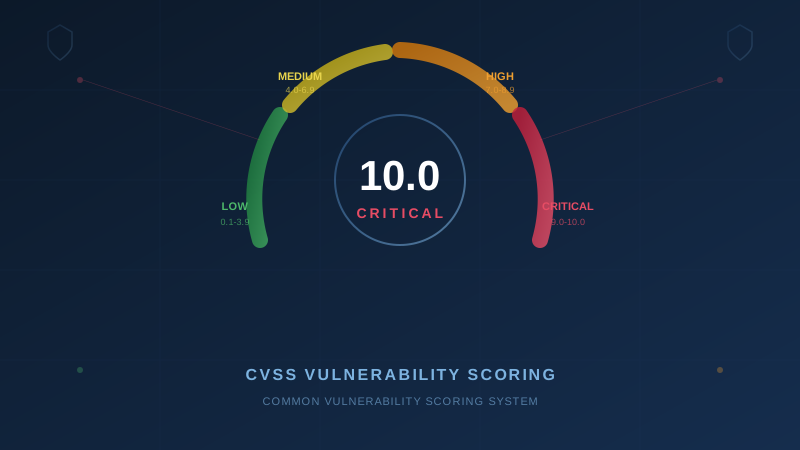
The current widely used version is CVSS v3.1, with CVSS v4.0 now being adopted. The numeric scale and severity categories are the same across both versions:
| Rating | Score Range |
|---|---|
| None | 0.0 |
| Low | 0.1 – 3.9 |
| Medium | 4.0 – 6.9 |
| High | 7.0 – 8.9 |
| Critical | 9.0 – 10.0 |
When you see a headline that says a vulnerability scored 8.8, that places it squarely in the High category. A score of 10.0 is the worst possible rating — Critical — and it means the flaw is as dangerous as it gets.
What Goes Into the Score
A CVSS score is not a single judgment call. It is calculated from a set of specific metrics that describe how the vulnerability works and what damage it can cause. Understanding these metrics — even at a high level — helps you assess how a given flaw might affect your business.
How the Attacker Gets In
- Attack Vector — Can it be exploited over the internet (Network), or does the attacker need physical access to the device? Network-based attacks are the most dangerous because they can be launched from anywhere in the world.
- Attack Complexity — Is exploitation straightforward, or does the attacker need specific conditions to be in place? Low complexity means more attackers can pull it off.
- Privileges Required — Does the attacker need an existing account on the system, or can anyone exploit it without logging in?
- User Interaction — Does someone need to click a link or open a file, or can the attack happen without any human action?
Does the Damage Spread Beyond the Vulnerable System?
- Scope — Can the vulnerability be used to attack other systems beyond the one that is directly vulnerable? When Scope is "Changed," the blast radius extends beyond the original target — for example, escaping a virtual machine to compromise the host server.
What the Attacker Can Do
- Confidentiality Impact — Can the attacker read data they should not have access to?
- Integrity Impact — Can the attacker modify or tamper with data or systems?
- Availability Impact — Can the attacker take the system offline or make it unusable?
When all of these metrics are at their worst — remote access, low complexity, no privileges needed, no user interaction, damage that spreads beyond the vulnerable system, and full impact to confidentiality, integrity, and availability — the result is a 10.0. Remove any one of those factors and the score drops. For example, if everything is worst-case but the damage stays contained to the vulnerable system (Scope: Unchanged), the score drops to 9.8.
Real Examples: What 8.8 and 10.0 Look Like in Practice
CVSS 8.8 — Windows Notepad Vulnerability (CVE-2026-20841)
In February 2026, Microsoft patched a flaw in Windows Notepad that allowed an attacker to execute commands on a victim's computer through a specially crafted Markdown file. Here is why it scored 8.8:
- Attack Vector: Network — the malicious file could be delivered via email or a website
- Privileges Required: None — the attacker did not need an account on the victim's system
- User Interaction: Required — the victim had to open the file and click a link
- Impact: High across all three categories — full control of the system was possible
The user interaction requirement is what kept this from being a 9.0 or higher. The attacker needed the victim to take an action. That single factor — one click — was the difference between High and Critical.
This is exactly why security awareness training matters. That one click is your last line of defence.
CVSS 10.0 — Erlang/OTP SSH Remote Code Execution (CVE-2025-32433)
In April 2025, researchers at Ruhr University Bochum discovered a flaw in the Erlang/OTP SSH server that was widely reported with a CVSS score of 10.0 — the maximum possible rating. (The exact score varies slightly depending on the assessing organization — the GitHub Advisory database assigned 10.0, while some other sources scored it 9.8 — but either way, it is firmly Critical.) Here is why it scored so high:
- Attack Vector: Network — exploitable from anywhere on the internet
- Attack Complexity: Low — straightforward to exploit
- Privileges Required: None — no authentication needed at all
- User Interaction: None — no human action required
- Scope: Changed — the vulnerability could be used to compromise systems beyond the SSH server itself
- Impact: High across confidentiality, integrity, and availability — complete system compromise
The flaw allowed an unauthenticated attacker to send SSH messages before the authentication step completed. Because SSH servers often run with root (administrator) privileges, a successful exploit gave the attacker full control of the system. Security firm Horizon3.ai described creating a working exploit as "surprisingly easy."
This vulnerability affected products from Cisco, Ericsson, Broadcom, and any application using the Erlang/OTP SSH library. CISA added it to its Known Exploited Vulnerabilities catalog in June 2025, confirming it was being actively exploited in the wild.
Every metric was at its worst-case value. That is what a 10.0 looks like.
CVSS 8.8 — Google Chrome Zero-Days (March 2026)
Google's March 2026 Chrome updates addressed multiple vulnerabilities rated High severity, including two zero-days — CVE-2026-3909 (an out-of-bounds write in the Skia graphics library) and CVE-2026-3910 (a type confusion flaw in the V8 JavaScript engine) — that were already being actively exploited before the patch was available. Both were later scored CVSS 8.8 by the National Vulnerability Database. CISA added both to its Known Exploited Vulnerabilities catalog on March 13, 2026.
A separate update later in March patched eight additional High-severity vulnerabilities across Chrome's WebAudio, CSS, WebGL, Dawn, WebGPU, Fonts, and FedCM components. While none of those eight were confirmed as actively exploited at the time of disclosure, the vulnerability types involved — heap buffer overflows and use-after-free flaws — are commonly weaponized for remote code execution.
With an estimated 3.5 billion users worldwide, a single unpatched Chrome vulnerability represents one of the largest attack surfaces on the planet.
Why This Matters for Your Business
You do not need to memorize the CVSS formula. But understanding the difference between a 6.5, an 8.8, and a 10.0 helps you make better decisions about how urgently to respond.
Here is a practical framework:
- Critical (9.0–10.0): Drop what you are doing. These vulnerabilities can be exploited remotely, often without any user interaction, and give attackers full control. Patch immediately — within hours, not days.
- High (7.0–8.9): Patch within days. These are serious flaws that require some condition to be met (like a user clicking a link), but attackers will actively try to create those conditions through phishing and social engineering.
- Medium (4.0–6.9): Patch within your regular update cycle. These are real risks but typically require more specific conditions or produce limited impact.
- Low (0.1–3.9): Address during routine maintenance. These flaws exist but are difficult to exploit or cause minimal damage.
This is not just a technology decision. It is a business decision. A Critical vulnerability in a system that handles your customer data is a different priority than a Critical vulnerability in a tool nobody uses.
How CVSS Connects to the Baseline Controls
If you are thinking "this sounds like a lot to track," you are right. That is exactly why the Canadian Centre for Cyber Security includes Patch Management (BC.2) as one of the 13 Baseline Cyber Security Controls for small and medium organizations. CVSS scores are the tool that makes patch management practical — they tell you what to fix first.
But patching is only part of the picture. The Baseline Controls work together:
- Patch Management (BC.2) — Use CVSS scores to prioritize which patches to apply first. Critical and High vulnerabilities in internet-facing systems go to the front of the line.
- Secure Configuration (BC.4) — Reduce your attack surface so there are fewer vulnerabilities to worry about. Disable features you do not use, remove software you do not need.
- Network Security (BC.9) — Limit what is exposed to the internet. A CVSS 10.0 vulnerability in a system that is not internet-accessible is still serious, but the risk is substantially lower.
- Security Awareness (BC.6) — For vulnerabilities that require user interaction (like the Notepad flaw), trained employees are your last line of defence.
- Anti-Malware (BC.3) — Even when a vulnerability is exploited, anti-malware tools can detect and block the resulting payload.
- Incident Response (BC.1) — When a Critical vulnerability is being actively exploited and you cannot patch immediately, your incident response plan determines how quickly you can contain the damage.
The pattern across every recent headline — Chrome, Notepad, Erlang/OTP — is the same. A vulnerability is discovered, a severity score is assigned, a patch is released, and attackers begin exploiting unpatched systems. The organizations that respond quickly are the ones that have these controls already in place.
What You Should Do
1. Make Sure Your Software Updates Automatically
The most important defence against high-severity vulnerabilities is ensuring patches are applied promptly. For browsers like Chrome, enable automatic updates. For operating systems and business applications, work with your IT team or managed service provider to ensure updates are deployed on a predictable schedule.
2. Know Your Prioritization Framework
Not every patch needs to be applied on the same day. But you need a process for identifying which ones do. If your IT provider tells you a Critical vulnerability has been disclosed in software you use, that is a same-day conversation — not a next-week ticket.
3. Reduce What Is Exposed
Every application, service, and open port is a potential target. The fewer internet-facing systems you run, the fewer Critical vulnerabilities you need to worry about. Audit what is exposed and disable what you do not need.
4. Train Your People
Vulnerabilities that require user interaction — and many High-severity flaws do — rely on someone clicking, opening, or approving something they should not. Regular security awareness training reduces that risk.
5. Assess Where You Stand
If you are not sure whether your business has a reliable patch management process, or whether your other security controls are in place, our free assessment evaluates your organization against all 13 of the Canadian Centre for Cyber Security's Baseline Control areas and gives you a clear picture of what needs attention.
The Bottom Line
CVSS scores are not just numbers for IT teams to worry about. They are a standardized way of communicating risk — and understanding them helps you ask the right questions, set the right priorities, and protect your business from the vulnerabilities that matter most.
The next time you see a headline about a vulnerability rated 9.8 or 10.0, you will know exactly what that means: patch now, ask questions later.
Disclaimer: This article is intended for general informational purposes only and does not constitute professional cybersecurity, legal, IT, or compliance advice. While we strive to ensure accuracy, the cybersecurity landscape changes rapidly and information may become outdated. Organizations should consult with qualified cybersecurity professionals and legal counsel to assess their specific situation and develop appropriate security policies. Use of this information is at your own risk. See our Privacy Policy for more information.
Cybersecurity Canada is an independent resource and is not affiliated with, endorsed by, or connected to the Canadian Centre for Cyber Security, the Communications Security Establishment, or the Government of Canada.
How does your organization measure up?
Take our free cybersecurity assessment based on the Canadian Centre for Cyber Security's Baseline Controls. 50 questions, under 30 minutes, 100% confidential — your answers never leave your browser.
Take the Free Assessment